

So reduzierst du unbesetzte Arbeitsplätze im hybriden Büro
Auf dem Papier sieht das Büro voll ausgebucht aus, aber die Hälfte der Schreibtische steht leer. Diese Diskrepanz zwischen Reservierungen und Realität nervt alle: Mitarbeitende, die einen Platz suchen, Teams, die sich mit Beschwerden rumschlagen müssen und Chefs, die sich fragen, ob das Büro zu klein oder einfach nur schlecht organisiert ist.
Ungenutzte Buchungen schwächen dein Hybrid-Work-Konzept. Hier erfährst du, wie du No-Shows messen und mit reibungslosen Abläufen reduzieren kannst, wie du ungenutzte Kapazitäten automatisch freigeben kannst und wie du dein Konzept mit fairen Richtlinien für alle besser machst.
Was ist ein „Desk No-Show“ und wie entsteht das Phänomen?
Man spricht von einem „Desk No-Show” oder „Ghost Booking”, wenn jemand einen Schreibtisch reserviert, aber dann nicht auftaucht, um ihn zu benutzen. Der Schreibtisch bleibt den ganzen Tag leer, während andere Kolleg:innen verzweifelt nach einem Platz suchen. Um solche ungenutzten Buchungen zu vermeiden, setzen die meisten hybriden Büros auf eine Desk-Sharing-Software mit automatischen Check-ins, klaren Buchungs- und Stornierungsbedingungen, zeitgesteuerten Erinnerungen und Analysen, um Muster aufzuzeigen.
Die Grundidee ist simpel: einfache Schreibtischbuchungen, einfache Stornierungsmöglichkeiten und die automatische Freigabe ungenutzter Buchungen in einer Hot-Desking-Konfiguration.
Warum buchen Leute und tauchen dann einfach ab?
Die meisten No-Shows sind nicht böse gemeint. Meistens ist es eine Mischung aus geänderten Plänen, Unsicherheit über die kommende Woche und Problemen beim Stornieren. Wenn es leichter ist, eine Buchung einfach zu ignorieren, als sie zu stornieren, machen die Leute das meistens auch.
- Vergessen zu stornieren: Pläne ändern sich, ein Meeting wird auf Zoom verlegt, und die Stornierung der Schreibtischbuchung geht einfach unter.
- Reservierungen für alle Fälle: Wenn es an Schreibtischen knapp wird, buchen die Leute frühzeitig, um sich einen Platz zu sichern, den sie vielleicht gar nicht nutzen werden.
- Teilzeitnutzung: Für 8 Stunden gebucht, 2 Stunden dort gesessen.
- Terminkonflikte: Ein kurzfristiger Kundenanruf oder eine Terminänderung hält jemanden komplett vom Büro fern.
- Verwirrende Grundrisse: Wenn die Suche nach dem gebuchten Schreibtisch einer Schatzsuche gleicht, geben manche Leute einfach auf und arbeiten stattdessen von der Couch aus.
- Umständliche Buchungstools: Wenn das System schwer zu bedienen ist oder nicht mit den Tools zusammenarbeitet, die die Leute schon nutzen (wie Outlook oder Teams), lassen sie es einfach links liegen.
Warum Ghost Bookings mehr schaden, als du denkst
Das Frustrierende daran: Ungenutzte Schreibtischbuchungen haben einen Dominoeffekt, der über leer bleibende Schreibtische hinausgeht, die im System als „gebucht“ angezeigt werden. Denn dadurch werden deine Auslastungsdaten unzuverlässig. Wenn ein Großteil der gebuchten Schreibtische ungenutzt bleibt, überschätzen deine Analysen die Nachfrage. Das führt zu falschen Entscheidungen über die Größe, das Layout und die Hybridarbeitsrichtlinien deines Büros.
Auch Teams verlieren das Vertrauen in das Buchungssystem. Wenn Leute immer wieder feststellen, dass „ihr” gebuchter Schreibtisch von jemand anderem besetzt ist oder sie trotz „fehlender Verfügbarkeit” auf ein leeres Stockwerk stoßen, hören sie auf, sich auf das Tool zu verlassen. Und wenn dieses Vertrauen erst mal weg ist, braucht es echt viel Mühe, es wieder aufzubauen.
Wie du das Ausmaß ungenutzter Buchungen bei dir messen kannst
Bevor du neue Regeln einführst, solltest du dir überlegen, was du eigentlich lösen willst. Nicht jedes Problem mit unbesetzten Arbeitsplätzen kommt von schlechten Gewohnheiten. Manchmal ist das eigentliche Problem, dass du an Spitzenzeiten nicht genug Schreibtische hast oder an ruhigen Tagen zu viele.
Zuerst solltest du also herausfinden, ob es ein Kapazitätsproblem oder ein Verhaltensproblem ist. Dazu solltest du dir ein paar Fragen stellen:
- Hast du von Dienstag bis Donnerstag oft „Überlauf-Probleme“, wenn alle reinkommen wollen?
- Sind Schreibtische als gebucht angezeigt, aber während der Stoßzeiten sichtbar leer?
- Kommen Ghost Bookings bei bestimmten Teams oder an bestimmten Wochentagen häufiger vor?
Wenn deine Schreibtische wirklich überbelegt sind, helfen strengere Regeln nicht weiter. Vielleicht musst du deine Büroräume genauer planen,mit Überlaufzonen, flexiblen Bereichen oder einer Kapazitätsanpassung. Wenn dagegen viele Schreibtische leer stehen, obwohl sie im Buchungssystem als „belegt“ angezeigt werden, bringen verhaltensorientierte Lösungen wie Check-ins und automatische Freigaben mehr.
Die richtigen KPIs zu unbesetzten Arbeitsplätzen im Büro
Bevor du irgendwas änderst, solltest du eine Ausgangsbasis schaffen. Ohne klare Buchungsdaten triffst du Entscheidungen zur Raumplanung nur auf der Grundlage von Vermutungen. Mit Workplace Analytics erkennst du, ob es sich bei dir um einen Kapazitätsengpass oder ein Problem mit den Buchungsgewohnheiten handelt.
Beobachte ein paar wichtige Kennzahlen über 2 bis 4 Wochen, um zu verstehen, womit du es wirklich zu tun hast:
- No-Show-Rate. Das ist der wichtigste Maßstab für das Problem der Phantom-Buchungen. Man sollte versuchen, sie unter 10 % zu halten, am besten unter 5 %.
- Check-in-Rate. Zeigt, wie zuverlässig die Mitarbeitenden ihre Ankunft bestätigen. Sollte möglichst nah an 100·% sein.
- Zurückgewonnene Kapazitäten. Zeigt, wie oft automatisch freigegebene Schreibtische wieder gebucht werden. Idealerweise über 50·% halten.
- Nutzung vs. Anwesenheit: Schau dir die gebuchten Schreibtische im Vergleich zu den tatsächlichen Check-ins an. Eine große Lücke deutet auf No-Shows hin.
Echte Einblicke aus den Buchungsdaten deines Büros zeigen dir dann, was für dich am besten passt. Wenn du hohe No-Show-Raten und niedrige Stornierungsraten feststellst, vergessen die Leute wahrscheinlich einfach zu stornieren. Setze auf Erinnerungen und einfache Stornierungsabläufe. Wenn hingegen ungenutzte Schreibtische weit im Voraus als „für den Fall der Fälle” gebucht werden, mach deine Buchungsfenster kürzer und denk über Obergrenzen nach. Oder wenn No-Shows an Tagen mit vielen Besprechungen sprunghaft ansteigen, priorisiere zuverlässige Kalenderintegrationen und experimentiere mit der Einrichtung von Erinnerungen.
10 Tipps für weniger unbesetzte Arbeitsplätze
1. Mach den Check-in obligatorisch
Der Check-in bestätigt, dass die Person, die einen Schreibtisch gebucht hat, auch wirklich da ist. Das kann über eine App, einen QR-Code am Schreibtisch oder ein kurzes Tippen in Microsoft Teams oder Slack passieren. Wenn der Check-in obligatorisch ist, werden nicht erschienene Buchungen sofort sichtbar und du kannst was dagegen machen.
2. Nicht beanspruchte Schreibtische automatisch freigeben
Knüpfe die Check-ins an automatische Freigaben. Wenn jemand nicht innerhalb eines bestimmten Zeitfensters eincheckt, wird der Platz automatisch wieder zur Buchung verfügbar. Das geht ganz ohne manuellen Aufwand und der Platz kann wieder genutzt werden.
Ein guter Ausgangspunkt: ein 30-minütiges Check-in-Fenster, mit automatischer Freigabe 15 Minuten danach. Du kannst das je nach deiner Bürokultur und der üblichen Pendelzeit der Leute anpassen.
3. Schick Erinnerungen zum richtigen Zeitpunkt
Ein gut getimter Hinweis kann echt viel bewirken. Schick eine Erinnerung am Abend vorher und noch eine etwa 30 Minuten vor Beginn des Termins. Wenn Erinnerungen über Outlook, Google Kalender oder Teams kommen, fühlen sie sich wie ein natürlicher Teil des Arbeitstages an statt wie eine zusätzliche Aufgabe.
4. Schränke Vorausbuchungen ein
Wenn du Leuten erlaubst, Schreibtische 30 Tage im Voraus zu reservieren, führt das zu spekulativen Buchungen. Überlege stattdessen, den Zeitraum auf 7 bis 14 Tage zu verkürzen, um „Just-in-case“-Reservierungen zu reduzieren und die Verfügbarkeit für alle genauer zu halten.
5. Begrenze die Anzahl der aktiven Buchungen pro Person
Erlaube jeder Person nur eine Schreibtischbuchung zur Zeit, damit niemand Plätze hortet. Wenn jemand für morgen reservieren will, muss erst die ungenutzte Reservierung für heute storniert werden. Einfach, aber effektiv.
6. Mach die Stornierung einfach
Je schwieriger die Stornierung ist, desto weniger werden sich die Leute die Mühe machen wollen. Mit einem Klick in Teams, Slack oder einer mobilen App dauert die Absage nur 2 Sekunden und wird auch wirklich genutzt.
7. Nutze Fair-Use-Richtlinien statt Strafen
Strenge Regeln sorgen für Ärger. Ein sanfterer Ansatz ist besser: erst mal erinnern, dann aufklären und bei Wiederholungsfällen vorübergehende Buchungsbeschränkungen einführen. Das sollte man als Fairness für alle sehen, nicht als Strafe für einzelne Leute.
8. Verbessere deine Grundrisse und Wegweiser
Dieser Punkt wird echt oft übersehen: Wenn dein Büroplan veraltet oder verwirrend ist, finden die Leute ihren reservierten Schreibtisch nicht und setzen sich einfach woanders hin. Die Reservierung wird dann als No-Show angezeigt, obwohl die Person im Büro ist. Genaue, interaktive Grundrisse sorgen für weniger Chaos und verbessern gleichzeitig die Qualität deiner Daten.
👉 Die interaktiven Büropläne in deskbird machen es Mitarbeitenden ganz einfach, ihren reservierten Schreibtisch in Sekundenschnelle zu finden. Das beseitigt Unklarheiten und versehentliche No-Shows.
9. Biete Alternativen an, um Sorgen vor Platzknappheit abzubauen
Wenn Leute Angst haben, keinen Platz zu kriegen, buchen sie gerne mal zu viel. Du kannst dem entgegenwirken, indem du feste Bereiche (Gruppen von Schreibtischen für bestimmte Teams), Überlaufbereiche oder einfache Umbuchungen am selben Tag anbietest. Durch Echtzeit-Einblick in die Verfügbarkeit von Schreibtischen können Mitarbeitende darauf vertrauen, dass ein Platz frei ist, wenn sie einen brauchen.
10. Passe dich an hybride Rhythmen an
Wenn dein Unternehmen Anker-Tage (feste Tage, an denen die Teams zusammenkommen) oder teamorientierte Wochenpläne nutzt, pass die Verfügbarkeit der Schreibtische an diese Muster an. Vorhersehbarkeit verringert den Drang, Plätze „für alle Fälle“ zu reservieren, weil die Leute wissen, wann ihr Team da ist und wo sie sitzen werden.
Lösungen für häufige Gründe, die hinter ungenutzten Arbeitsplätze stehen
Mit Standardrichtlinien deckst du ungefähr 80 % der Fälle ab. Die restlichen 20 % sind aber oft die frustrierendsten.
Teams, die zusammensitzen wollen
Hier hilft die Reservierung nach Bereich oder Zone. Leg für bestimmte Teams bestimmte Tage fest und lass einen Teamleiter die Reservierungen für die Gruppe verwalten. Dieser Ansatz sorgt für weniger Reservierungen „für alle Fälle“ und eine bessere Zusammenarbeit.
Pendelzeitfenster und Verspätungen
Dieselbe Check-in-Frist passt selten für alle. Wenn dein Büro mehrere Städte umfasst oder viele Pendler mit langen Arbeitswegen hat, solltest du standortspezifische Regeln in Betracht ziehen. Alternativ kannst du die Frist verlängern und auf Erinnerungen setzen, um frühzeitige Stornierungen anzuregen.
Halbtagesbuchungen
Wenn Leute oft ganze Tage buchen, aber nach dem Mittagessen gehen, schlag ihnen doch vor, nur halbe Tage zu reservieren. Manche Teams teilen die Schreibtische in Vormittags- und Nachmittagsplätze auf, wenn viel los ist.
Schreibtischtausch
Jemand bucht Schreibtisch A, setzt sich aber an Schreibtisch B. Eigentlich ein No-Show, aber die Person ist im Büro. Mach schnelle Schreibtischwechsel in deinem Buchungstool möglich, damit die Daten korrekt bleiben und abbilden, was wirklich passiert.
Genauigkeit des Gebäudeplans
Veraltete Pläne machen mehr Ärger, als du denkst. Wenn Schreibtisch 42 plötzlich nicht mehr da ist (oder in ein anderes Stockwerk verlegt wurde), buchen Leute ihn, finden ihn nicht und setzen sich einfach woanders hin. Halte deine interaktiven Gebäudepläne also immer auf dem neuesten Stand, um solche Missgeschicke zu vermeiden.
Faire Richtlinien, die auch wirklich umgesetzt werden
Regeln funktionieren nur, wenn man sich daran hält. Das heißt, man muss klar kommunizieren und die Regeln konsequent durchsetzen.
Wenn du neue Richtlinien einführst, erkläre gleich am Anfang, warum das so ist. Hier ist eine Vorlage, die du anpassen kannst:
Wir ändern unseren Prozess für Schreibtischbuchungen, damit jeder bei Bedarf immer einen Platz findet. Ab dem [Datum] werden Reservierungen automatisch freigegeben, wenn du nicht innerhalb von 45 Minuten eincheckst. Wenn sich deine Pläne ändern, kannst du deine Reservierung einfach stornieren, damit jemand anderes den Tisch nutzen kann. Hast du Fragen? Dann melde dich bei [Kontakt].
Ein paar hilfreiche organisatorische Grundlagen sind auch nicht verkehrt:
- Einen Verantwortlichen bestimmen: Jemand aus dem Bereich Workplace Operations, IT oder HR ist für die Richtlinie zuständig und kümmert sich um Ausnahmen.
- Vierteljährliche Überprüfung: Schau dir deine Kennzahlen an und passe die Regeln an – je nachdem, was gut läuft.
- Ausnahmen einbauen: Eventuell müssen Besucher, Barrierefreiheit und Team-Events müssen anders behandelt werden.
Transparenz schafft Vertrauen. Zeig den Teams anonymisierte Daten zu No-Shows, damit alle das Problem und die Fortschritte sehen können, die ihr gemeinsam macht.
Warum smarte Desk-Booking-Lösungen so wichtig sind
Die meisten unbesetzten Arbeitsplätze lassen sich vermeiden, indem man das richtige Verhalten möglichst einfach macht. Wenn das Buchen, Ändern und Stornieren mit einer intuitiven Software nur ein paar Sekunden dauert, machen die Leute das auch wirklich.
Lass deine Mitarbeitendenihre Schreibtische dort buchen, wo sie sich eh aufhalten. Also in Microsoft Teams, Slack, Outlook oder Google Kalender, nicht in einer separaten App, die schnell vergessen wird. So können sie mit einem Klick Reservierungen stornieren und den Kalender frei von ungenutzten Buchungen halten.
Auch Erinnerungen können helfen. Ein kleiner Hinweis am Vorabend und noch einer am Morgen gibt den Leuten die Möglichkeit zu stornieren, falls sich die Pläne über Nacht geändert haben. Ebenfalls wichtig ist eine klare Beschilderung im Büro: Wenn jemand seinen reservierten Schreibtisch nicht findet, gibt er vielleicht auf und setzt sich woanders hin, sodass im System ein „No-Show” angezeigt wird, obwohl die Person im Gebäude ist.
💡 Fazit: Stell dir das Ganze wie einen Kreislauf vor. Benutzerfreundlichkeit sorgt dafür, dass die Regeln eingehalten werden. Eingehaltene Regeln machen das System zuverlässig. Und ein zuverlässiges System schafft Vertrauen. Wenn irgendwo im Kreislauf was nicht stimmt, werden auch die No-Shows wieder steigen.
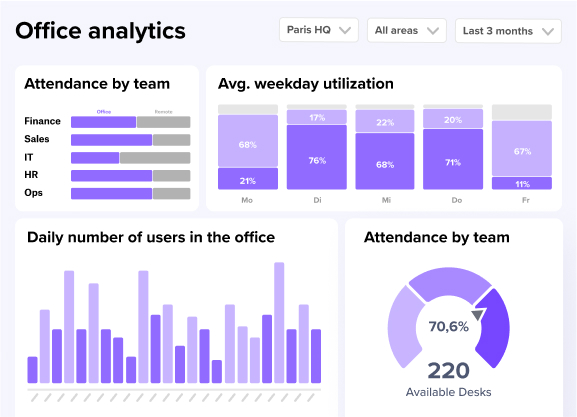
Von unbesetzten Arbeitsplätzen zu zuverlässiger Verfügbarkeit
Bei der Reduzierung von unbesetzten Arbeitsplätzen geht's nicht darum, Mitarbeitende ständig zu kontrollieren. Es geht darum, das Büro für alle, die es nutzen wollen, besser zu machen. Die Abfolge ist immer dieselbe: das Problem messen, Reibungspunkte beseitigen, mehr Verantwortungsbewusstsein einführen und klar kommunizieren. Die meisten Teams sehen innerhalb weniger Wochen eine deutliche Verbesserung.
Die Vorteile gehen dabei über mehr verfügbare Schreibtische hinau: Du bekommst zuverlässigere Daten für die Raumplanung, zufriedenere Mitarbeitende mit Vertrauen in dein System und ein hybrides Büro, das wirklich so funktioniert. Denn mit genauen Daten triffst du bessere Entscheidungen über deine Raumnutzung.
👉 Lege faire Regeln fest, mach die Zusammenarbeit einfacher, indem du die bereits genutzten Tools integrierst und behalte die Ergebnisse im Blick, ohne den Verwaltungsaufwand zu erhöhen. Buche eine Demo, um zu sehen, wie deskbird dich dabei unterstützen kann.

Häufig gestellte Fragen
Was ist ein realistisches Ziel für die No-Show-Rate am Arbeitsplatz?
Wenn Check-ins aktiviert sind, versuchen die meisten Unternehmen, die Rate der No-Shows zunächst unter 10 % zu halten. Nach ein paar Monaten Optimierung kann man aber auch auf unter 5 % kommen. Behalte zuerst deine Ausgangsbasis im Auge, damit du den Fortschritt genau messen kannst.
Reduzieren Kalenderintegrationen wirklich die Zahl der unbesetzten Arbeitsplätze?
Ja. Wenn du Termine in Outlook, Teams oder Google Kalender buchst, sehen die Leute ihre Reservierungen neben den Meetings. Diese Sichtbarkeit macht das Stornieren ganz einfach, wenn sich Pläne ändern.
Wie geht man mit wiederholten No-Shows um, ohne Konflikte zu verursachen?
Fang mit automatischen Erinnerungen an, nicht mit Strafen. Wenn jemand immer wieder nicht erscheint, hilft meistens eine vorübergehende Buchungsbeschränkung (z. B. 1 Woche lang die Vorausbuchungen einschränken). Vermeide öffentliche Bloßstellungen oder harte Konsequenzen, die das Vertrauen zerstören.
Wie geht deskbird mit Check-ins und No-Shows um?
Mitarbeitende können per QR-Code oder Smartphone einchecken. Wenn für eine Buchung nicht eingecheckt wird, wird der Arbeitsplatz automatisch für jemand anderen freigegeben.
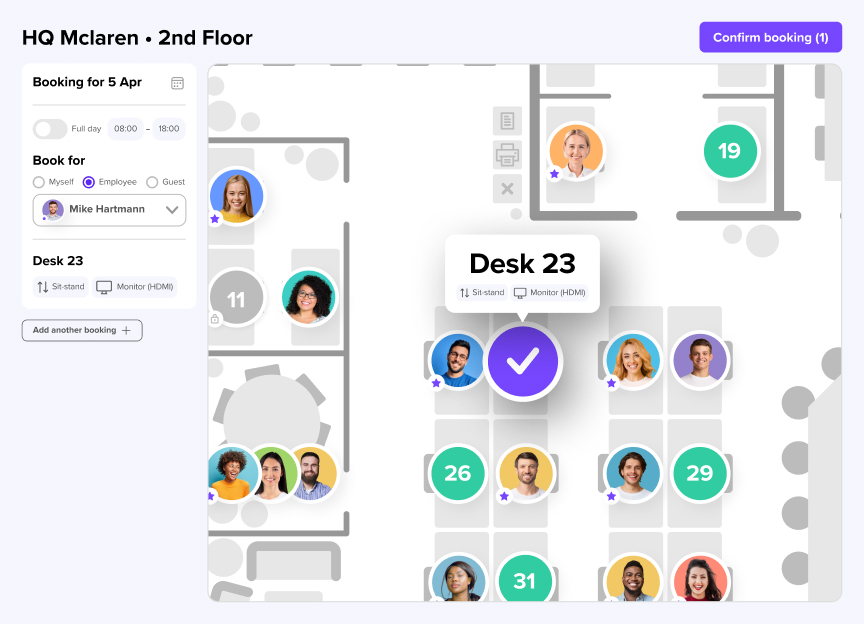
Zuverlässige Schreibtischbuchungen mit deskbird
– Weniger ungenutzte Buchungen dank smarter Buchungsregeln, ohne Mitarbeitende zu benachteiligen
– Klare Raumdaten für nachhaltigere Entscheidungen
