
AI in the workplace: what IT and workplace leaders need to know
Many workers worry automation will reshape their roles, yet broader AI and the future of work trends show the shift is creating new roles as others evolve. For IT and workplace leaders, the real question is not whether AI will replace workers, but how to capture productivity gains while managing validation overhead, preventing shadow AI sprawl, and building governance that scales. Here is what we observe and learn about using AI in the workplace effectively.
TL;DR
AI in the workplace has moved beyond chatbots to become a core operational layer for IT and workplace teams.
- AI supports IT through automation, data analysis, security monitoring, and software development
- Benefits include improved efficiency and 24/7 availability, but require AI governance to manage shadow AI and validation overhead
- The shift demands new skills and policies, not job replacement, with AI as copilot rather than autopilot
What are the pros and cons of AI in the workplace?
[Table1]
The benefits of AI in the workplace
Working with AI improves performance
Like in all other parts of the organization, working with AI helps improve efficiency and productivity in the IT department. Workers can get the boring, time-consuming, and repetitive tasks done using technological resources based on AI and workplace automation. This gives them the opportunity to focus on meaningful and more complex operations. The outcome improves as a result.
Using AI in the workplace reduces the risk of human error
AI systems can digest and analyze vast amounts of data quickly and accurately. They process data consistently without fatigue, though they can still produce errors that require human validation. They can also identify patterns and anomalies that humans struggle to detect, improving the reliability of decision-making processes. This leads to increased productivity and efficiency in the workplace.
Teaming up with robots makes your business available and productive 24/7
AI systems operate continuously without downtime. They work for you and your team members around the clock. A common example is chatbots: they can answer your customers' questions and try to solve their issues anytime. AI tools can also continue collecting and analyzing data outside of human working hours. AI helps your business remain available and productive at all times in many ways.
Using AI tools improves decision-making
AI helps workers make decisions in many ways. It can help with sales, reaching out to more prospects through LinkedIn automation. It can also help remove barriers. For instance, AI's lack of emotions or human perspective can sometimes be positive. Emotional choices are avoided, and decisions are based only on facts. This helps prevent discrimination in recruitment or career development processes. Working with AI can therefore enhance DEI in the workplace.
The downsides of working with AI
Working with AI requires learning how to combine conventional expertise and computer skills
Some people need time to adapt and learn how to use AI in their daily tasks. AI systems succeed when combined with human expertise. At the same time, employees need AI to work more efficiently, increase their skill set, and focus on more meaningful assignments. You can't expect your staff to work with AI tools and get the most out of them without proper training.
Giving more space to AI in the workplace can make some jobs evolve
Implementing AI in the workplace changes some roles. AI automates repetitive and mundane tasks that were previously done by humans, such as data entry or basic customer service. This leads to job evolution and the need for workers to reskill and adapt to new roles that require more complex skills and human interaction.
Using AI technology reduces creativity and lacks a human touch
AI algorithms are designed to follow specific rules and patterns based on the data they are trained on. They lack the emotional intelligence and intuition that humans possess. This leads to a lack of originality and innovation in the output. When AI is combined with human input and expertise, however, it enhances creativity and brings a unique perspective to a task or project. This is one of the main reasons employees and AI systems need to work together.
Shadow AI creates security and governance risks
When employees adopt AI tools without IT approval, known as shadow AI, organizations face hidden security and compliance risks, along with unnecessary cost. Without clear AI governance policies, you cannot track what data flows into which tools or who is accountable for AI-assisted decisions. The time spent supervising and correcting AI output, sometimes called "botsitting," erodes productivity gains if not managed intentionally.
Key governance considerations include:
- Inventorying current AI usage across teams
- Establishing approved tool lists and data handling guidelines
- Defining accountability for AI-assisted decisions
- Setting validation protocols based on task risk level
How can AI support IT teams?
Automation
Automation is a significant advancement in technology. Letting automation handle repetitive operations saves time and enables employees to focus on more important aspects of their jobs. Generative AI tools expand these capabilities further. IT experts make complex processes more efficient while reducing the risk of human error. Developers, for example, use AI to complete or fix code. By working with artificial intelligence to code, they execute more tasks in a shorter time and with fewer keystrokes. Code completion resources using AI include Tabnine, GitHub Copilot, Visual Studio IntelliCode, PyCharm, and AIXcoder.
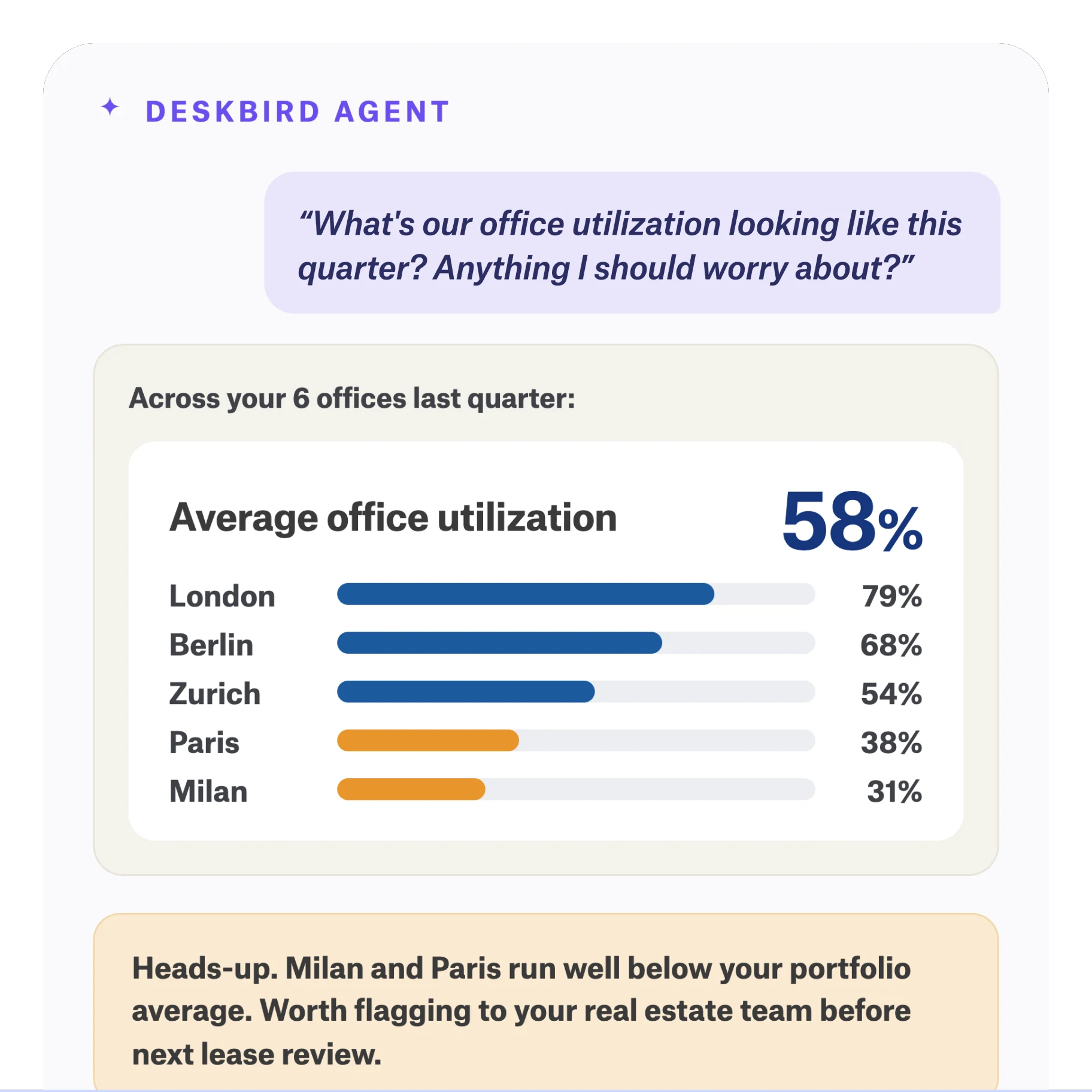
The next evolution is agentic AI: systems that execute multi-step workflows autonomously rather than just answering questions. For workplace operations, this means AI that coordinates scheduling, flags space conflicts, or surfaces utilization patterns without manual prompting. The key distinction is that agentic systems act as a copilot, making recommendations you review rather than taking unattended action.

Data analysis
Artificial intelligence helps IT employees analyze data faster. AI tools process a significant amount of data, more than the human brain ever could. Data analysis takes time. IT team members who work with AI treat more data in less time, increasing their efficiency and productivity. They then pinpoint new market trends ahead of your competitors. They also notice particular customer behavior.
Data security
Cybersecurity is a priority for IT teams, and artificial intelligence plays a key role in this sector. AI systems detect potential threats or data leaks. Machine learning helps AI increase data protection and systems security. This is key support for IT teams working with AI. These tools then send an alert message through an automated notification or directly block any suspicious IP address. When paired with clear governance policies, AI becomes a detection layer that strengthens your overall security posture.

Software development
Taking all of the previous insights into account, AI significantly improves software development. It assists IT teams in automating time-consuming tasks like code review and testing. It also allows more time for innovation and creativity. AI identifies potential security threats and recommends solutions, resulting in more secure and reliable software. IT teams quickly improve their software development processes, reduce costs, and deliver higher-quality products. Ultimately, they gain a significant advantage in the market.
How are AI systems transforming IT jobs?
The use of AI resources implies reviewing IT teams' ways of working
To maximize AI's value, IT employees must adjust their way of working. They should consider AI as a copilot to work "hand in hand" and increase their abilities. This means involving AI in the entire software development lifecycle, from design to testing, and using it to improve processes and outcomes continuously.
IT teams should also be provided with the necessary infrastructure and training to support AI integration. Ethical and regulatory considerations must be addressed. By adapting their way of working, IT teams fully embrace the benefits of AI and stay ahead in a rapidly evolving technology landscape.
AI in the workplace can boost risk-taking behaviors and innovation
AI in the workplace boosts risk-taking and innovation by reducing the fear of failure. AI simulates scenarios and tests ideas in a virtual environment, allowing teams to try new approaches and take risks without the consequences of real-world failures. AI also provides insights into emerging trends and consumer behavior, revealing new opportunities for innovation.By using AI in these ways, companies foster a culture of experimentation and creativity. This leads to breakthroughs that would not have been possible with traditional means. Organizations gain a competitive edge by rapidly adapting to changing market conditions and customer needs.

The impact of AI on the job market
A Gallup survey found that 27% of U.S. workers worry that technology could make their jobs obsolete, a record high that has nearly doubled since 2017.
A Zippia article notes that 37% of Americans are worried about automation displacing them from their jobs. Using artificial intelligence will change some job positions. The rise of AI, however, will create more jobs than it will remove. According to the Future of Jobs Report from the World Economic Forum, 85 million jobs will be displaced due to automation and AI, while 97 million new career opportunities will emerge from this sector.
The bigger shift is in required skills. AI works best as a copilot, not an autopilot. Workers who learn to collaborate with AI, validate its output, and apply human judgment to AI recommendations will find their roles enhanced rather than eliminated. Companies that reject AI will fall behind. All businesses should prioritize upskilling and reskilling employees.
Workplace technology shapes how employees complete daily tasks. Working with AI requires everyone, including IT teams, to adapt. Getting proper training helps to maximize the advantages of introducing AI in the workplace and minimize the downsides. The use of artificial intelligence will indeed lead to the evolution of certain jobs. It is an opportunity for workers to expand their skills, find more purpose in their careers, and let AI handle the rest.
How deskbird supports AI-powered workplace management
deskbird is built on the principle that AI should work as a copilot, never autopilot. Our workplace management platform uses AI to surface insights and recommendations while keeping humans in control of decisions.
- deskbird Intelligence analyzes space utilization patterns to help you right-size real estate and reduce unused capacity, delivering decision-grade data without tracking individuals
- Agentic workplace features coordinate scheduling and flag conflicts automatically, making recommendations you review rather than taking unattended action
- Governed AI integration means capabilities are built into the platform your IT team already manages, reducing shadow AI risk
Companies like ILF Consulting Engineers Austria use deskbird to accommodate more employees in the same space by understanding actual utilization patterns. Facing rapid growth and limited office space across six locations, ILF Austria introduced deskbird to manage around 800 workstations transparently. The platform is now used by over 80% of the workforce, and the company discovered through detailed analytics that they actually have enough space to continue growing without running into desk shortages. The result: better real estate decisions based on accurate utilization data.
There are no more discussions and through all the analyses, we've also realized that we actually have enough space. In fact, we could continue to grow, and desks would probably still not become scarce. But we were only able to make that statement after using deskbird to closely review desk occupancy and evaluate everything in detail.
Josef P. Mayr, Managing Director, ILF Consulting Engineers Austria

Frequently Asked Questions
What is shadow AI and why does it matter?
How do I validate AI output without duplicating the work?
What is an agentic AI and how is it different from chatbots?
How should companies create AI governance policies?
Will AI replace IT jobs?
How do I reduce time spent supervising AI output?
See how deskbird puts AI to work in your office
- Space utilization data without tracking individuals
- AI recommendations you review, not actions taken without you
- 90%+ adoption rate across 500+ companies