
.svg)
Hot desking guide: setup, policies, software and what to avoid
Everything you need to implement hot desking that works: space setup, policies, software, and what to avoid.

What is hot desking?
Hot desking is a flexible office setup where employees don't have assigned desks. Instead, they book a workspace when they need it, whether for a few hours, a full day, or specific team sessions. The goal is to reduce unused desks, make better use of office space, and support hybrid work schedules where not everyone is in the office at the same time. When done right, hot desking can cut office operating costs by up to 30% and reduce space needed by 15–25%.
What you'll learn in this guide
Only 25% of U.S. organizations still operate with assigned seating. Hot desking is no longer the exception. Whether you're introducing it for the first time or fixing a setup that isn't working, this guide gives you the essentials to do it right.
You'll learn how to define clear rules, plan your office layout, choose the right desk booking software, roll out the change smoothly, and manage day-to-day operations without chaos. The goal is simple: make hot desking efficient, fair, and easy for employees to use.
Who this guide is for
This guide is for the people responsible for making hot desking actually work: workplace and facilities managers designing shared-desk policies, IT leaders evaluating booking software, Operations leads managing space utilization, and HR teams supporting employee transitions to flexible work.
It's most useful if you're rolling out hot desking for the first time, or if your current setup is creating friction: ghost bookings, teams unable to sit together, desks sitting empty while employees struggle to find space.
Key takeaways
- Hot desking works best when it supports how people work, not just when it saves space.
- Clear rules, simple layouts, and the right tools are what separate successful setups from chaotic ones.
- The real win comes from balancing employee flexibility with structure so teams can collaborate without losing predictability.
- Adoption depends on trust, transparency, and making the booking experience effortless for everyone.
Chapters





Why invest in a hot desking platform?
Hot desking only works when people, spaces, and schedules are in sync. A hot desking platform connects all 3, so nothing falls through the gaps.
Give your people clarity
Show employees where to work, when to come in, and who they’ll be working with.
Keep teams coordinated
Plan in-office days together, sync schedules, and avoid misaligned office presence.

Manage the office without chaos
Handle bookings, visibility, and space data in one centralized, IT-friendly platform.
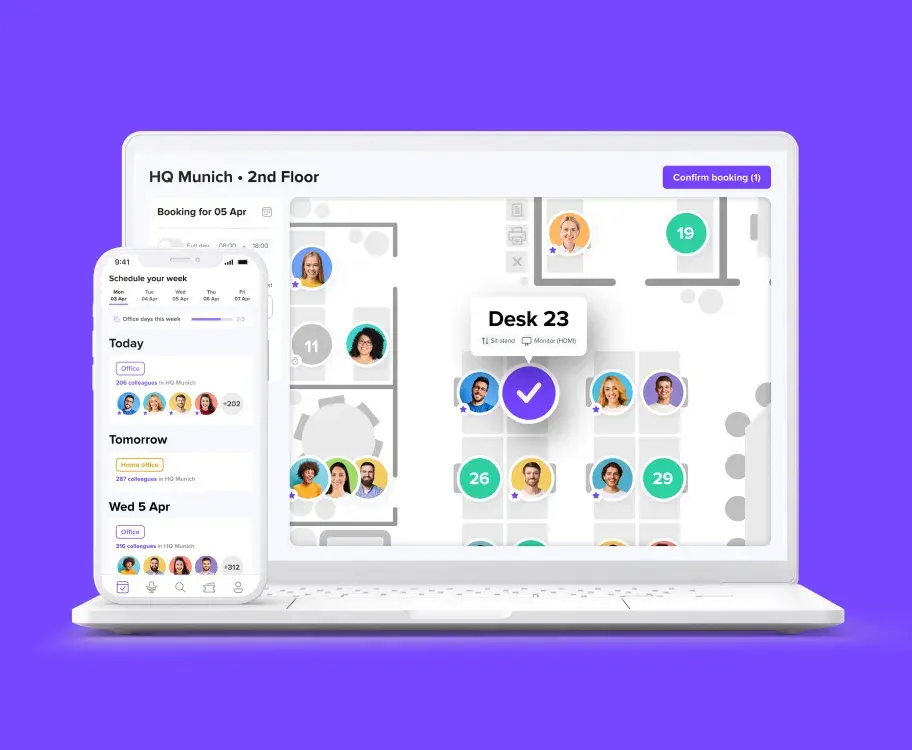
Run your hot desking office with deskbird
- Simplify desk booking for your team with an intuitive, mobile-first app
- Improve space efficiency with real-time availability, smart booking rules, and auto-release for unused desks
- Keep hot desking running smoothly with automated check-ins, interactive floor plans, and analytics
Trusted by 100,000+ employees worldwide

Frequently Asked Questions
Learn more about hot desking and how to implement it at your workplace.
What is the difference between hot desking and desk hoteling?
Hot desking means employees take any available desk when they arrive, with no reservation required. Desk hoteling means employees book a specific desk in advance, similar to reserving a hotel room. Hot desking is more spontaneous; hoteling gives more predictability. Most modern workplaces use a combination: some desks available for walk-in use, others bookable in advance for teams or longer sessions.
What are the benefits of hot desking for companies and teams?
Hot desking helps organizations use office space more efficiently, cut real estate costs, and adapt to fluctuating attendance. Teams benefit from greater flexibility, more opportunities for cross-department collaboration, and access to desks that fit their daily tasks. Overall, it supports a smoother hybrid work experience and reduces wasted workspace.
Is hot desking cheaper than fixed desks?
Yes, hot desking is typically more cost-effective. By eliminating the need for one dedicated desk per employee, companies can reduce the number of workstations, shrink office space, and lower overhead costs. Many organizations save significantly by matching desk supply to actual usage instead of maintaining underused fixed desks.
What is the right desk-to-employee ratio for hot desking?
There's no universal answer, but a ratio of 7:10 (7 desks for every 10 employees) is a common starting point for organizations with 2–3 hybrid office days per week. The right ratio depends on your actual attendance patterns. Use occupancy data for at least 4 weeks before reducing desk count, or you risk overcrowding on peak days.
What technology or software do you need to run hot desking effectively?
Most organizations rely on a dedicated desk booking system to keep shared desks organized and easy to use. The right software lets employees see real-time desk availability, book desks in advance or on the day, and check in when they arrive. For office managers, solutions like deskbird provide booking rules, interactive floor plans, and usage analytics to prevent conflicts, reduce no-shows, and ensure desks are used efficiently.
What are the biggest challenges of hot desking, and how can companies overcome them?
The most common challenges include employees not finding a suitable desk, teams struggling to sit together, ghost bookings blocking availability, and resistance to giving up assigned seats. Companies overcome these by setting clear booking policies, using software with real-time availability and team visibility features, and communicating the change thoughtfully before rollout.