
The best desk sharing software in 2026
Improve your hybrid office with flexible desk sharing software. Explore the platforms that give you occupancy insights, reduce admin time and learn how to choose the best solution for your teams.
Introduction
Desk sharing software helps hybrid companies manage shared desks with clarity and confidence. The best solutions are people-first and data-driven, providing fast desk booking, real-time office visibility, automation, and workplace analytics that make hybrid work simple.
Choose a desk sharing platform that’s easy to use, integrates with your existing tools, and gives you reliable workplace data to optimize space decisions. deskbird leads this category by combining intuitive desk sharing with deep workplace intelligence.
Why go for a desk sharing platform?
Desk sharing supports a modern, people-first workplace, but you can’t run desk sharing on spreadsheets. You need a system that’s reliable, frictionless, and built for hybrid teams. The right platform becomes the single source of truth for where work happens. When implemented well, you get:
Workspace efficiency benefits
- Reduced office space costs. Use space based on actual demand instead of fixed seating. Desk sharing can save up to 30% on office expenses, primarily due to decreased requirements for physical space, as not all employees need to be in the office simultaneously.
- Impact on office space and design. With accurate data for planning, facility managers and office admins can see and optimize workplaces with intent.
- Fewer operational costs. When implemented well, a hybrid model with desk sharing lead to more efficient allocation of cleaning and energy-consumption resources.
- Reduced IT and commute subsidies. In the long run, desk sharing software is set to reduce IT and commute costs, further adding to the cost-effectiveness of this approach.
Employee well-being and productivity benefits
- Increased productivity. It's estimated that well-coordinated hybrid work with desk sharing can increase productivity by up to a day per week.
- More flexibility. Employees can choose their in-office days, essentially giving them freedom on choosing where and how they work.
- Higher sense of belonging. Office days with efficient desk sharing workflows makes teams meet in the office with purpose, not chance. This mitigates feelings of loneliness, disengagement, and leads to a boost in employee happiness.
How to choose desk sharing software in 2026
The short answer is that your desk sharing software should feel invisible. In the right platform, it should be it easy to book a desk in seconds, understand space usage at a glance, and integrate it with your existing tech stack without headaches.
So, what criteria to look for in a desk sharing system?
- Simple, fast desk booking. Employees need a clean, mobile-first experience with filters and interactive floor plans that mirror the real office.
- Detailed analytics. Admins need workplace intelligence that show occupancy rates, booking trends, and peak office days so you can optimize layout and reduce underused space.
- Automated check-ins. Powerful to avoid unused bookings and accurate data. Opt for sensors, QR codes or calendar-based check-ins.
- Integrations that work. The best software connects your entire stack with minimal IT overhead. Must-have integrations include MS Teams, Outlook, Slack or Google Workspace and Calendar.
- Modern, intuitive UI. A platform that is simple to navigate and perform actions makes booking and managing spaces effortless for everyone, improving user adoption blockers and miniziming IT support required in the long run.
- Social functionalities. Hybrid is social. The best tools allow to see who's in the office when and the spaces teammates have booked.
- Visitor & meeting room management. Office collaboration isn't just about desk sharing. Find a platform that is able to book meeting rooms and manage visitors for a complete workspace experience.
- Privacy & security. Enterprise-grade security standards like ISO 27001 and GDPR-compliant workflows are key for a modern desk sharing platform.
List of the best desk sharing software in 2026
1. deskbird
deskbird stands out as a people-first desk sharing platform for hybrid organizations. Employees can browse a visual floor-plan, see where their teammates will be, select and book a desk in seconds, and check in effortlessly when they arrive. Meanwhile, workplace and facility managers gain real-time visibility into desk utilization, no-show rates, and team attendance patterns, so you don’t just “run" shared desks but manage it with purpose, data and culture in mind.
On the back end, deskbird fits into your existing hybrid work tech stack with minimal friction. It integrates with calendar tools, HR systems, SSO, and access control, meaning IT doesn’t have to rebuild systems and you don’t have to train employees on a heavy new workflow. With analytic dashboards showing how many desks were used on which day, which floors are under-utilised, and where you might consolidate space, you can make smarter real estate decisions and support a hybrid-first culture that scales.
deskbird Pricing
deskbird offers a Starter plan at €0 per user/month (for up to 15 users and one location) which gives full core functionality. Paid plans start at €2.50/user/month and can be complemented with add-ons for room bookings, visitors and user management.
deskbird is incredibly user-friendly and intuitive, making it easy for our team to book desks and meeting rooms efficiently. The real-time availability feature ensures we always have the latest information, reducing the chances of double bookings.
deskbird's G2 review
2. Robin
Robin offers desk sharing and hot-desking features as part of its broader workplace management platform. Users can browse an interactive floor-plan, reserve a desk before arriving, and check who else is in the office. The system also provides analytics on desk utilisation and office occupancy, which can help managers make data-driven decisions about shared workspace.
3. OfficeRnD
OfficeRnD Workplace supports desk sharing by enabling employees to choose from shared desks on visual floor-plans across mobile or web apps. It also integrates with existing systems (Microsoft 365, Google Workspace) and offers analytics on shared desk usage patterns, helping organisations track performance of their hybrid-workspace initiatives.
4. Skedda
Skedda originally targeted shared-space booking (gyms, labs) and now provides desk- and resource-booking capabilities for offices and hybrid work. It may appeal to organisations seeking a simpler, cost-conscious tool, though the depth of workplace analytics, check-in automation and team-coordination features might feel to some users as more limited compared to other platforms.
5. Tactic
Tactic is tailored to managing hybrid-work settings with desk sharing as a central capability: employees can reserve desks, filter by location or team zone, and see who else is coming in to coordinate. The platform also delivers real-time occupancy data and supports visitor and workspace management alongside shared desk booking workflows.
Implementing a desk sharing software step-by-step
Start by understanding how your team actually uses the office, and prepare them for the change ahead. A successful desk-sharing rollout takes careful planning and attention to both logistics and the people side of things.
Here are key steps to ensure a smooth transition and effective implementation.
- Audit current system & define requirements. Begin with a clear picture of how your space is currently used. Ask things like: How many desks can we accommodate? What’s the current booking process, if there is one? Evaluate your desk-to-employee ratio and identify friction points like double-bookings, limited visibility or low adoption.
- Define “must-have” and "nice-to-have" criteria. Do you need visual floor plans? Automated check-in? Outlook or Teams integration? Setting these requirements early gives you a strong foundation for choosing the right tool.
- Get team buy-in. Get the right people on board from the start: IT, HR, workplace/office managers and team leads. Define timelines as well as clear rules and expectations for desk bookings e.g who gets priority, how far ahead to book, what “untidied desk” means. Lay out these protocols as part of a hybrid policy so everyone understands how your new system supports a smooth and respectful shared workspace culture.
- Pilot. Consider running a small pilot launch with one department or location to see how the tool performs in the real world. Use the insights to adjust settings, tailor workflows and work out any resistance or confusion.
- Launch and training. When you’re ready for full implementation, deploy the solution broadly, but don’t leave people to figure it out alone. Provide quick-start guides, short walkthroughs, FAQs and clear support channels. The easier you make the onboarding, the faster you’ll see usage and the smoother things will go.
- Monitor and optimize. A desk sharing tool isn't a“set it and forget it” system. Analyze desk usage, no-shows and space utilization and use the data to refine policies, adjust permissions or even reconfigure zones/floor-plans. In other words: treat your desk sharing platform as a workplace asset that evolves with your organization.
The future of desk sharing
With the right software, desk sharing becomes smarter, not just cheaper. Future-ready platforms predict desk usage via AI, connect with sensors to show real-time availability and let you adapt floor plans dynamically. They support personalised experiences (eg. saved preferences for desk height or tech setup) and enhance employee well-being by offering flexible spaces tuned for focus, collaboration or rest.
They also bring sustainability into work-space planning: fewer under-used desks, lower real-estate footprint, smarter materials and energy use. Hybrid isn’t just home vs office, it’s about connected, adaptable work-spaces that truly reflect how people work today and want to work tomorrow.
For you as a decision-maker, this means choosing a future-proof desk sharing solution that’s not just a booking tool but a platform that aligns space, tech and people culture for hybrid work.
Disclaimer
Software listed in this article, and corresponding pricing and functionalities, are based on publicly available information as of 17-11-2025 and our own assessment and are subject to change. Information provided without guarantee. If something is mapped out incorrectly, please contact us here.
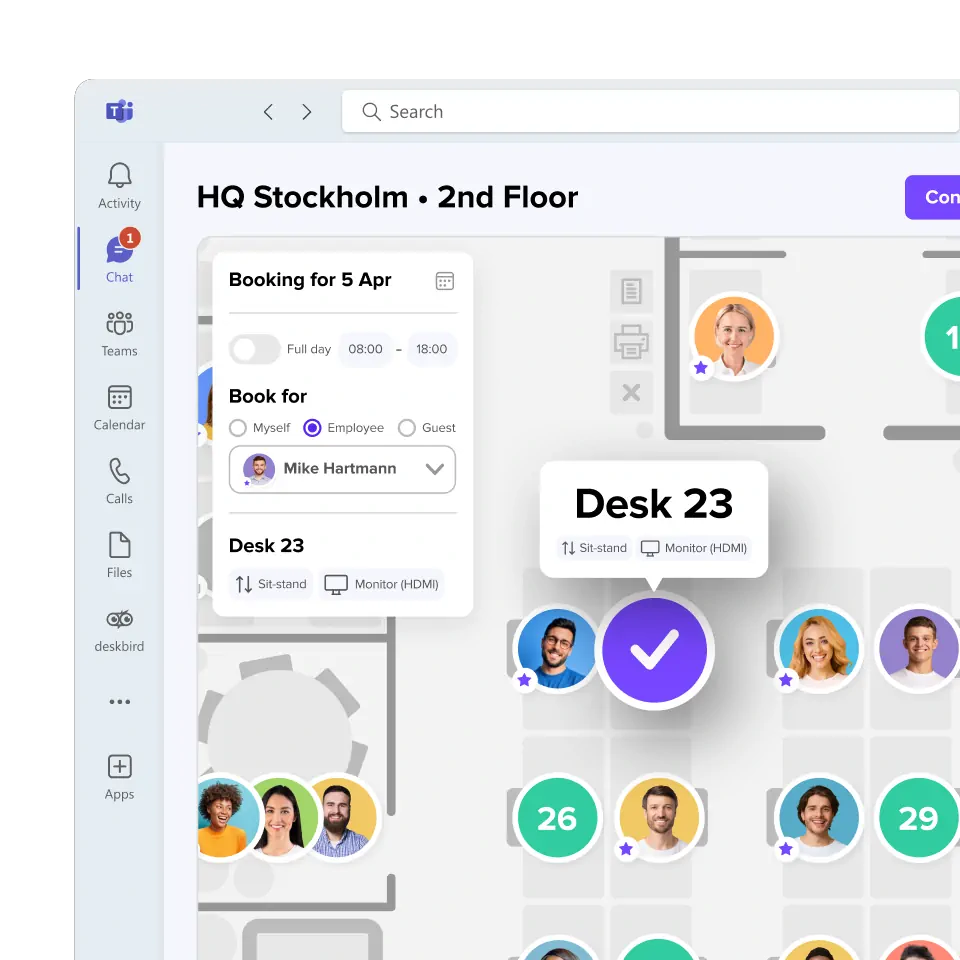
Choose people-first, data-driven desk sharing
deskbird is the platform chosen by modern workplace leaders to coordinate hybrid work, integrate seamlessly with existing tech and use clear analytics to continuously evolve and optimize their office.
Frequently Asked Questions
How to make the best out of desk sharing software.
What is desk sharing software?
Desk sharing software lets employees reserve shared desks on demand instead of relying on assigned seating. It works best in hybrid environments where not everyone is onsite daily, provides a clear view of which spaces are available, who’s coming into the office, and how the workspace is being used. For admins, it centralizes bookings, floor plans, rules, and analytics so hybrid work runs smoothly.
What are the benefits of having a desk sharing platform?
A desk sharing platform reduces unused space, cuts real-estate costs, and helps employees coordinate their office days with ease. It also improves visibility: no more double bookings or guessing who will be onsite. And with built-in analytics, you get reliable data to optimise layouts, adjust policies, and right-size your office over time.
How do I choose the best desk sharing software for my company?
Start by auditing your existing workspace and defining what exactly do you need from this solution. Then consider adoption: your team should be able to book in seconds, mitigating user friction. Finally, look for a platform that scales with your organization and fits into your existing IT landscape without heavy setup.
What integrations should I look for in desk sharing software?
Modern desk sharing solutions should connect with existing HR, calendar and access control systems, supporting integrations with tools like Microsoft 365/Outlook, Google Workspace, HRIS systems and access control/sensor hardware.
What is the best desk sharing solution today?
The best solution is one that employees actually use intuitively and that gives workplace leaders accurate, actionable data based on their needs. While this undoubtely varies for each organization, deskbird stands out for its fast booking experience, real-time floor plans, deep analytics, and seamless integrations, helping medium and large organisations run desk sharing with clarity and confidence.
