How to choose and implement a successful hybrid work schedule
Discover how to set office days, coordinate teams, and create a hybrid schedule that boosts engagement, productivity, and flexibility.

Hybrid work schedules define when employees work in the office and when they work remotely. The main schedule types are fully flexible, fixed (company-driven), 3-2 hybrid week, team-based, cohort, and staggered. The right choice depends on your team's roles, collaboration needs, and office capacity. Start with a pilot, collect feedback, and iterate.
Key takeaways:
- There's no one-size-fits-all hybrid schedule. Schedule types vary and are as individual as the company that implements them.
- The best schedules are tested, reviewed, and refined over time based on feedback and data.
- Tools like deskbird make scheduling transparent, coordinated, and data-driven, turning hybrid work from a logistical challenge into a strategic advantage.
What are hybrid work schedules?
Hybrid work schedules are frameworks that define when employees work onsite and when they work remotely. They can be fixed, flexible, company-assigned, or tailored by department, depending on your team's needs, company goals, and available office space. The idea is to create an integrated plan that gives you the best of both worlds: office collaboration and social interaction combined with the convenience of a remote setup, supporting productivity, work-life balance, and stronger team connections.
Hybrid work schedule vs. model vs. policy
Hybrid work schedule, hybrid work model, and hybrid work policy are often used interchangeably, but they each mean something different.
- Hybrid work model = the big-picture structure (e.g., fixed, flexible, office-first, remote-first).
- Hybrid work schedule = the specific days/times when employees or teams are remote or onsite.
- Hybrid work policy = the organization’s official rules and expectations surrounding hybrid work.
Why is setting a hybrid work schedule important?
A well-defined hybrid work schedule is the foundation of effective team coordination. Without it, in-office days become unpredictable, collaboration suffers, and employees lose clarity on when and where they're expected to work.
Hybrid work schedules play a crucial role in team coordination and alignment because they determine when and where employees are available for real-time collaboration, communication, and project sync. Well-coordinated hybrid scheduling is key to successful hybrid work because it:
- facilitates collaboration,
- helps managers avoid situations where only a part of the team is present,
- makes the most of team time,
- builds stronger connections, and
- keeps things clear for everyone.
What are the different types of hybrid work schedules?
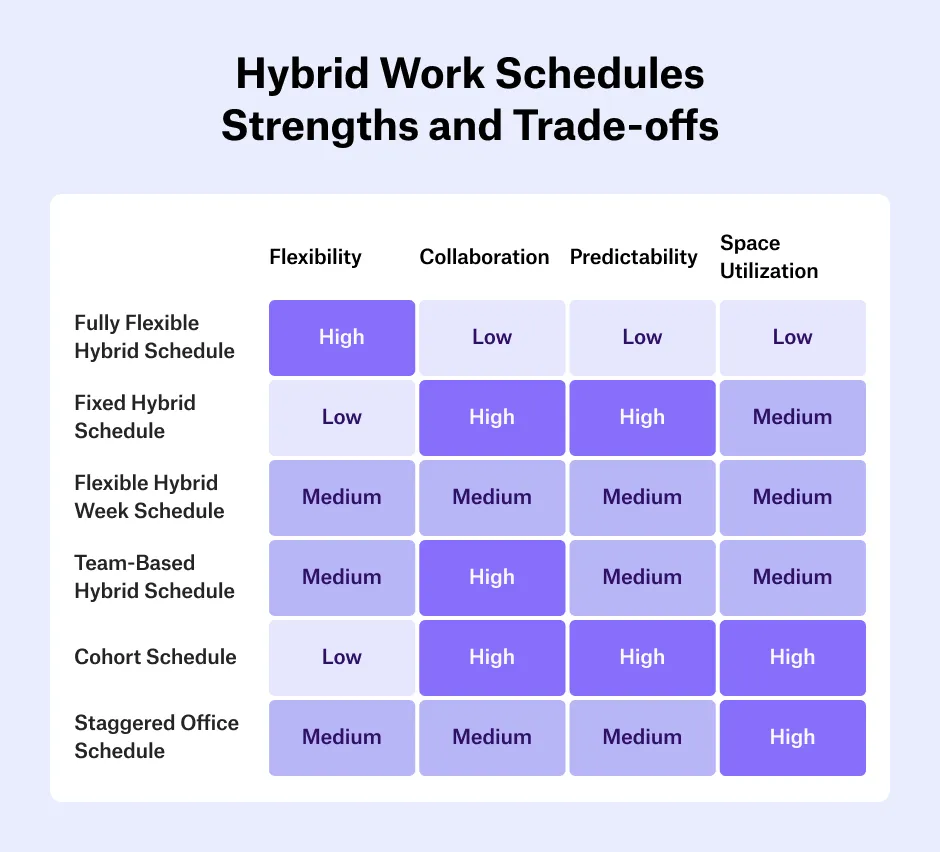
Common hybrid work schedule types include fully flexible, fixed or company-driven, 3-2 hybrid weeks, team-based schedules, cohort rotations, and staggered office hours. Each schedule type offers different degrees of flexibility, structure, and collaboration.
Fully flexible hybrid schedule
A flexible hybrid schedule allows employees to choose when and where they work based on their personal preferences, team needs, or project demands. For example, an employee might come in only for key meetings or to collaborate with a teammate once a week. While this approach gives employees a maximum of flexibility, it makes coordination and management difficult. Only 8% of organizations worldwide have a fully flexible work policy.
When to choose this hybrid work schedule?
- When trust and autonomy are core parts of your company’s culture.
- If employees have diverse personal needs, commutes, or working styles.
- For roles that don’t require constant in-person collaboration and for knowledge‑intensive tasks where employees can manage their own productivity.
Fixed hybrid schedule or company-driven hybrid schedule
A fixed hybrid schedule (also known as company-driven schedule) defines specific days for in-office and remote work. Following the top-down approach,the company sets the rules for when employees must be in the office and how often. For instance, all employees might be required to be onsite Monday through Wednesday and remote on Thursdays and Fridays. As shown by a recent Cisco study, 37% of organizations mandate set in-office days, with Monday to Wednesday being the most common choice.
When to choose this hybrid work schedule?
- When leadership wants predictable, consistent in-office presence across the organization and maintain control over workplace operations.
- For organizations that prioritize in-person presence for productivity, security, collaboration, or another reason.
- In environments where aligning all teams on a unified schedule is necessary for efficiency or company culture.
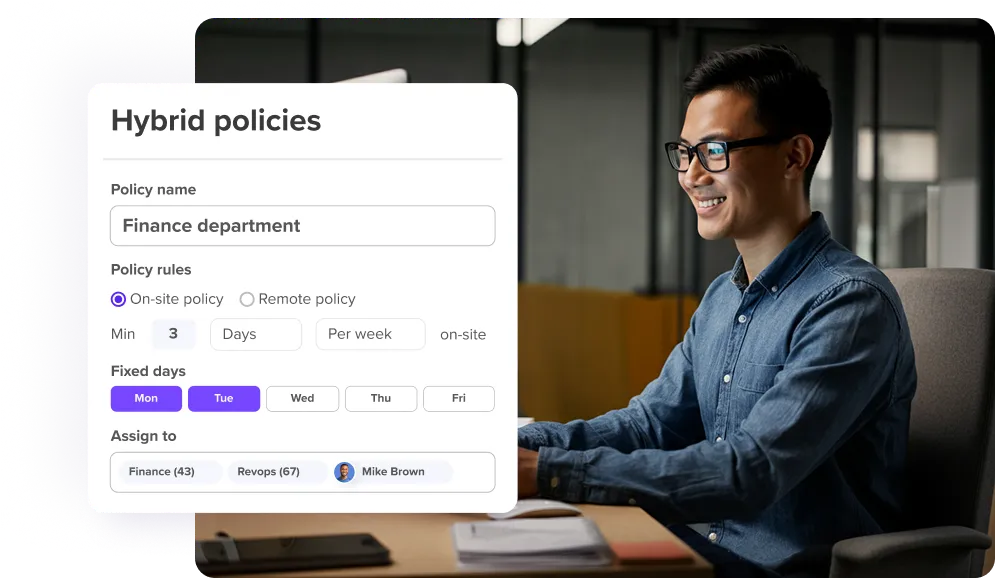
3‑2 hybrid week schedule (fixed or flexible)
The 3-2 hybrid week is a popular model where employees spend three days in the office and two days working remotely—or the other way around, depending on personal preferences or company policy. It comes in two different settings:
- Fixed: Specific in-office days are set for everyone (e.g., Tuesday to Thursday in the office, Monday and Friday remote).
- Flexible: The 3-2 split is maintained, but employees can choose their own in-office days within the agreed guidelines.
When to choose this hybrid work schedule?
- When balancing in-person collaboration with remote flexibility is a key goal.
- If leadership wants a structured hybrid rhythm without micromanaging daily schedules.
- For companies wanting a consistent culture while leveraging work-from-home benefits.
If companies prescribe 2.5 or 3 days in the office or only design their office for this model (i.e., desk sharing for everyone with a home zone), this does not meet the wishes of 69% of their workforce.
— Prof. Johanna Bath, Hybrid Work Expert, Author, Speaker & LinkedIn Top Voice
Team-based hybrid schedule
A team-based hybrid schedule gives individual departments or teams the freedom to determine their own hybrid work pattern based on their specific needs. For example, the sales team might meet in the office every Wednesday and Friday, while IT might prefer having office Thursdays only and work remotely throughout the rest of the week. This bottom-up approach helps each team design a schedule that fits their workflow and collaboration patterns.
When to choose this hybrid work schedule?
- Companies with a variety of different roles and team needs.
- Organizations that value team autonomy and trust.
- Diverse teams with different collaboration rhythms or time zone challenges.
Cohort schedule for hybrid work
The cohort system groups employees into "cohorts" (i.e., a group of individuals who share a common characteristic) that have a pre-defined schedule for in-office and remote work. For instance, Cohort A could work onsite Mondays and Tuesdays and Cohort B on Thursdays and Fridays. It’s a top-down approach since schedules are set by management.
When to choose this hybrid work schedule?
- In larger teams or departments where office space is limited.
- When there's a need to minimize overlap between groups for health or logistical reasons.
- For projects that require close collaboration within smaller teams.
Staggered office schedule
A staggered office schedule spreads out employee in-office times across the day to prevent the office from becoming too crowded. Instead of having everyone arrive at and leave the office at the same time, employees start and end their workday at different times. For example, some people might begin early in the morning and leave by mid-afternoon, while others arrive later and stay until the evening.
When to choose this hybrid work schedule?
- When office capacity or health protocols require smaller, spread-out groups.
- To accommodate employees with different commuting or caregiving schedules.
- For companies operating across time zones or needing extended coverage throughout the day.
10 hybrid schedule best practices to set you up for success
Implementing a hybrid work schedule requires alignment with organizational needs, understanding employee preferences, adjusting your office layout, and defining clear policies and expectations.
1. Align your hybrid schedule with organizational needs
Analyze and understand your team's diverse roles and work styles. Gather input from different departments, teams, and stakeholders to identify when in-office presence adds the most value.
2. Understand your employees’ flexibility preferences
Use surveys or open conversations to learn what matters most to your employees, and leverage that input to design a flexible, inclusive policy that supports diverse work styles and keeps employees engaged. Some may prefer more remote days, while others thrive in the office.
3. Coordinate in-office days to maximize interaction
Align schedules to turn office hours into high-value moments for connection, problem-solving, and creativity. By making intentional overlap part of your hybrid rhythm, you ensure the office is buzzing with energy and collaboration rather than just occupied seats.
4. Redesign your office to support hybrid needs
Offer a mix of hot desks, quiet zones, and collaboration areas and integrate hybrid-friendly tech like room booking systems and video conferencing tools. When your office is adapted to support both remote and on-site work, your team feels more included, empowered, and ready to collaborate.
5. Document and share a clear hybrid work policy
Your hybrid work policy should define expectations around availability, communication, scheduling, equipment, and performance. Keep the policy transparent, accessible, and regularly updated to reflect changing needs and build trust and clarity across the board.
6. Make collaboration and communication the foundation
Use consistent tools and rituals to stay connected, whether it's through weekly team calls, async updates, or shared project platforms. Prioritize open dialogue and make feedback a regular part of team interactions to create a culture of connection that spreads across locations and keeps everyone aligned.
7. Train managers for hybrid leadership
Provide managers with training focused on inclusive leadership, flexible performance management, and effective remote communication. Teach them how to build trust, empower autonomy, and support team members regardless of where they work.
8. Review and evolve your hybrid setup regularly
Collect feedback on what's working, what's not, and where adjustments are needed and use it to make meaningful improvements. A flexible, evolving approach ensures your hybrid model continues to deliver value over time.
9. Reassess your tech stack for hybrid compatibility
Reevaluate whether your communication platforms, project management tools, and devices support both flexibility and security. Ensure everyone has reliable access to core systems—no matter where they work.
10. Test and refine your hybrid schedule before full rollout
Begin with a survey to understand employee needs and expectations, then launch a small-scale pilot to see how the schedule works in practice. A hybrid work implementation plan helps you stay on track and ensure roll-out success.
How deskbird simplifies hybrid scheduling
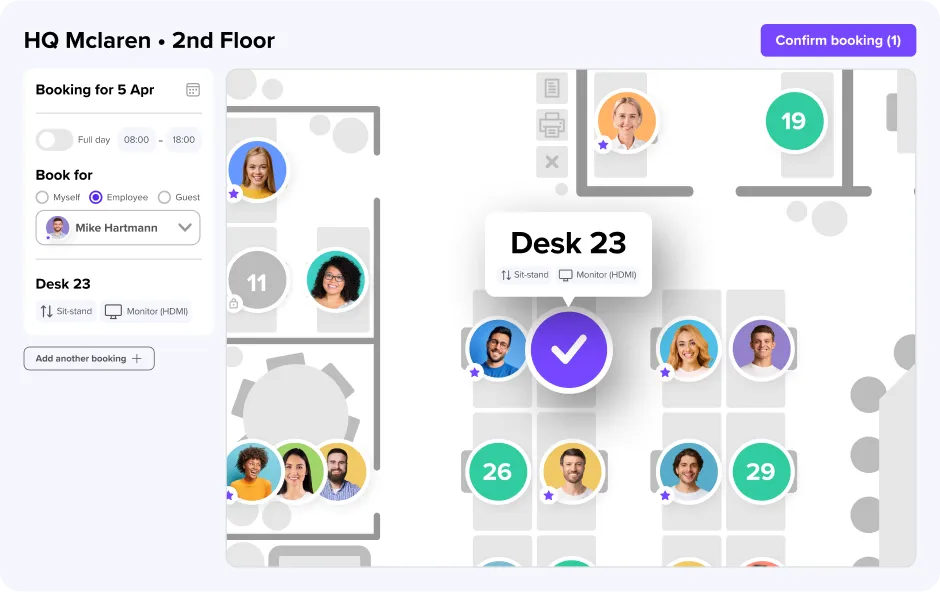
deskbird provides hybrid teams with an easy-to-use platform that combines scheduling, booking, space management, and analytics features and solves key hybrid work challenges: difficulty coordinating in-office days, overcrowding on popular days, weakened team cohesion, and lack of visibility into who will be in the office and when.
Easy desk and room booking
deskbird’s desk sharing and room booking features help employees reserve workstations, meeting rooms, or collaboration spaces in advance, avoiding double bookings and enabling smooth transitions between remote and in-office days.
Enhanced team scheduling and coordination
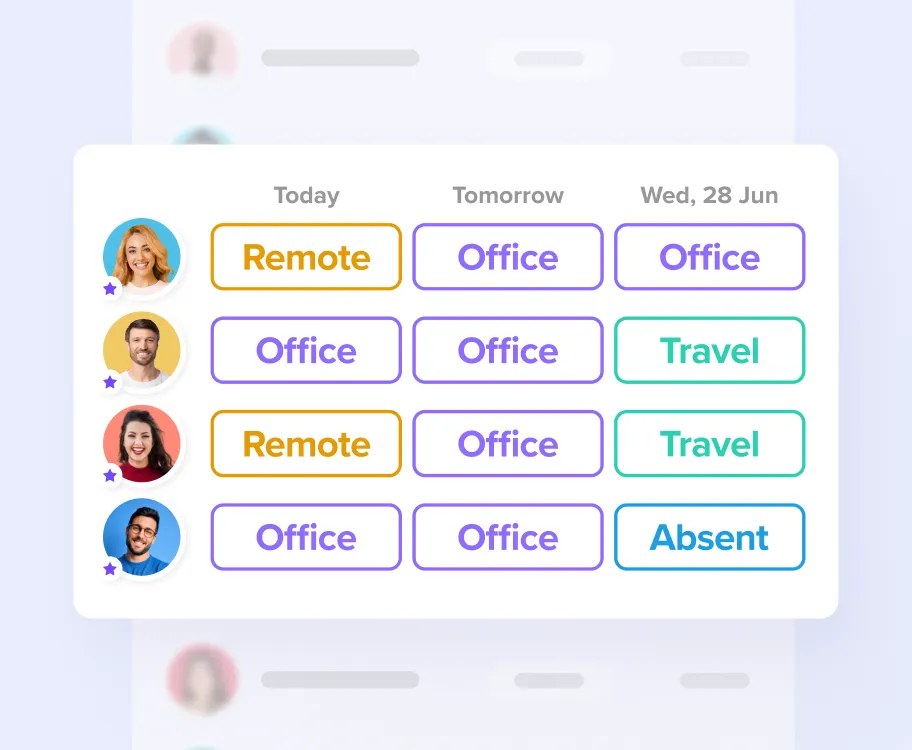
With deskbird, employees know who will be in the office and when so they can plan meetings or group sessions. Features like interactive floor plans, weekly planning overviews, and easy office event planning make coordination and collaboration effortless.
Integration with collaboration tools
deskbird is available in MS Teams and Slack and syncs in real-time with Outlook, Google Calendar, and your HRIS. Integrations between your hybrid scheduling tool and other workforce and office management tools simplify day-to-day planning, enhance collaboration, and reduce scheduling friction. Synchronizing employee schedules across calendars and tools is crucial for successfully managing hybrid schedules.
Better capacity and space management
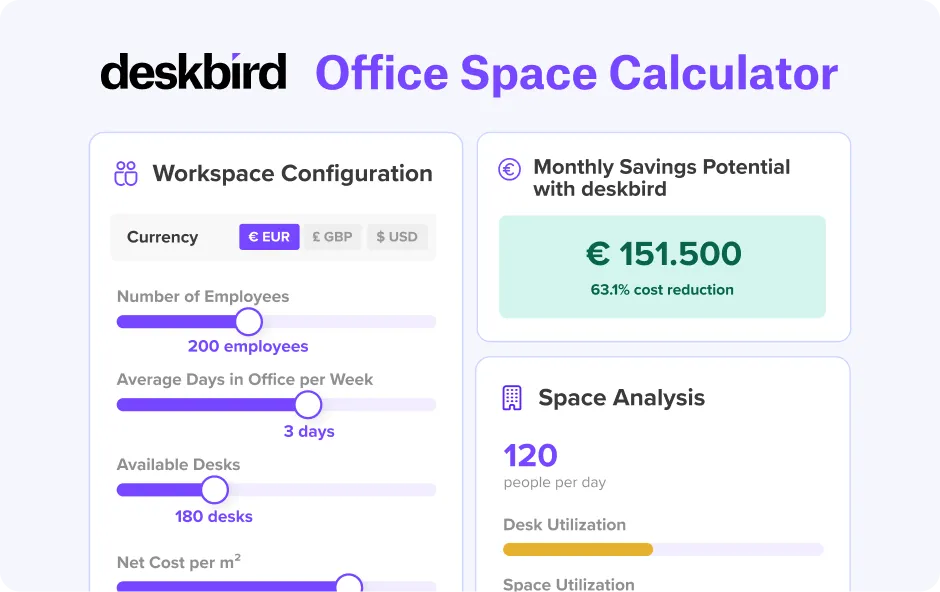
Office analytics in deskbird provide insights into real office usage, helping companies adjust their office layouts and reduce overhead by only paying for the space they actually need. Having data on office space and resource utilization further helps align your hybrid schedule with your physical office space. Try our office space calculator to configure your workspace and determine how much you could save every month using deskbird.
The bottom line: Successful hybrid work schedules require coordination and iteration
Which hybrid work schedule is right for your organization depends on your people, culture, and goals. As team needs and business priorities change, your chosen hybrid schedule needs adjusting too, making continuous iteration a key requirement. Start with a plan, measure how it works, gather feedback, and be ready to make adjustments along the way.
But setting a hybrid work schedule is only a part of successfully implementing hybrid work in your organization. In the next chapters, we’ll explore how to create a hybrid work policy that gives everyone clarity on what’s expected, how to lead hybrid teams, how to choose the right hybrid work software, and more.
Hybrid Work Schedule FAQs
What is the most common hybrid schedule?
The most common hybrid schedule globally is 3 days in-office and 2 days remote, often called the 3-2 schedule. It offers a predictable rhythm for collaboration while still giving employees regular remote days. Many companies use a fixed version for consistency or a flexible version to give employees a choice.
How many days should employees work from the office?
There's no universal answer, but the most widely adopted standard is 2 to 3 days per week in the office. According to a Cisco study, 37% of organizations mandate set in-office days, with the 3-day in-office week being the most common. The right number depends on your roles, collaboration needs, and office capacity, not industry averages.
How do we decide which hybrid schedule is right for our company?
The best hybrid schedule depends on your business goals, job profiles, workstyles, and team dynamics. Assess how often in-person collaboration is needed, review employee preferences, and check your office space capacity. Pilot a schedule, gather feedback, and refine it until it balances flexibility, productivity, and cultural connection for your organization.
What is a 3/2/2 hybrid schedule?
The 3/2/2 schedule is a structured hybrid model where employees spend three days in the office, two days working remotely, and two days off each week. It’s designed to offer a balance between in-person collaboration, focused remote work, and personal downtime.
How can we prevent overcrowding on popular in-office days?
Overcrowding often happens when everyone prefers mid-week office days. The solution is to coordinate attendance using hybrid scheduling tools, limit occupancy on certain days, or stagger team schedules. This approach spreads office attendance evenly, ensures meeting rooms and desks are available, and keeps the office comfortable and productive for everyone.
Coordinate and manage hybrid schedules with deskbird
- Enable employees with schedule visibility and transparent policies for hybrid work
- Gain team-wide visibility into who’s working where, every day
- Use attendance, trends, and engagement data to shape smarter hybrid strategies
Trusted by 100,000+ employees worldwide