How to pick the best hot desking software
Learn what features, integrations, and analytics to look for in hot desking software, and why UX matters for employee adoption.

The best hot desking software automates bookings, prevents ghost bookings, and gives workplace teams the analytics they need to optimize space.
Key criteria: real-time desk availability, interactive floor plans, mobile UX, integrations with your existing tool stack (Outlook, Teams, Slack, HRIS), and built-in analytics. Poor UX is the biggest adoption killer: 40% of employees avoid software after a bad first experience.
Choosing the right hot desking software is essential for running an efficient, data-driven hybrid workplace. A dedicated hot desking tool eliminates manual admin work, prevents double and ghost bookings, improves the employee experience, and leverages built-in analytics to support smarter real-estate decisions.
Why you need a hot desking tool that isn’t Excel
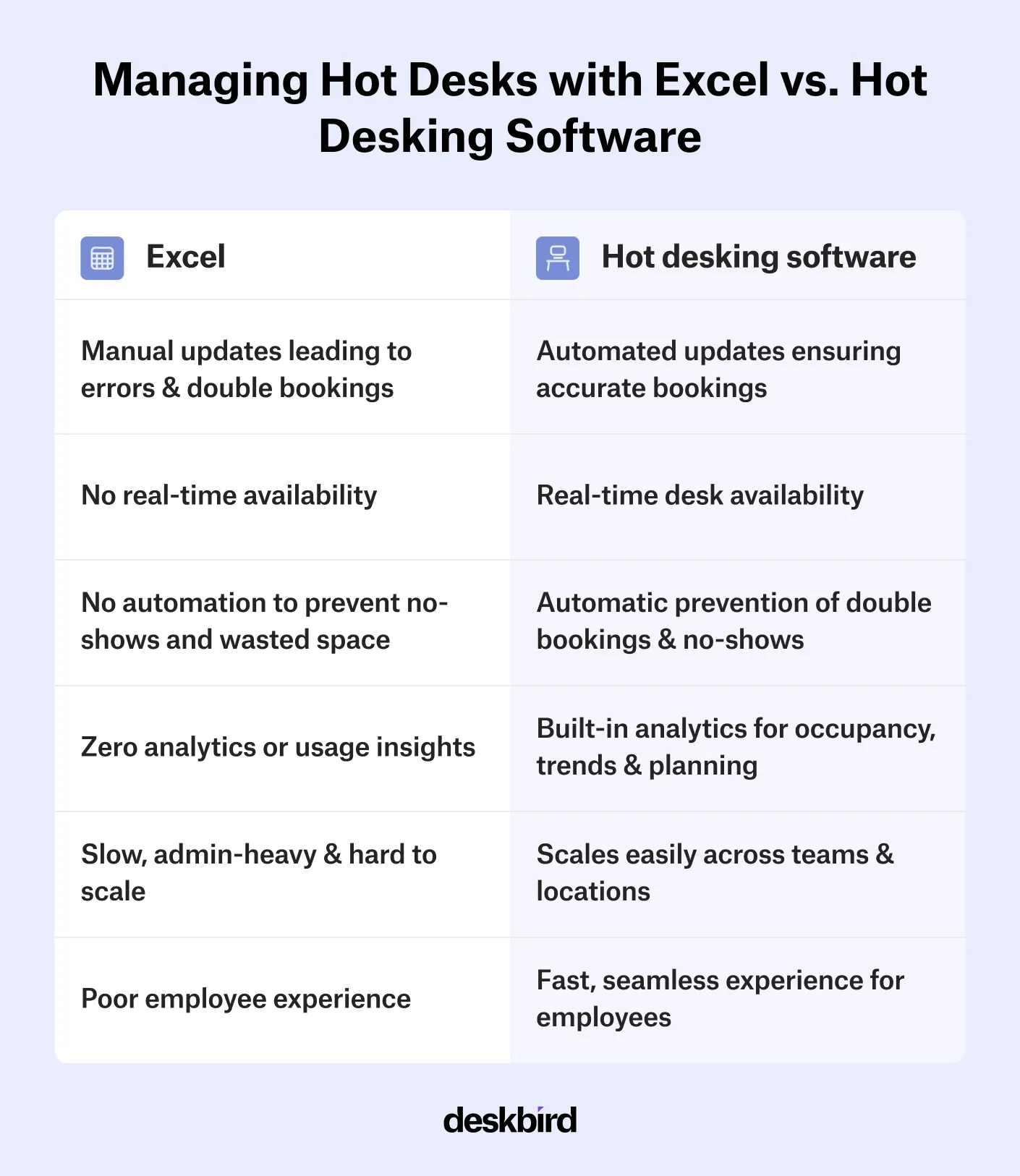
Managing hot desks in Excel can work for small teams, but it quickly becomes slow, error-prone, and hard to maintain as your organization grows. Spreadsheets rely on manual updates, which lead to double bookings, no-shows, and zero visibility into how your office is actually used. Every change requires admin time, and every decision relies on pure guesswork.
Hot desking software removes all of that friction, which makes it a far better alternative to desk booking in Excel. A dedicated software tool for hot desking not only solves the challenges of manual desk coordination via spreadsheets, but it also offers additional benefits, such as:
- Automation that eliminates admin work by replacing manual editing and handling check-ins, cancellations, and no-shows.
- No more double bookings or human errors thanks to clear booking rules and real-time updates that ensure desks can’t get overbooked.
- Workplace analytics that provide insights into occupancy rates, busiest days, and attendance patterns.
- Enhanced employee experience thanks to clear visibility into who’s in the office and easy booking via desktop or mobile.
- Positive impact on ROI thanks to reduced office costs, higher employee satisfaction, and better space availability.
Which core functionalities to look for in a hot desking solution?
The core features to prioritize are real-time desk availability, interactive floor plans, smart check-in, configurable booking rules, analytics, scalability, and integrations with your existing tool stack.
When evaluating options, focus on capabilities that support daily operations, connect with your existing tools, and scale with ease as your organization grows:
- Real-time desk availability: Employees should immediately see which desks are free, occupied, or unavailable so they can book with confidence.
- Interactive floor plans: An interactive map helps people choose the right spot and understand the office layout instantly.
- Smart check-in options: Automated or timed check-ins prevent ghost bookings and ensure unused desks get released quickly.
- Clear booking rules and limits: Look for a solution that offers configurable booking policies, like booking lead times, team zones, or priority access, to support your hybrid work model.
- Analytics: Strong workplace analytics that highlight trends, peak days, and underutilized areas help you optimize your office space and avoid unnecessary real-estate costs.
- Scalability: Make sure the solution can handle multiple locations, more users, and added features without compromising performance and that pricing remains transparent and aligned with your growth.
- Simple, user-friendly interface: A clean, intuitive design lowers friction and boosts software adoption across your teams.
- Integrations: Connections to calendars and communication platforms keep bookings aligned with meetings and workflows.
What integrations are important when choosing hot desking software?
The most important integrations for hot desking software are Outlook, Microsoft Teams, Google Calendar, Slack, SSO, and HRIS. Together they ensure bookings stay in sync with existing workflows and employee data updates automatically.
Your hot desking software will work best when it's connected to your existing tool stack so your teams can book desks and resources through the tools they're already familiar with. Integrations with other workplace technology and hybrid work tools ensure that data flows automatically, bookings stay up to date, and employees can reserve desks without having to learn how to use yet another software.
- Outlook & Microsoft Teams: A two-way sync with MS Teams and Outlook ensures desk bookings appear directly in employee calendars and stay updated in real time, preventing overlaps between bookings.
- Google Calendar: An integration with GCal lets employees book and manage workspaces from the calendar they already rely on.
- Slack: Integrating the tool with Slack enables quick booking, push notifications, and reminders directly within the daily used tool, which reduces the need to switch between apps.
- Single Sign-On (SSO): SSO provides frictionless access and boosts security by allowing employees to log in with their existing corporate credentials.
- HRIS Integration: An integration with your HR system automatically syncs employee data, permissions, and absences so the system always reflects who is eligible to book desks and when.
- User management: Integrating your hot desking software with user management systems makes it easy to onboard and remove users at scale, while keeping access, roles, and directory information up to date without manual work.

What makes hot desking software easy to adopt?
A survey by Gartner found that new software is a source of frustration for 60% of employees and that 40% of users avoid using software after having a bad experience with it. A smooth user experience is therefore critical for driving adoption at both employee and admin level. Employees embrace hot desking tools only if they feel intuitive and are easy to use.
The same applies to IT and workplace admins. The easier the system is to set up, maintain, and scale, the faster your organization will realize the expected ROI. So choose a hot desking solution that offers an intuitive interface, a strong mobile app experience, easy setup and scaling, and clear permission controls that keep management simple and aligned with your hybrid work policies.

What analytics should hot desking software include?
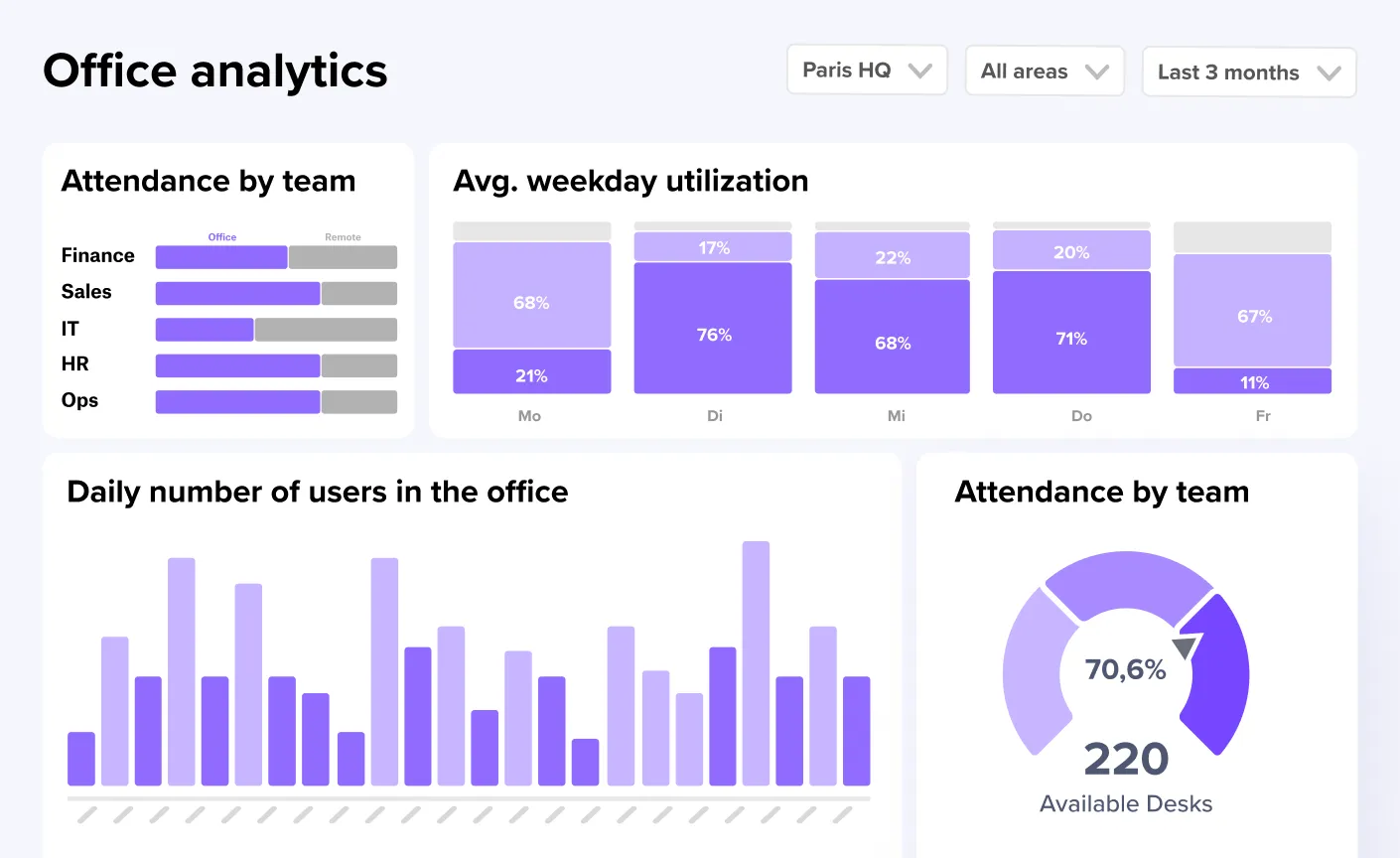
Detailed analytics are one of the most powerful capabilities of hot desking software. Built-in analytics dashboards allow workplace and facility managers to track desk usage and understand space utilization. These data insights eliminate guesswork and enable smarter real-estate decisions. With clear insights into occupancy, demand, and behavior patterns, organizations can optimize their office space, redesign underused areas, and plan future office investments with confidence.
So, what analytics should you look for?
- Daily and weekly occupancy trends let you see how full the office is over time and identify peak days.
- Desk and zone demand helps you understand which areas are most and least popular to optimize layouts or repurpose space.
- Check-in vs. no-show rates allow you to spot unused reservations and quantify real utilization.
- Employee attendance patterns reveal hybrid work rhythms at the team and/or department level.
- Space utilization by asset type shows how different workspace categories (desks, meeting rooms, focus areas, collaboration zones) perform.
- Capacity vs. actual usage highlights whether your current office footprint aligns with real demand.
deskbird: the best hot desking software for your teams
deskbird is more than just a hot desking software. It is your go-to app for managing hot desking and hybrid work. Designed with simplicity at its core, deskbird makes booking a workspace effortless while giving organizations the insights they need to run a high-performing, compliant workplace.
Teams benefit from better in-person collaboration thanks to features like interactive floor plans and real-time presence updates, while deep integrations with tools like Outlook, MS Teams, Slack, and HRIS systems keep everything connected and frictionless. deskbird's hot desking platform offers a range of features and benefits that make hot desking work, including:
- Easy desk booking: Employees can quickly book desks, rooms, and resources, ensuring smoother space utilization and easy access to the workspace they need.
- Hybrid work solution: Designed for flexible work patterns, deskbird supports both remote and in-office schedules to match the realities of hybrid teams.
- User-friendly interface: An intuitive, clean design makes navigation effortless, minimizing training time and boosting adoption.
- Advanced analytics: Insightful workplace analytics and data on space usage and employee behavior helps you optimize layouts, reduce waste, and make smarter real estate decisions.
- Integration capabilities: Deep integrations with tools like calendars, HRIS, MS Teams, or Slack streamline workflows and reduce administrative effort.
- Cost and resource optimization: Efficient booking and resource management lowers operational costs and helps eliminate unnecessary real estate or resource spend.
- Flexibility and adaptability: Customizable settings and policies allow the platform to fit your unique workflows, schedules, and team structures.
- Support for collaboration: Easy booking and visibility features help teams coordinate on-site days, strengthen interaction, and improve the overall in-office experience.
- Compliance: Organizations can ensure hybrid work policy adherence with workforce analytics and built-in workflow tools, such as booking rules, approvals, and hybrid policy attendance tracking.
What to keep in mind when choosing hot desking software
The right hot desking software is a purpose-built tool, not a generic scheduling app adapted for desks. It should handle the full cycle: booking, check-in, release, and reporting. Start from your organization's actual pain points (double bookings, ghost reservations, lack of visibility) and evaluate tools against those specific needs rather than feature lists.
While many platforms offer parts of this, deskbird brings everything together in one user-friendly, deeply integrated solution built specifically for hybrid work. From implementing hot desking to effectively managing your hot desking office, deskbird makes it easy to support a hybrid workforce and foster a flexible, efficient, and collaborative work environment.
Frequently Asked Questions
We can help!
Do I really need dedicated software to implement hot desking?
While small teams can manage hot desking in Excel, scaling this setup quickly becomes messy. Dedicated software automates reservations, prevents double bookings, handles check-ins, and gives you analytics on how your office is actually used. It also improves employee experience with mobile booking and real-time visibility, which is something spreadsheets simply cannot deliver.
What is the best hot desking software?
The best tool depends on your workflows, but platforms that are purpose-built for hybrid work typically outperform generic scheduling tools. deskbird, for instance, offers intuitive UX, advanced analytics, deep integrations with tools like Outlook and MS Teams, and strong booking and collaboration features. It’s especially suited for organizations that want a scalable, employee-friendly, and data-driven hot desking system.
What features should hot desking software have?
Look for real-time desk availability, interactive floor plans, check-ins to prevent ghost bookings, mobile apps, and flexible booking rules. Strong analytics are essential for understanding occupancy and optimizing office space. Integrations with calendars, HRIS, and communication tools help streamline daily workflows and boost employee adoption.
How does hot desking software prevent ghost bookings?
Hot desking tools reduce ghost bookings through features like timed or automated check-ins. If users don’t confirm their reservation within a set window, the desk is released back into availability. This ensures unused desks don’t sit blocked, improves real utilization, and keeps your space data accurate.
What integrations are important in a hot desking tool?
Prioritize integrations with Outlook, MS Teams, Google Calendar, and Slack so employees can book through tools they already use. SSO ensures secure, frictionless login, while HRIS and user-management integrations keep permissions, roles, and absences synced automatically. Together, these integrations reduce admin work and strengthen adoption.

Discover deskbird’s hot desking software
- Let employees plan their week, book a space, and show up with confidence
- Use a frictionless, mobile-first UX and book with ease from any device
- Avoid double bookings with rules, real-time visibility, and interactive floor plans
Trusted by 100,000+ employees worldwide