

Meeting room etiquette: essential rules for productive meetings
Ghost meetings can waste significant booked meeting room time in many offices. Rooms sit empty while colleagues scramble to find space, double bookings create scheduling conflicts, and meetings that run over disrupt everyone's day. Clear meeting room etiquette solves these problems by establishing shared expectations around booking, punctuality, and room turnover. This guide covers the essential rules for both organizations and employees, explains how to enforce standards without constant policing, and shows how room booking software turns good intentions into reliable behavior.
TL;DR
Meeting room etiquette covers the shared expectations that keep conference spaces running smoothly: booking in advance, starting and ending on time, leaving rooms ready for the next group, and including remote participants in hybrid meetings. Without clear conference room rules, offices face ghost meetings, double bookings, and constant friction over space. Room booking software helps enforce these standards automatically. It reduces no-shows and makes utilization data visible so you can make better decisions about your workspace.
What is meeting room etiquette?
Meeting room etiquette refers to how you and your team use and respect shared meeting spaces. It covers the basics: booking rooms correctly, being on time, and leaving the space clean for the next person.
Good conference room etiquette prevents common problems like ghost meetings (rooms booked but unused), room hoarding (blocking time "just in case"), and double bookings that derail everyone's schedule. When teams follow the same guidelines, scheduling becomes smoother. Conflicts disappear. The goal is to show consideration and create a collaborative environment where meetings actually work.

Why conference room rules matter
Clear conference room rules solve real problems. Without them, offices waste space, time, and goodwill. Here's what's at stake:
- Ghost meetings leave rooms empty when others need them
- Double bookings create awkward standoffs and delays
- Room squatting blocks space without formal reservations
- Meetings that run over disrupt the next group's schedule
- Messy rooms signal disrespect and slow down setup
Keep everyone aligned on expectations
When your team follows the same guidelines, scheduling and running meetings becomes straightforward. Clear rules prevent conflicts before they start. For you, this means less time mediating disagreements and more time focused on actual work.
Maintain a functional shared workspace
Following conference room rules keeps spaces pleasant and ready for use. When everyone respects the guidelines, rooms stay clean, organized, and functional. The next group can start immediately instead of dealing with leftover messes or missing equipment.
Prevent scheduling conflicts and friction
Double bookings happen when systems fail or people ignore them. Room squatting, where someone occupies a space without booking, creates tension. Meetings that run over cascade into everyone else's schedule. Clear policies and enforcement tools like scheduling conflict prevention eliminate these problems.
Improve meeting room utilization
Well-defined guidelines help you manage meeting rooms efficiently. When everyone follows the same booking etiquette, you get accurate data on how spaces are actually used. This visibility helps you make better decisions about real estate, room configurations, and capacity planning.
Meeting room etiquette for companies
Organizations set the foundation for good meeting room behavior. Here's what to provide:
Invest in room booking software
A room booking system eliminates guesswork. Real-time availability prevents double bookings. A meeting room scheduling software with auto-release features reclaims rooms from no-shows and helps cut ghost meetings. Calendar sync with Outlook, Teams, and Google Calendar means employees book from tools they already use.
Provide wayfinding and interactive floor plans
Help staff navigate efficiently with wayfinding apps or interactive floor plans. Real-time updates show which rooms are available. Employees find their reserved space without wandering the office or interrupting meetings in progress.
Give meeting rooms clear names
Naming your meeting rooms helps with organization and clarity. When each space has a distinct name, your team knows exactly where they're headed. Pick names that align with your company's identity or the room's purpose. This reinforces culture and eliminates confusion.
Equip rooms with the right furniture and technology
Consider functionality and comfort when setting up meeting rooms. The right hybrid workplace technology makes collaboration possible across locations. Ensure rooms have:
- Power outlets and USB ports for devices
- Quality cameras positioned to show the full room
- Reliable audio systems for remote participants
- Whiteboards or digital displays for collaboration
- Flexible furniture that adapts to different meeting types
Establish clear time boundaries
Make punctuality a company expectation, not just a personal preference. Meetings should start and end on time so rooms are available for the next group. If a discussion needs more time, schedule a follow-up rather than running over. This shows respect for everyone's schedule and keeps the office running efficiently.
Meeting room etiquette for employees
Individual behavior makes or breaks meeting room culture. Here's a quick reference:
[Table1]
Book rooms in advance and choose the right space
Reserve meeting rooms ahead of time using your room booking system. Think about how many people will attend, what technology you need, and the meeting's purpose. A 3-person check-in doesn't need a 20-seat boardroom. Choosing the right space ensures everyone fits comfortably and has the tools they need.
Arrive prepared and on time
Show up a few minutes early with your materials ready. Have your laptop charged, presentations loaded, and documents accessible. This respects everyone's time and ensures the meeting starts promptly. Being prepared sets a professional tone and prevents delays.
Minimize digital distractions
Turn phones off or switch them to flight mode before meetings start. Vibrations and notifications disrupt focus. They also signal disrespect to speakers and colleagues. If you must take a call or check a message, step out quietly to avoid disturbing the discussion.
Practice inclusive communication
Create an environment where everyone feels comfortable contributing. Listen actively, avoid interrupting, and respect different perspectives. Building trust in the workplace leads to more productive meetings and stronger team dynamics.

Leave the room ready for the next group
Clean up before leaving. Dispose of trash, wipe down surfaces if needed, and return furniture and equipment to their original positions. A turnover buffer of a few minutes between bookings helps. The outgoing group should always leave the space ready for immediate use.
Be mindful of food and drink
Water and coffee are generally fine. Avoid strong-smelling foods or messy items that could distract others or leave the room in poor condition. If your meeting includes a meal, plan for cleanup time and consider whether the room is appropriate for food service.
Report equipment issues promptly
If you notice problems with the room or equipment, report them immediately. Whether it's a broken chair, malfunctioning projector, or missing remote, alerting the right people ensures quick resolution. This prevents disruptions for future meetings and keeps shared spaces functional.
Meeting room booking etiquette
How you book matters as much as how you behave in the room.
Cancel bookings you won't use
If your meeting gets canceled, release the room immediately. Ghost meetings waste space that colleagues need. This simple act keeps the office running efficiently and shows consideration for your team. Most booking systems make cancellation easy, so there's no excuse for holding unused rooms.
Book only the time you need
Room hoarding happens when people block extra time "just in case." If your meeting takes 30 minutes, don't book an hour. Be realistic about duration. Build in a turnover buffer for the next group rather than padding your own reservation.
Notify attendees promptly
As soon as you book a room, share the details: date, time, room name, and meeting topic. Clear communication helps everyone plan their day and prevents confusion about where to be and when.
Hybrid meeting room etiquette
Hybrid meetings require extra attention to ensure remote participants aren't left out.
Include remote participants equally
Proximity bias is real. In-room attendees naturally dominate conversations while remote colleagues become spectators. Counter this by:
- Positioning cameras to show the full room, not just the speaker
- Using turn-taking protocols that give remote attendees clear opportunities to contribute
- Avoiding side conversations that exclude those on video
- Checking in with remote participants explicitly throughout the meeting
- Sharing materials on screen rather than pointing at physical whiteboards
Set up technology for hybrid success
Room setup determines whether remote participants can engage effectively. Test audio before meetings start. Position cameras at eye level when possible. Ensure screen sharing works smoothly. When technology fails, remote attendees lose the ability to participate meaningfully.
How to communicate meeting room rules
Having rules matters less than ensuring people know and follow them.
Share guidelines via email and internal systems
Send a clear message outlining your meeting room guidelines and any updates. Store the full policy in your intranet or employee portal so everyone can reference it anytime. New hires should receive this information during onboarding.
Display rules in meeting rooms
Post conference room rules on walls or screens in the meeting rooms themselves. Visual reminders help people remember expectations in the moment. When employees see the policies regularly, they're more likely to follow them.
Address non-compliance constructively
When rules aren't followed, address it directly but professionally. A quick conversation usually resolves issues faster than passive-aggressive emails. Focus on the impact: "When meetings run over, it delays the next group" rather than "You broke the rules." Persistent problems may need escalation to managers or facilities teams.

How deskbird supports meeting room etiquette
Good intentions only go so far. Technology helps enforce meeting room etiquette automatically so you're not relying on willpower alone.
deskbird's room booking features address the most common pain points:
- Real-time availability prevents double bookings before they happen
- Auto-release reclaims rooms from no-shows, eliminating ghost meetings
- Check-in reminders prompt attendees to confirm they're using the space
- Calendar integration with Outlook, Teams, and Google Calendar means booking happens in familiar tools
- Analytics show actual utilization so you can right-size your meeting room inventory
For smaller gatherings, a huddle room is more appropriate than a full conference room. deskbird helps employees find the right space for their needs.
The platform fits into broader flexible office design approaches, giving you visibility into how spaces are actually used. TwentyCi, an advertising services company, needed a booking tool that integrated seamlessly with Microsoft Teams while accommodating diverse employee preferences for in-office days. After implementing deskbird, they achieved 80-85% adoption without chasing people, and employees now benefit from knowing who's in the office on any given day, preventing wasted commutes and boosting productivity.
Your cost is transparent. There's nothing worse than going on a website for a tool you might want to use, and it says contact us for a price. And the support has been outstanding and very responsive.
Rob Taylor, Head of People, TwentyCi
Start a free trial to see how deskbird reduces no-shows and ghost meetings, or book a demo to discuss your specific needs.

Frequently Asked Questions
What is the 40 20 40 rule for meetings?
What is the rule of 7 in meetings?
How do I handle a meeting that runs over into my booked time?
What should I do if someone is using a room I booked?
How do I prevent ghost meetings and no-shows?
What's the etiquette for hybrid meetings with remote participants?
Should food and drink be allowed in meeting rooms?
How early should I arrive to set up for a meeting?
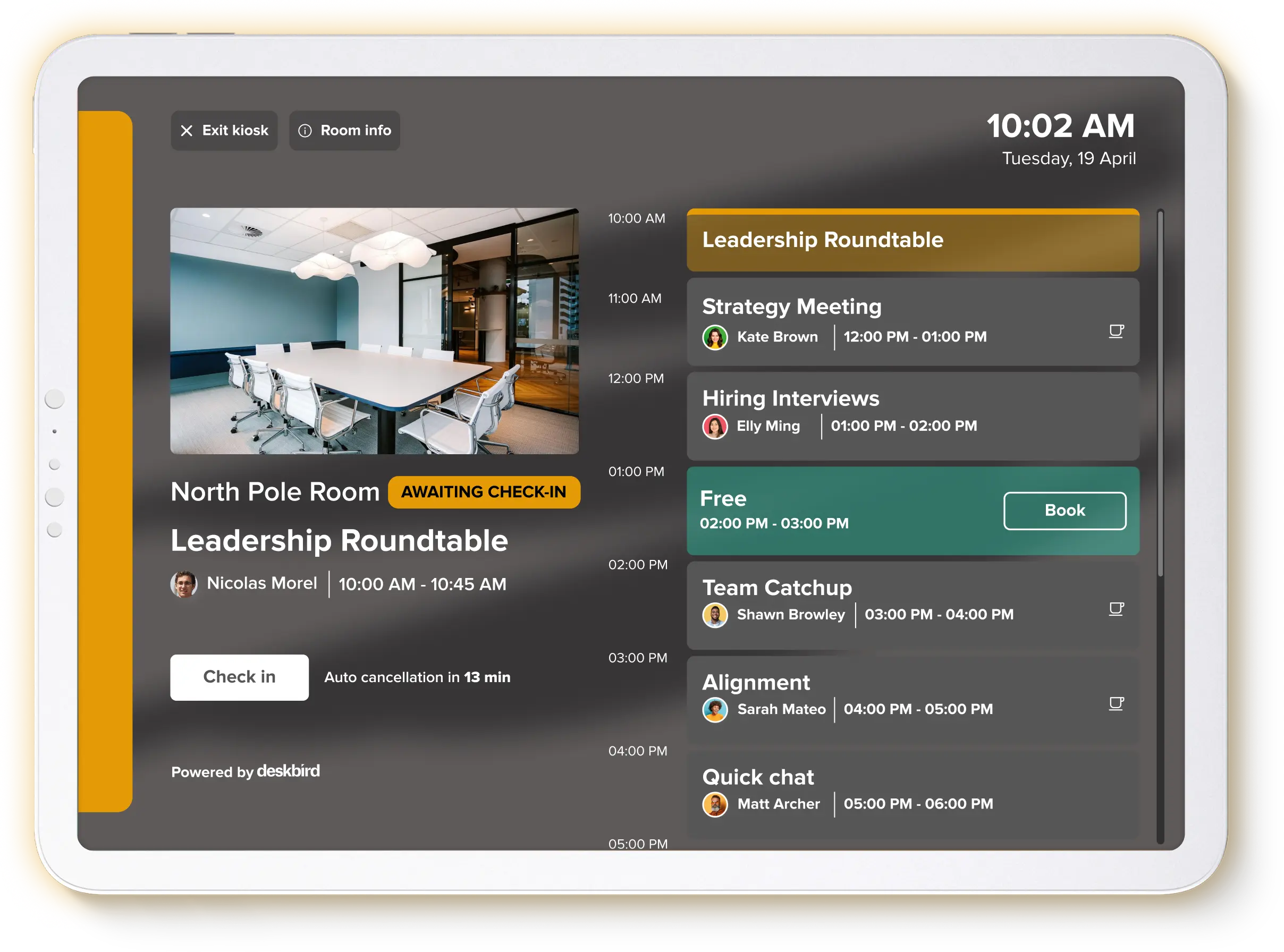
Stop ghost meetings before they start
- Auto-release reclaims unused rooms the moment a no-show is detected
- Real-time availability stops double bookings before they create conflict
- Check-in reminders confirm attendance so empty rooms don't block colleagues