

Office occupancy analytics: how to measure and optimize space utilization
Organizations that track actual occupancy often discover they're paying for more space than they need, yet most real estate decisions still rely on badge swipes and calendar bookings that don't show where people actually sit or how long they stay. This article explains how to calculate occupancy rate, which metrics reveal true space usage, and how to turn that data into defensible decisions about real estate, hybrid policies, and costs.

TL;DR
Office occupancy analytics helps you understand how space is actually used, not just how it's booked. Accurate data lets you right-size real estate, validate hybrid policies, and present defensible utilization figures to leadership. The catch: reliable data requires tools employees actually use. When adoption is high, you get the visibility needed to cut costs without cutting corners on employee experience.
What is office occupancy and how do you calculate it?
Office occupancy refers to the percentage of available workspaces in use at a given time. It answers a simple question: how much of your space are people actually using?
The formula is straightforward:
(Occupied spaces ÷ Total available spaces) × 100 = Occupancy %
If your office has 200 desks and 150 are occupied on a Tuesday afternoon, your occupancy rate is 75%.
This differs from utilization rate, which measures how often a space is used over time. A desk occupied 3 out of 5 days has 60% utilization, regardless of how many other desks were filled on those days.
What counts as good occupancy depends on your work model. Fully in-office teams often target 80-90%. Hybrid organizations typically aim for 60-80% on peak days, leaving buffer for flexibility. Is your occupancy consistently below 50%? You're likely paying for space nobody uses, which creates an opportunity to reduce your real estate footprint or reconfigure for better efficiency.
Why measuring office occupancy matters for your business
Without occupancy data, real estate decisions rely on gut feel, calendar bookings, or badge swipes that don't tell the full story. Accurate measurement changes that.
Cost savings from accurate occupancy data
Underutilized space is expensive. Rent, utilities, cleaning, and maintenance costs don't decrease just because desks sit empty. Organizations that track actual occupancy often discover they're paying for 30-40% more space than they need.
Reliable data lets you consolidate floors, renegotiate leases, or sublease unused areas. The savings compound: smaller footprints mean lower energy bills, reduced maintenance, and fewer resources spent on space that doesn't serve anyone.
Supporting hybrid work policies with real data
Hybrid policies work better when grounded in reality. Occupancy data reveals which days teams actually come in, whether your Tuesday-Thursday mandate creates overcrowding, and whether certain floors sit empty while others overflow.
This visibility helps you coordinate team presence, adjust policies based on actual patterns, and ensure the office supports employee well-being rather than creating friction.
Key benefits of occupancy analytics
Occupancy analytics transforms raw data into actionable insights. Here's what it enables:
- Real-time visibility into which spaces are occupied, allowing immediate operational adjustments
- Cost reduction through evidence-based decisions about space allocation and real estate
- Better employee experience by designing spaces that match how people actually work
- Sustainability gains from reduced energy consumption in unoccupied areas
- Increased productivity by aligning workspace design with work patterns
- Adaptability to evolving needs as teams grow, shrink, or change how they work
Real-time visibility into space usage
Real-time occupancy data enables immediate adjustments. When integrated with building systems, you can make heating, cooling, and lighting more efficient based on actual presence rather than schedules. This reduces waste and ensures occupied areas stay comfortable.

Data-driven decisions for employee experience
Understanding how employees use office spaces helps you design environments that enhance well-being. Data showing breakout areas consistently full while formal meeting rooms sit empty? Invest in comfortable collaborative seating rather than adding more conference rooms.
Sustainability and energy efficiency
Making office space more efficient using occupancy analytics aligns with sustainability goals. Reduced energy consumption, less paper usage, and a smaller carbon footprint are some of the environmentally friendly outcomes of this approach.
Companies like JP Morgan Chase have used occupancy sensors to track office space utility and improve building energy usage. This dual-purpose application reduces operational costs and contributes to a more environmentally friendly workplace.
Key occupancy metrics to track
Occupancy rate is just the starting point. To make informed decisions, track these office utilization metrics:
[Table1]
Peak days and attendance patterns
Most hybrid organizations see peak days on Tuesday, Wednesday, and Thursday. According to Desk Sharing Index 2026, Tuesday and Wednesday account for 47.7% of all office bookings in Germany. Knowing your specific patterns helps you plan capacity, schedule maintenance on low-traffic days, and avoid overcrowding that frustrates employees.
Booking accuracy vs. actual attendance
No-shows create a significant gap between what your calendar says and what's actually happening. If desk bookings regularly go unused, your occupancy data is overstated, which makes decisions harder to defend. This makes it harder to justify space reductions or identify true capacity needs.
Tracking the difference between bookings and actual attendance, through check-ins or sensor data, gives you the accurate picture you need for defensible decisions.
How to measure office occupancy accurately
Accurate measurement requires the right data sources. Each has tradeoffs.
Occupancy sensors and people counting technology
Sensors provide objective, continuous data on space usage. Options include:
- Time-of-Flight (ToF) sensors: Use infrared to detect presence without capturing identifiable images. Privacy-preserving by design.
- Thermal sensors: Detect body heat to count people. No video, no facial recognition.
- Camera-based systems: More detailed data but raise privacy concerns. Some organizations avoid these entirely.
For organizations concerned about employee surveillance, ToF and thermal options offer accurate people counting without the risks of recognizable video.
Desk and room booking systems
Desk booking and desk sharing systems generate occupancy data as a byproduct of reservations. Employees book spaces, and the system tracks what's reserved.
The limitation: bookings don't equal attendance. Without a check-in requirement, you're measuring intent rather than reality. Systems that prompt employees to confirm arrival, or automatically release unreserved spaces, close this gap.

Badge and access control data
Card-swipe data from building access systems is often the first data source organizations consider. It's already available and requires no new hardware.
The problem: badge swipes tell you who entered the building, not where they sat or how long they stayed. Someone badges in at 9am, works from a café across the street, and returns at 5pm. The data shows a full day of occupancy that never happened.
Badge data works best as a supplement to booking or sensor data, not a replacement.
Integration with building systems
Many occupancy analytics tools integrate with building systems, including HVAC (heating, ventilation, and air conditioning) and lighting. This integration allows for dynamic adjustments based on real-time occupancy data.
When an area is unoccupied, the system can automatically reduce energy consumption by adjusting temperature settings or turning off lights. This contributes to energy efficiency and cost savings.
Challenges in occupancy measurement and how to address them
Implementing occupancy analytics isn't without obstacles. Here are the most common challenges and practical solutions:
- Privacy concerns: Employees worry about surveillance. Solution: Use privacy-preserving sensors (ToF, thermal) and be transparent about what data is collected. For EU organizations, ensure GDPR compliance.
- Data accuracy: Badge swipes and calendar bookings overstate actual occupancy. Solution: Combine data sources and require check-ins to capture true attendance.
- Low adoption: If employees don't use the booking system, your data is incomplete. Solution: Choose tools that integrate with existing workflows (MS Teams, Outlook, Slack) and require minimal effort.
- Check-in friction: Employees forget to confirm arrival. Solution: Use automatic check-in via mobile app location or desk sensors, or implement automatic release for no-shows.
Privacy and data protection considerations
Privacy concerns are legitimate. Employees don't want to feel tracked. Address this by:
- Choosing sensors that count people without identifying them
- Communicating clearly about what data is collected and how it's used
- Ensuring compliance with GDPR and local data protection regulations
- Avoiding camera-based systems unless absolutely necessary
Ensuring data accuracy through adoption
Here's the core challenge: accurate occupancy data requires tools employees actually use. A booking system with low adoption gives you only a partial picture.
This is why ease of use matters for analytics, not just employee satisfaction. When adoption rates reach 90%+, your utilization data becomes reliable enough to justify million-euro real estate decisions. Low adoption means low confidence in your numbers.
Strategies for making your office space more efficient with occupancy data
Once you have reliable data, you can act on it. Here are 5 strategies for making your office space more efficient, each informed by occupancy insights:
1. Desk booking systems
The desk booking system has become a linchpin of making office space more efficient in the hybrid work era. This strategy empowers employees to reserve desks or workstations for specific days they plan to be in the office.
Desk booking ensures efficient space allocation by matching demand to available resources. Employees choose their workspace based on daily needs, whether a quiet corner for focused work or a collaborative area for team meetings.
Booking data also reveals utilization patterns: which desks are popular, which sit empty, and whether you have the right mix of workspace types.
2. Hot desking
Hot desking takes desk booking to the next level by eliminating permanently assigned desks altogether. In a hot-desking setup, employees choose any available desk or workspace when they come to the office. This approach offers several compelling benefits. It ensures maximum space utilization, eliminating the problem of underutilized workstations.
Hot desking fosters spontaneous interactions and collaboration by encouraging employees to move around the office. It can also lead to significant cost savings, as your company requires smaller office spaces when adopting hot desking, reducing rent and maintenance expenses.

3. Activity-based working
Activity-based working represents a dynamic and adaptable approach to making office space more efficient. It involves creating various workspaces within the office, each tailored to specific tasks or activities.
These spaces can include quiet zones for focused individual work, collaborative areas equipped with tools for team meetings and brainstorming, and relaxation spaces for breaks and informal gatherings. Activity-based working ensures that every square foot of office space serves a clear purpose, making resource usage more efficient and promoting employee well-being.
Occupancy data shows which zones are actually used, helping you invest in the right types of spaces.
4. Reducing your office footprint
Downsizing office space is a practical strategy, particularly if a significant portion of your workforce continues to work remotely. Reducing the office footprint brings several advantages. It results in cost efficiency by lowering rent, utilities, and maintenance expenses.
Smaller office spaces consume less heating, cooling, and lighting energy, contributing to sustainability goals. The resources saved through downsizing can be reallocated to other business areas, enhancing employee experiences and promoting innovation.
The key is having data to justify the decision. Occupancy analytics provides the defensible numbers you need to present to leadership, showing exactly how space is underutilized and the potential savings from reclaiming space.
5. Implementing flexible furniture
Flexible furniture and modular furniture systems are essential in making office space more efficient.
These versatile systems can be instantly reconfigured to accommodate various work styles, from individual tasks to group meetings. The adaptability of flexible furniture reduces the need for frequent replacements, resulting in cost savings.
It also enhances employee satisfaction by allowing individuals to personalize their work environment, promoting comfort and productivity. Flexible furniture assists in fostering an agile office layout that can quickly adapt to changing circumstances, ensuring that the office space aligns with evolving employee needs and business objectives.
Modern tools for occupancy analytics
Beyond measurement hardware, software capabilities determine how useful your occupancy data becomes.
Predictive analytics for future planning
Some occupancy analytics tools incorporate predictive analytics to forecast future space requirements. By analyzing historical data and trends, these systems offer valuable insights into how office space needs evolve. This foresight allows companies to proactively adapt their office layouts, ensuring they remain efficient for changing circumstances.
Employee feedback integration
To complement sensor data, many occupancy analytics tools integrate employee surveys. These surveys allow employees to provide feedback on their workspace preferences and needs. By combining survey responses with sensor data, companies can fine-tune office layouts to align with employee expectations, enhancing overall satisfaction.
Space management software
Space management software helps organizations strategically plan, design, and make their office spaces more efficient. It allows for efficient space allocation, room reservations, desk booking, and overall space utilization management.
Modern platforms also address a common pain point: outdated floor plans. When your digital floor plan doesn't match reality, employees lose trust in the system. Look for tools that make floor plan updates straightforward.

How deskbird supports office occupancy analytics
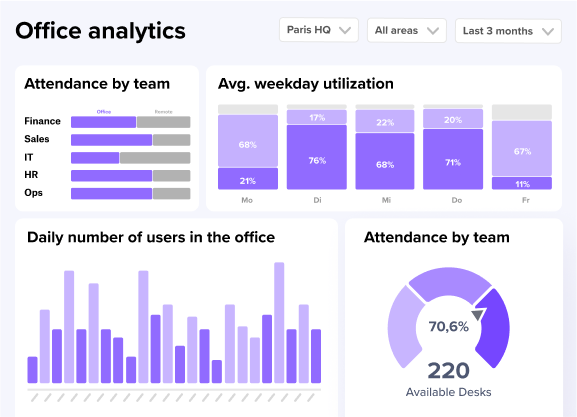
deskbird's Workplace Analytics gives you visibility into how your office is actually used, beyond just booking data.
The platform tracks utilization patterns, attendance by day and team, and peak days across your locations. This data helps you identify underutilized areas, validate hybrid policies, and build the business case for real estate decisions.
What makes the data reliable? deskbird integrates with tools employees already use, a core requirement for hybrid work software, including Microsoft Teams, Slack, and Outlook. High adoption means your utilization numbers reflect reality.
For privacy-conscious organizations, deskbird is built and hosted in Europe (Frankfurt), with ISO 27001, SOC 2 Type II, and GDPR compliance. You get accurate data without surveillance concerns.
ILF Austria, with 800+ employees across six locations, faced the challenge of limited office space while their workforce grew in a hybrid model. Using deskbird's analytics to closely review desk occupancy, they discovered they actually had enough space to continue growing without adding real estate. As Managing Director Josef P. Mayr noted, this data-driven insight eliminated internal debates about space allocation and gave leadership the defensible numbers needed for strategic planning.
There are no more discussions and through all the analyses, we've also realized that we actually have enough space. In fact, we could continue to grow, and desks would probably still not become scarce. But we were only able to make that statement after using deskbird to closely review desk occupancy and evaluate everything in detail.
Josef P. Mayr, Managing Director, ILF Consulting Engineers Austria
Ready to see what your occupancy data tells you? Book a demo.

Frequently Asked Questions
What is a good office occupancy rate?
How do you calculate office occupancy?
What is the difference between occupancy rate and utilization rate?
Occupancy rate measures how many seats are filled at a given time, while utilization rate measures how often a space is used over a period. A desk used 3 of 5 days has 60% utilization, regardless of how many other desks were occupied on those days.
How can I measure office occupancy without invading employee privacy?
You can use privacy-preserving technologies like Time-of-Flight (ToF) sensors or thermal imaging that count people without capturing identifiable images. Booking-based systems like deskbird also provide occupancy data through voluntary check-ins rather than surveillance.
Why is badge swipe data not enough for occupancy analytics?
How do no-shows affect occupancy data accuracy?
No-shows create a gap between booked capacity and actual attendance, leading to overestimated occupancy and wasted space. Tools with automatic release features or check-in requirements help capture true utilization. deskbird's check-in prompts and automatic desk release address this directly.
What metrics should I track beyond basic occupancy rate?
Beyond occupancy rate, track peak day patterns, cost per seat, booking-to-attendance ratio, and zone-level utilization to make informed decisions about space allocation and hybrid policies.
How can occupancy analytics help justify real estate decisions to leadership?
See what your office space is actually costing you
- Most companies pay for 30-40% more space than they actually use.
- deskbird shows you real utilization data, not just bookings.
- Book a demo and get the numbers to back your next real estate decision.