
6 best (hot) desk booking software & platforms in 2026
This guide compares the main desk booking platforms, explains what features actually matter for adoption and cost savings, and shows you how to choose the right tool for your organization.

TL;DR
The best desk booking software makes reserving a workspace as easy as sending a message. A booking system is only as useful as the data it generates, and data quality depends entirely on whether employees actually use the tool. That is why the best platforms focus as much on employee experience as on admin controls.
The shortlist for the best desk booking software this year is:
- deskbird. Best for mid-market to enterprise teams that want a modern, intuitive platform. Book desks in 2 clicks directly inside Teams and Outlook, with adoption rates above 90% that produce utilization data you can act on.
- Skedda. Good choice for simple setups or smaller teams. Solid booking rules and predictable space-based pricing for offices that don't need a full workplace platform.
- Envoy. Envoy's integration of visitor management and desk booking in one platform is a differentiator for organizations where front-desk operations and space management overlap.
Introduction
Desk booking software lets hybrid teams reserve workspaces before they arrive, eliminating desk hunting and giving workplace leaders the data they need to manage office space efficiently.
The best desk booking software isn't the one with the most features. It's the one your employees actually use, consistently enough to generate data that helps you make smarter decisions about space. This is crucial because most offices are paying for more space than they need. In fact, only 36% of organizations use real-time occupancy data to manage their footprint. The rest are guessing.
Desk booking software closes that gap, but only when adoption is high enough to trust the data. That is the bar to clear. Use this guide to find the tool that clears it for your team.
How to choose desk booking software for your team
The features that matter most reduce friction for employees and give you reliable data. Everything else is secondary.
- Real-time availability on an interactive floor plan. Employees should see which desks are free, where their team is sitting, and book without extra steps.
- Check-in and auto-release. Ghost bookings, desks reserved but never used, are a real cost. Check-in flows that auto-release no-shows keep your data accurate.
- Integrations that reduce friction. If employees need to open a new app to book a desk, adoption will suffer. Tools that work inside Teams, Outlook, or Slack remove that barrier.
- Analytics that inform decisions. Peak-day attendance, utilization rates, no-show patterns. These numbers let you make confident space decisions instead of relying on assumptions.
- Booking rules and policies. Team zones, booking windows, and attendance targets help you match space to how your office actually works.
List of 6 desk booking software tools
1. deskbird
Best for: Hybrid offices at mid-market to enterprise organizations, especially those already on Microsoft 365, that need high adoption and reliable space utilization data.
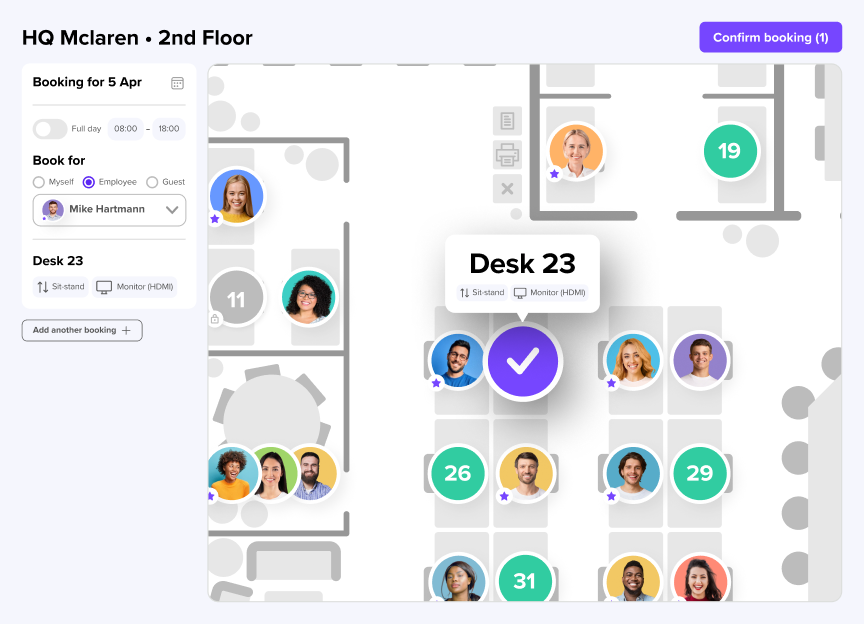
deskbird is a workplace management platform built specifically for hybrid work. Employees book desks, rooms, parking, and other resources through an interactive floor plan or directly inside Microsoft Teams and Outlook without switching apps.
The platform's defining advantage is adoption. deskbird sees employee adoption rates above 90%, which produces utilization data that actually holds up in a real estate conversation. Rather than tracking intent (what employees said they would do), deskbird tracks check-ins, which reflects what employees actually did. That distinction matters when you are justifying space decisions to a CFO.
Standout features:
- Desk and room booking in 2 clicks, natively inside Teams and Outlook
- Colleague view: see who is in and sit near teammates without extra coordination
- Auto check-in and ghost booking prevention
- Workplace analytics with real utilization rates, no sensors required
- SCIM, Azure AD/Entra ID, and Okta for zero-maintenance IT provisioning
- ISO 27001 certified and SOC 2 Type II compliant, EU-hosted in Frankfurt
deskbird pricing
deskbird offers transparent pricing so teams only pay for the features needed and aligned with their stage of growth. Paid plans start at €2.75/user/month and can be complemented with add-ons for room bookings, visitors and user management.
2. Envoy
Best for: Mid-to-large offices where visitor management, access control, and desk booking are equally important.
Envoy started as a visitor management platform and built desk booking on top of that foundation. For organizations where managing who enters the building matters as much as who books which desk, that combined capability is useful. In March 2026, Envoy added flexible desk scheduling that auto-rotates desk assignments by day or shift pattern, reducing manual admin work for teams running rotating schedules.
Admins can designate desks as hot, permanent, or unavailable, and set up team neighborhoods so groups can sit together. The analytics give workplace managers a view of who's onsite, when, and where, useful for both space planning and compliance.
Some users may find it lacks structured hybrid work coordination features like in-office policies or EU-level privacy standards options. Online reviews also mention admins finding Envoy hard to navigate.
Pricing: Envoy Workplace starts at $60/bookable resource/year. Visitor management (Envoy Visitors) is a separate module, and capabilities like deliveries, access control, and evacuations are priced per location or product, which can make total cost harder to predict as you scale.
3. Officely
Best for: Teams under 200 people running primarily on Slack who want desk booking without implementation overhead.
Officely takes a channel-native approach: employees book desks and rooms directly inside Slack, and increasingly Microsoft Teams, without leaving the platform they already use to communicate. For smaller teams or startups that have not committed to a full workplace management tool, that is a fast way to get started with no new app to onboard.
The trade-off is depth. Officely does not match the analytics, multi-location controls, or admin customization of full workplace platforms, and hybrid policy compliance only works through Slack or Teams. Larger organizations that need reliable utilization data and space optimization tools will likely outgrow it.
Pricing: Paid plans start from $2.50/user per month (billed annually).
4. Skedda
Best for: SMBs, universities, and organizations with straightforward booking needs.
Skedda is an established space booking platform serving over 12,000 customers, built around a configurable booking rules engine wrapped in a simple interface. Administrators set policies around who can book what, when, and under which conditions, with a self-service model that keeps admin overhead low once it is running. Recent updates added check-in analytics (check-in rates by method and by space), day- and time-based priority booking filters, and visitor categorization tools, extending the platform beyond pure space booking.
One thing to watch: Skedda prices by bookable space, not by user. That sounds predictable, but costs can climb quickly once you add meeting rooms, parking bays, or phone booths, since every resource type counts toward the tier limit. Analytics and advanced admin controls are also gated behind higher tiers.
Pricing: Starting from $99/month including 15 spaces and a limited insights dashboard.
5. Kadence
Best for: Teams prioritizing team visibility and AI-assisted coordination.
Kadence focuses on the coordination side of hybrid work: not just where desks are available, but who will be in the office and when. Its dynamic team neighborhoods let zones shift by day of the week, useful for offices where departments rotate their in-office schedules.
Kadence also recently launched SpaceOps, a conversational AI tool that helps real estate and workplace leaders model stack plans, run scenario planning, and evaluate office consolidation without spreadsheets. It is aimed squarely at the real estate decision-maker rather than the day-to-day booker.
Pricing: Kadence prices are not publicly displayed on their website, requiring custom quotes for evaluation.
6. Robin
Best for: Large enterprises managing multi-site, multi-resource environments.
Robin started as a meeting room booking tool and has expanded into a broader workplace platform covering desk booking, room reservations, visitor management, wayfinding, digital signage, and workplace analytics in one system.
The platform connects with hardware displays and interactive kiosks, which is relevant for large office campuses where physical signage is part of the space management setup.
Pricing: Robin pricing isn’t disclosed. The subscriptions are billed on an annual basis, effectively locking you into a long-term contract, which can result in higher minimum commitments.
Which platform fits your team?
The right tool depends on a few variables including your integration environment, where your offices are located and ultimately, your team size.
- List your must-have integrations. If your company lives in Microsoft Teams, a tool without deep Teams integration will struggle to get adopted.
- Check data privacy requirements. Ask where data is hosted. If you operate in Europe or work with European clients, GDPR compliance and EU hosting are essential, not optional.
- Test the user experience yourself. The best software is the one people actually use. If booking is not intuitive, adoption will fail regardless of feature list.
- Ask about rollout support. Moving to hybrid is a culture change. Look for a vendor that helps with onboarding and internal communication.
- Compare total cost. Factor in setup fees, add-on costs, and the savings from reducing your real estate footprint, not just the sticker price per user.
Why hybrid teams end up choosing deskbird
deskbird combines desk and room booking, workplace analytics, and hybrid policy management in one platform and is designed specifically for teams that need high adoption and reliable space data.
Employees book from their phone, from Microsoft Teams, or from the Outlook Add-In, wherever they already plan their day. Facilities teams get utilization data based on actual check-ins, not intentions. And the whole platform is GDPR-compliant and EU-hosted, in addition to ISO 27001 certification and SOC 2 compliance.
The result is a workplace management tool that doesn't require a behavior change to work. That's why deskbird customers see 90%+ adoption rates and why that adoption translates into data teams can actually use to make decisions.
Disclaimer
Software listed in this article, and corresponding pricing and functionalities, are based on publicly available information as of July 2026 and are subject to change. Information provided without guarantee. If something is mapped out incorrectly, please contact us.

Intuitive desk booking, accurate office insights
Choose an effortless desk booking system that gives you real-time visibility, automated coordination, and office insights your team can rely on.
Frequently Asked Questions
Additional questions on desk booking software.
What is desk booking software?
Desk booking software lets employees reserve a workspace before coming into the office, instead of relying on assigned seating or first-come, first-served. In hybrid offices, where not everyone comes in every day, it prevents overcrowding, eliminates desk conflicts, and gives workplace teams the data they need to manage space efficiently. Most platforms include interactive floor plans, check-in flows, and analytics for tracking utilization over time.
What's the difference between hot desking software and desk hoteling software?
Hot desking is first-come, first-served with no reservation. Desk hoteling lets employees reserve a specific desk in advance. Most modern platforms, including deskbird, support both models.
Which desk booking software integrates best with Microsoft Teams?
deskbird builds directly into Teams. It let employees book desks and rooms directly inside Teams and Outlook without switching contexts. For Microsoft-native organizations, that distinction matters a lot for adoption. Kadence and Envoy also offer Teams integration but with more setup involved.
How does desk booking software handle ghost bookings?
Ghost bookings happen when employees reserve a desk but don't show up. The standard fix is auto-release: if an employee doesn't check in within a set window (typically 15–45 minutes after their booking starts), the desk is automatically made available again. The best platforms let you configure that window and send reminders to reduce unnecessary releases.
What security certifications should desk booking software have?
Look for ISO 27001 certification as well as SOC2 Type II and GDPR compliance at minimum. If you operate in Europe, EU-based data hosting like deskbird offers adds an extra layer of protection for employee location data.