

Cubicles vs open office: What's the best setup for your team?
With 39% of knowledge workers now operating in hybrid mode, the cubicles vs open office debate has shifted from aesthetic preference to strategic necessity. The question isn't which layout looks better. It's which one supports the work your team actually does. This article breaks down the strengths and weaknesses of cubicles and open offices, examines how each affects privacy, collaboration, and productivity, and shows you how to design a flexible workspace that adapts to hybrid work patterns using data instead of guesswork.
TL;DR
There's no universal winner in the cubicles vs open office debate. The right choice depends on your team's work type, privacy needs, and collaboration requirements. Cubicles support focus time and confidential conversations. Open layouts encourage teamwork and flexibility. Most organizations benefit from a hybrid office layout that combines quiet zones with collaborative spaces. Using workplace analytics helps you make data-driven decisions and refine your layout over time based on actual usage patterns.
What's the difference between cubicles and an open office?
In a cubicle workspace, each employee has a personal space surrounded by partitions. This setup offers privacy and minimizes distractions from external noises, functioning like a mini-office for solo work where concentration comes easier. Cubicles often contain desks, shelves, and storage areas for private use.
An open office layout (also called open plan or open concept) removes these partitions entirely. The result is a shared working environment without physical barriers between workers. Team members can easily communicate and collaborate. This openness also introduces more background noise and visual distractions, which can disturb concentration.
Choosing between cubicles vs open offices depends on the kind of work your team members do. Cubicles are an excellent option for tasks that require intense focus time. Workspaces with open plans are perfectly suited for projects that demand quick, continuous communication between coworkers.
[Table1]
What are the pros and cons of cubicles?
The pros of cubicles
Cubicles offer several advantages for teams that need focused, independent work environments:
- Privacy for confidential conversations and concentrated work
- Personalization options that boost well-being
- Noise reduction from physical barriers
- Defined personal space that minimizes interruptions
Privacy for each employee
Cubicles offer excellent confidentiality. Employees can make private calls or focus on work without worrying about being easily overheard. This matters for confidential conversations with HR, sensitive client calls, or simply thinking through complex problems without distraction. A sense of privacy can boost productivity because it reduces external stress.
Personalization
Employees can decorate their cubicles with photos, plants, and personal items to make the place feel less sterile and more inviting. This goes beyond aesthetics. Personalization improves wellness and job satisfaction, so people love coming to work.
Noise reduction
Cubicles act as physical barriers in an office, muting printer noise, loud conversations, and foot traffic. You won't lose your train of thought because of loud talkers nearby. By reducing background sounds, workers can protect their focus time and maintain a calm, productive environment. This proves especially valuable for tasks requiring deep concentration.
Defined personal space
Boundaries help employees reduce distractions. Without constant disruptions, people can prioritize their work. The result is fewer interruptions and more organized task management.
The cons of cubicles
Despite their benefits, cubicles come with notable drawbacks:
Isolation from the team
Cubicles provide privacy, but physical barriers also hinder spontaneous communication and quick collaboration, both crucial to teamwork and problem-solving. The isolation problem matters even more in hybrid work environments. When employees come to the office specifically to connect with colleagues, sitting alone in a cubicle defeats the purpose. Isolation can affect cooperation among coworkers and require more effort to boost team spirit.
Limited space
Cubicles are compact. They don't offer as much room for movement and storage as a larger office. Confinement may cause employees to feel boxed in. In a hybrid work setup, people tend to come on-site to interact socially and work on group projects. They often don't want to sit in a cubicle by themselves.
Aesthetically unpleasing
Laying out cubicles uniformly can result in a monotonous visual landscape. The office looks impersonal and uninspiring to both employees and guests. This uniformity doesn't reflect the dynamic nature of the work your team does.
Lack of adaptability
Cubicles make it difficult to adjust to changing team sizes. Adding new employees can result in inefficiencies and workspaces that don't meet business needs. As your organization grows or shifts to hybrid work, fixed cubicle layouts can become obstacles rather than assets. Understanding how office layout affects productivity helps you plan for these changes.
What are the advantages and downsides of an open office?
The benefits of working in an open office
Open offices deliver clear advantages for teams that prioritize teamwork and flexibility:
- Easy collaboration and idea sharing
- Flexible workspace that adapts to hybrid teams
- Unified company culture without hierarchical barriers
- Cost-effective use of real estate
Fosters collaboration
Open offices make it easy for your employees to collaborate and share ideas. This leads to better solutions and stronger teamwork, enhancing productivity and creativity on the days they come on-site. Quick exchanges and collective efforts take place naturally, which is necessary for agile project development.
Flexible work environment
This layout supports dynamic space use by providing shared desks and communal areas. Hybrid teams pick their workstations based on their needs, promoting a flexible workspace that adapts daily. With desk sharing, employees can reserve the spot that matches their task, whether that's a quiet corner or a collaborative zone. Autonomy and variety support a hybrid workforce, resulting in better employee experience and productivity.
Promotes a unified company culture
Open office layouts foster equality and openness by removing physical barriers. Everyone, regardless of their position, can interact, help each other, and share their knowledge. This helps you reduce hierarchy and makes work more fun and engaging.
Cost-effective
Designing an open space reduces office costs: rent, electricity, furniture, and more. With this setup, you can fit more employees in less square footage, which is great if you want to decrease expenses. For organizations managing 40,000 square meters or more, even small improvements in space utilization translate to significant savings. That makes improving office space efficiency a practical priority.
The downsides of an open office layout
Open offices aren't without challenges:
Noise and distractions
Noise and distractions are the main drawbacks of open offices. Without walls to block sound, phone calls, loud talkers, and constant background sounds pull your employees away from their work. Every interruption costs focus time, and regaining concentration takes time. The constant background sounds lead to lower productivity and increased stress among your team.
Lack of privacy
Because of the open layout, workers don't have much privacy. Concentration and discretion become more challenging. Employees often report feeling constantly watched, which creates anxiety and discomfort. When people can't have confidential conversations or simply work without an audience, their performance and well-being suffer. This is why even open offices need private spaces for focused work.
Spread of illnesses
Germs are more likely to spread in open offices, raising concerns about health and well-being. One ill employee can inadvertently affect many others, leading to higher absenteeism rates. Sanitation protocols are even more important to keep your workforce healthy.
One size does not fit all
Open offices are conducive to collaboration, but they're not for everybody. They may overwhelm introverted or neurodivergent workers who need quiet to focus. These employees often struggle with sensory overload from constant visual and audio stimulation. The solution? Balance different types of spaces to suit everyone's needs. Learn about agile office design benefits and best practices for creating this variety.
Key factors to consider when choosing your office layout
Before redesigning your workspace, evaluate these decision factors:
- Work type: Does your team primarily do focused individual work, collaborative projects, or a mix? Roles requiring deep concentration (developers, analysts, writers) benefit from quiet spaces, while fully collaborative roles (sales, creative teams, project managers) thrive in open environments.
- Privacy needs: How often do employees handle confidential information or sensitive conversations? Legal, HR, and finance teams typically need more enclosed spaces.
- Company culture: Does your organization value transparency and open communication, or do teams work more independently? Your layout should reflect and reinforce your culture.
- Growth plans: Will your team size change significantly in the next 2-3 years? Flexible layouts adapt more easily than fixed cubicle farms.
- Noise tolerance: Some teams can tune out background sounds. Others can't. Survey your employees to understand their actual preferences rather than assuming.
The best office layout decisions come from understanding your specific team, not following trends.
How to create the best office layout for your hybrid team
Understand your employees' workspace expectations
Start by asking your employees what they envision. Not everyone wants the same things from their workplace. Your team's needs will vary based on their roles, jobs, and personalities. Someone in a creative position may thrive in an open space that encourages , while a developer might prefer a quiet area to code without interruptions.
Focus groups, surveys, or one-on-ones can reveal what your staff needs to be productive. Individuals can express their preferences, share their insights, and contribute to the decision-making process. By understanding your team's diverse work styles, you can design a flexible and inclusive office space that makes people feel valued and helps them thrive.
Stay aware of evolving workplace trends
Pay attention to how work life changes because it can deeply impact the office space and your employees' needs. Research shows office design significantly affects productivity. It shapes the atmosphere at work.
Talk to your team before rearranging desks, removing partitions, or even moving the coffee machine. They know what they need. Maybe they want a quieter area or a bigger, better meeting place. If your office layout reflects what your staff wants, you'll set everyone up for success.
Design a flexible, diverse, and agile office
Not everyone works the same way. The best thing you can do for your team (and your business) is to set up an office that provides a bit of everything. Some people enjoy having their own cubicle where they focus and get work done without distractions. Others prefer airy, open spaces where ideas flow freely and bounce around. Mixing and matching your workplace layout makes a big difference.
Let your employees pick their ideal work setup. If someone needs the coziness of a cubicle today, they can book it. Next time, if they're feeling more social, they'll switch to an open, collaborative spot. Your office won't just be a place people have to go. It'll be where they want to be because it flexes with them. Make your workspace as adaptable as your team so everyone works at their best.

Use data to make smart layout decisions
Workplace analytics help you make informed workspace decisions. By looking at how different areas are used, you can identify what's working and what isn't. If data shows a conference room is rarely occupied for its intended purpose, you might convert it into a small open space that meets your team's needs. If there's high demand for quiet zones, it may be time to expand those spots.
This approach allows you to create a workspace that supports your team's productivity and well-being based on actual use. Your space changes over time and meets your present requirements. Use facts and stop guessing. Start a free trial of the deskbird app to see how workplace analytics can guide your layout decisions.
Test and iterate on your layout choices
At this point, you've collected valuable information: employee opinions, how everyone uses the space, what's trending in office design, and more. This gives you a solid foundation for making smart changes to your workspace. Even with all of this data, you probably won't get the perfect setup right away. That's OK.
How can you improve it? By testing. Try out a new layout and see how it goes. Watch and listen to your team, noticing how it affects their work. When something isn't effective, adjust it. Using trial and error doesn't mean stumbling in the dark. Think of it as a deliberate strategy to enhance your workforce's productivity through office design.
Use technology to enhance the office experience
Proximity plays a crucial role in employee interactions. Even though open spaces and online communication tools are supposed to boost collaboration, they sometimes make it harder to interact meaningfully. It's all about how people engage, which can be influenced by office layout and technology.
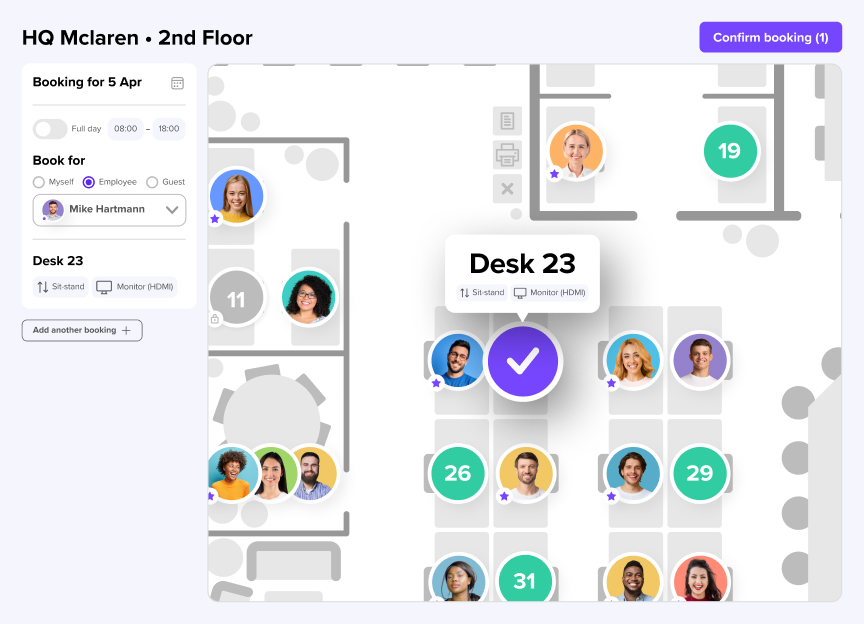
Desk booking apps are changing everything. They make it simple for your staff to book a workspace based on where their coworkers are. deskbird provides your team with an interactive floor plan and a weekly planner. They can schedule their weeks and choose desks close to their colleagues. This transforms how hybrid teams boost interactions and foster teamwork.
How deskbird helps you optimize any office layout
Whether you choose cubicles, open offices, or a mix of both, deskbird helps you improve space utilization and make better real estate decisions. The platform works with any layout to give employees choice while providing you with the data to make smarter decisions.
Here's how deskbird supports your office layout strategy:
- Interactive floor plans let employees see available spaces at a glance, whether that's a quiet cubicle for focused work or an open desk near their team
- Desk and room booking gives your team the flexibility to choose the right environment for each day's tasks
- Workplace analytics reveal actual usage patterns so you can identify underused areas and high-demand zones
- Week planning helps employees coordinate with colleagues, making in-office days more productive and collaborative
Organizations like IU, with 1,500 employees across 30 locations, use deskbird to manage dedicated areas for focus work, collaborative work, and meetings. With office spaces featuring distinct zones for different work types, IU needed an intuitive solution that could handle their complex, multi-location setup. After implementing deskbird, employees now book desks in just 20 seconds on average, saving up to 20 hours per employee per year while giving real estate managers precise occupancy data to guide investment decisions.
We were looking for an easy, intuitive tool that could still cater for all our needs. Especially as the project involved a restructuring of our office layout, it was amazing how flexible deskbird was with our changing needs. With deskbird, we have found a software that offers great user experience along with all the features we wished for, especially SSO and access restrictions which were very relevant for us!
Jacqueline Schuster, Senior Project Lead HR
Ready to make your office layout work harder? Book a demo to see how deskbird can help.

Frequently Asked Questions
Why don't companies use cubicles anymore?
What are the main disadvantages of open offices?
The biggest downsides of open offices are noise and distractions and lack of privacy, which can reduce focus time and increase employee stress. Workers often report difficulty concentrating with constant background sounds and feeling watched in open layouts.
How can I create privacy in an open office?
What is a hybrid office layout?
A hybrid office layout combines different workspace types, including private areas for focused work, open zones for collaboration, and flexible workspace options that can adapt to changing needs. This approach lets employees choose the environment that best supports their task on any given day.
How do I know which office layout is right for my team?
Start by assessing the types of work your team does, how much privacy different roles require, and your company culture around collaboration.Workplace analytics can reveal actual usage patterns, helping you make data-driven decisions rather than guessing.
Can I mix cubicles and open office spaces?
See how deskbird helps you design a smarter office layout
- Book a desk in 20 seconds, save up to 20 hours per employee per year
- Workplace analytics show exactly which spaces get used and which don't
- Real usage data helps you right-size real estate and reduce wasted capacity