

Making space management effortless: deskbird Product Scoop recap
At deskbird, we’re building the next-generation space management ecosystem.
This week’s Product Scoop event was all about one theme: making space management effortless. Since our big Reveal event a few months ago, we’ve been busy launching new updates and refining existing features, so this was the moment to showcase some recent and coming releases.
From forgotten desk bookings to occupied meeting rooms to visitors being completely lost at reception to leadership wondering about rightsizing the office, we revisited the everyday hybrid office pain points that inspired our latest product updates and showed how deskbird is solving them with smarter, more seamless solutions.
Missed the event? No worries! We’ve prepared a full recap for you. Let’s dive into the highlights.
New and enhanced features for effortless booking
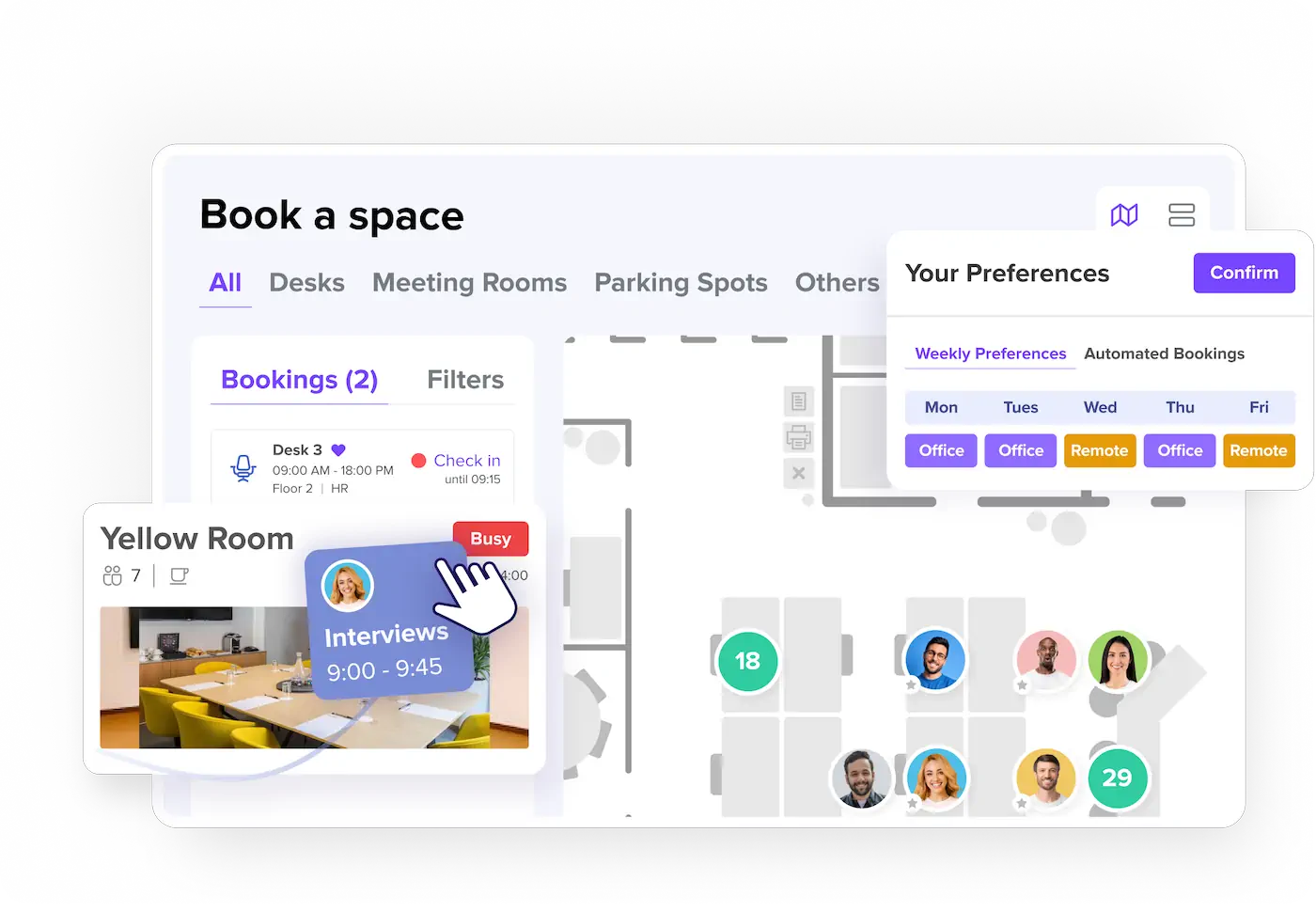
Making the workplace easy to navigate starts with a seamless booking experience. It’s only when booking tools feel effortless that people will actually use them. Higher adoption means fewer everyday frictions, smoother collaboration, and better data to guide decisions. With this in mind, we’ve released and announced a set of updates that make booking desks and rooms faster and smarter than ever.
Enhanced booking dashboard
You asked, we listened. One of the things we hear most often from our customers is that booking should be simple and intuitive. That’s why we’ve made changes to the way you book resources in deskbird. Here’s what’s new:
- Floor plan as default view: You can now see the office layout right away, instead of scrolling through lists of desks, rooms, and resources. Plus, it’s even easier to see where teammates are sitting and book right next to them.
- New side widget for quick access and easy check-in: With our new booking side widget, you’ve got all your go-to spots just one click away and can easily check in for your bookings as you arrive at the office.
- Streamlined navigation and a more visual experience: No more digging through menus. Instead, you land directly in the interactive floor plan where you can see your actual space and quickly locate where colleagues are sitting.
Together, these updates make your booking experience frictionless, more visual, and faster. And the best thing? These updates are already live so you can go and check them out immediately.
New floors and spaces overview
And we’ve not just simplified booking for users, but also made things easier for admins. How? By completely redesigning the floors & spaces section in deskbird. No more jumping between multiple screens just to get simple tasks done.
The new overview shows all your floors at a glance, with the option to expand or collapse each one. This way, you’ll instantly see every area, how many desks or resources it contains, and their respective status.
Plus, common actions like editing an area or changing who has access are now available directly from this single view. Need to add a new area? No problem, we’ve also simplified this workflow for you by removing unnecessary confirmation steps.
Shortly, you’ll be able to do your complete floor management from one smart overview, giving admins the clarity and control they need, without the clutter. The new floors and spaces overview will become available in the next few weeks. So make sure to keep your eyes open!
New views and filters for meeting rooms
We’ve also adjusted our room booking view so that the process becomes even simpler and faster than before. In the new view, available rooms are displayed as clear, informative cards that show you the essentials at a glance.
When it’s time to reserve your room, the booking popup puts everything together in one place: room details, availability, equipment, and booking options. Once confirmed, you’re taken straight back to your bookings with the reservation clearly visible.
It’s a smoother flow from start to finish, reducing room booking time to mere seconds—and soon available for you to try!
Drag & drop for room bookings
Rescheduling meetings and changing meeting rooms should be quick and painless. That’s why we’ve built a drag & drop feature for Rooms, giving you instant flexibility without the hassle. Just click, drag, and release. No extra menus, no saving screens, no reloads, no clunky multi-step process.
Whether you’re an employee booking your daily workspace or an admin managing your entire office, deskbird now works the way you think—visually, efficiently, and intelligently. This means less time spent juggling calendars and more time focused on making meetings run smoothly.
And great news: The drag & drop feature is already live. So if you haven’t done so already, book a room and test it!
👋 Say goodbye to room booking and scheduling headaches. Start your free trial or book a demo today and see deskbird Rooms in action!
Weekly preferences and automated desk bookings
You think your booking tool should be smart enough to know your habits? We think so too. That’s why we’ve automated the booking process for resources based on your typical hybrid work patterns. Say hello to weekly preferences and automated bookings!
- Set your weekly routine: Choose the days you plan to be in the office and deskbird automatically fills in your schedule for the next two months.
- Stay flexible: Change your status any day when you need to work from home, take a day off, or adjust as policies require. Managers can step in for approvals where necessary.
- Automatic bookings: Once preferences are set, deskbird books your desk, favorite seat, or even parking spot without you lifting a finger.
The result? Less stress, no repetitive planning, and peace of mind knowing there’s always a space waiting for you when you arrive. Both our weekly preferences and automated bookings features are already live and available.
MS Teams check-in and reminders and Outlook add-in for Rooms
Most of our customers spend their workday in Microsoft Teams because this is where meetings happen, conversations flow, and daily planning takes place. That’s why we’ve brought deskbird right into Teams, making check-ins as simple as sending a quick message to your colleagues.
On check-in day, users receive a reminder and can check in directly via MS Teams. No switching apps. No extra tabs. Plus, each user decides whether to get reminders in Teams or stick with notifications on mobile or on web.
Next in line for easy integration is Outlook. Soon, you’ll be able to find and book meeting rooms without ever leaving your calendar. The new deskbird-Outlook add-in will make finding the perfect room a lot easier and faster than before.
Both features are coming soon.
New and enhanced features for better workplace visibility
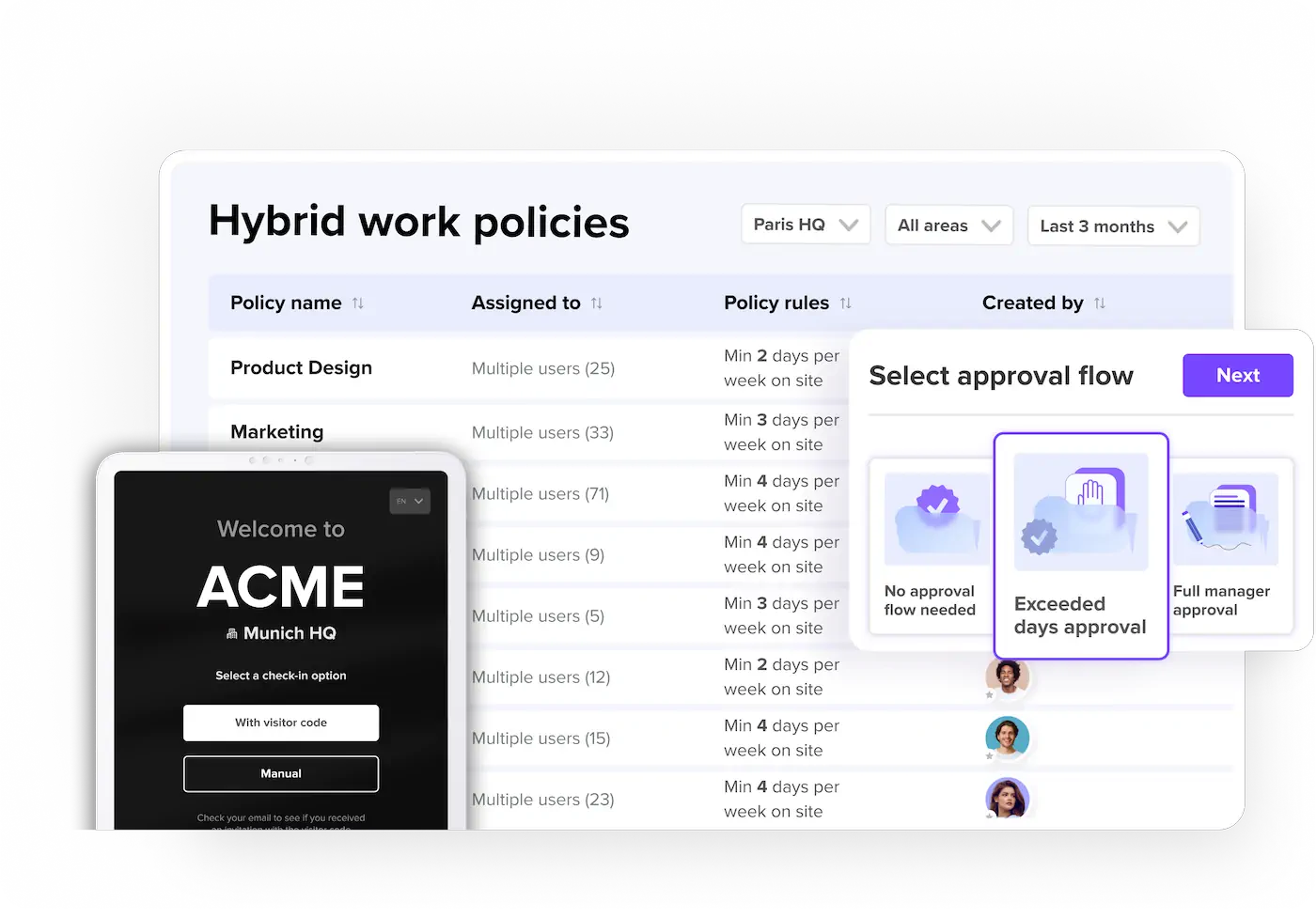
deskbird isn’t just a desk booking solution. It’s the full workplace picture, visitors, hybrid work policies, and compliance. All blended into one and managed without adding additional tools or processes to the mix. Let’s look at how we’re improving visibility in your workplace.
Visitor management and kiosk mode for Visitors
You probably already know our visitor management solution. deskbird Visitors keeps the guest experience simple and seamless: no chaos at reception, no tool-hopping, just full traceability, smooth check-ins, and host notifications directly via MS Teams. Make guests feel welcome before they arrive with branded invites, while collecting the details you need for a safe and productive visit.
And it gets even better because we’re working on a new addition we think you’ll love. Kiosk mode for Visitors will become available in the next few weeks, allowing you to turn any tablet into a self-service check-in kiosk. Walk-ins can register themselves, invited guests can self check in and out, and smaller offices can run reception without full-time staff. Less manual work, better first impressions.
👋 Ready to make a lasting impression on your guests? Get a demo of deskbird Visitors and see how smooth visitor management can be!
Schedule restrictions with manager approval
Governance shouldn’t feel like micromanagement. deskbird is always improving how we help your workplace operate smoothly—reducing admin while keeping flexibility at the core. Our new approval flow for hybrid work policies does just that, giving you and your employees more control and transparency for handling extra remote day requests.
- Exceeded days approval: When adding or editing a policy, you can now allow managers to approve or reject additional remote days outside of the set remote work quota.
- Transparent employee flow: Employees see their usual schedule dashboard. If they need to request an additional remote day (or a half-day), they’re guided through a quick, user-friendly submission and receive confirmation that their request has been submitted to their manager. No additional emails, no chasing.
- Manager dashboard: Managers see a clear weekly overview of their team’s schedules, who’s compliant, and who has requested an additional remote day, and approve or reject schedules directly in the dashboard.
In short, this new approval flow makes hybrid governance simple, fast, and transparent, while keeping policies fair. Employees get flexibility when they need it, managers get clarity and control, and everyone spends less time on admin.
The new approval flow is already live—ready for you to try!
Redesigned user admin section
Our user admin section has been completely redesigned, making it easier for workplace managers to access, update, and export data. The new user table layout brings all key user details into a streamlined side sheet so you don’t have to click around anymore to find the information you need.
What’s more, one of the most requested features is finally here too: CSV exports. Filter for users, export the list, make edits in bulk, and import back into deskbird—no workarounds, just smooth workflows.
This update is already live in deskbird. So head over to the admin section and check it out!
Block spaces
Admins currently have no ability to plan in advance, easily block certain areas or notify users. Plus, as our customers have told us, deactivating a whole floor or area for booking feels like a hammer when all you needed was a scalpel. Our new “Block spaces” feature will solve exactly this pain point.
Soon, you’ll be able to block desks, rooms, areas, or even entire floors for a specific time—whether it’s for renovations, cleaning cycles, or VIP meetings. Unlike the old “inactive” mode, this isn’t a blunt on/off switch. You can plan ahead, set clear reasons, and communicate them to your teams.
Worried about what happens to already made bookings? No need! Any existing bookings in affected spaces are automatically canceled, and users receive a notification to rebook elsewhere. And because all closures are managed from one place, the process is simple and free of disruptions, making space management effortless and proactive.
“Block spaces” will become available soon.
Advanced analytics to leverage the power of data

Every booking, desk, room, or visitor is a data point. And since your workplace strategy works best when it’s guided by data, not guesswork, we’re bringing you a new analytics suite that transforms everyday activity into workplace intelligence, covering:
- People & presence: Track attendance patterns by office, department, or even individual users. Monitor policy adherence, spot quiet days, and ensure teams are balanced.
- Spaces & resources: See which desks, meeting rooms, and parking spots are in demand—and which sit empty. Use those insights to reassign, consolidate, or even downsize with confidence.
- Safety & compliance: Ensure the right people are in the right place at the right time, from fire wardens to first aiders and other emergency roles. Perfect for health & safety requirements, internal audits, and future regulations.
These insights turn everyday bookings into actionable insights, helping organizations cut costs, optimize layouts, and build smarter workplace strategies. Can’t wait to try it out? We expect to launch later this year, so stay tuned!
And it doesn’t stop here…
With our recent and coming releases, we’re striving for effortless automation, proactive management, and actionable intelligence that help you run your workplace with confidence. But we don’t stop here. Behind the scenes, our team is already working on the next big things.
Want a closer look at what’s already live, or curious about what’s coming soon? Book a free demo today and explore how deskbird can elevate the way your hybrid teams work.