
Workplace management: A practical guide for hybrid teams
Workplace management is how you coordinate office space, people, and technology so hybrid teams know where to work and leaders can make smarter real estate decisions. This guide covers the systems, roles, and tools that reduce wasted space, prevent booking chaos, and turn your office into a resource that supports collaboration instead of creating friction.
What is workplace management?
Workplace management is how you coordinate your office space, technology, and people to support work. This means tracking who needs a desk, which rooms are available, and how your physical space gets used day to day. In a hybrid setup, it's the system that makes sure employees can find a spot when they come in and that you're not paying for empty floors.
The discipline covers everything from floor plans to booking software to attendance policies. It answers questions like "where will my team sit on Tuesday?" and "do we actually need this much office space?" When done well, it removes guesswork and turns your office into a tool that supports collaboration instead of creating friction.
With 77% of companies operating hybrid models, workplace management solves the coordination problem. It gives employees visibility into who's coming in and where they'll be. It gives leaders data on how space is actually used so they can make smarter real estate decisions.
Who needs workplace management and who owns it?
No single person owns workplace management in most companies. It sits across 4 functions that each care about different outcomes.
- Workplace and real estate leaders: They need to know if you're using too much space or too little. Their focus is on cost per square foot and whether the current footprint matches attendance patterns.
- Facilities managers: They handle the daily operations like cleaning, maintenance, and safety. They need accurate headcounts for emergency planning and resource allocation.
- HR and people ops: They care about employee experience and culture. They want to make sure hybrid policies feel fair and that the office remains a place people want to visit.
- IT: They evaluate tools through the lens of security, integrations, and compliance. They need systems that connect to existing platforms like MS365 without creating new vulnerabilities.
The best workplace management strategies involve all 4 groups working from shared data. When these teams operate in silos, you end up with conflicting policies and frustrated employees.
What workplace management covers in a hybrid office
Implementing a strategy for modern workplace management rests on 4 pillars. Each one addresses a different part of running a flexible office.
Space utilization and office layout
Space utilization measures which desks, rooms, and zones get used and when. This goes beyond headcount to track actual occupancy against available capacity. You might have 200 desks but only 80 people in the office on a typical Wednesday.
In hybrid work, static seating charts fail because attendance changes daily. Workplace management means creating flexible layouts where teams can claim neighborhoods on their in-office days. This lets you right-size your real estate based on real demand instead of theoretical headcount.
The data from utilization tracking shows you which spaces work and which don't. If meeting rooms are always full but desks sit empty, you know where to adjust. If one floor stays at 20% capacity while another hits 90%, you can redistribute teams or consolidate space.
Employee experience and fairness
Workplace management gives employees clarity about their work week. It shows them who's coming in so they can coordinate with teammates. Without this visibility, people commute to an empty office and lose trust in the hybrid model.
Fairness matters in a flexible environment. A good system ensures everyone has equal access to desks and rooms, not just whoever books first. It prevents the chaos of people wandering around looking for a spot or finding their reserved desk occupied by someone else.
Tools that support team coordination help maintain connection. When employees can see their manager or favorite colleagues are coming in on Thursday, they're more likely to show up too. Social coordination drives attendance more effectively than mandates.
Safety, security, and compliance
Managing a hybrid office means knowing exactly who's on-site at any moment. This matters for emergency evacuations where you need an accurate list of people in the building, not just badge swipe data from 3 hours ago. It also covers visitor management so guests are properly registered and escorted.
Compliance extends to data privacy. You need to track attendance for safety and planning without crossing into surveillance. Following standards like GDPR is non-negotiable, especially for companies with European operations or employees.
Role-based access adds another layer. You might need to know which fire wardens or first aiders are in the building on any given day. This information supports both safety protocols and operational planning.
Workplace technology and data
Modern workplace management runs on software that connects booking, attendance, and analytics. Manual spreadsheets can't handle the complexity of tracking 200 employees across 3 floors with changing schedules. The technology needs to integrate with tools people already use like calendars and communication platforms.
Data from these systems provides the insights you need to make decisions. It reveals patterns like peak days, underused zones, and booking-to-attendance gaps. This lets you adjust policies and layouts based on evidence instead of assumptions.
The right technology makes the system feel natural. Employees book a desk in 2 clicks from Slack. Managers see utilization dashboards without running reports. IT maintains one integration instead of managing 5 disconnected tools.
What good workplace management improves
A structured approach to workplace management delivers measurable benefits. It shifts your focus from managing a building to enabling a workforce.
Employee productivity and collaboration
When employees know their teammates will be in the office, they plan meaningful in-person time. This reduces wasted commutes where people spend the day on video calls anyway. Good management removes the friction of finding a workspace so people can focus immediately.
Clear booking processes prevent scheduling conflicts and double bookings. This smooth experience encourages teams to come in for collaborative work. The office becomes a tool for productivity instead of a source of logistical stress.
Space utilization and real estate cost
Workplace analytics reveal underused space so you can make smarter real estate decisions. If desk occupancy never exceeds 50%, you might consolidate floors or sublease unused areas—67% of companies cite hybrid work as the primary driver for portfolio contraction. This directly reduces office costs like rent and utilities.
Tracking cost per seat becomes accurate when based on actual usage. You can identify "ghost zones" that require heating and cooling but see little activity. Making these areas more efficient reduces waste and lowers your environmental footprint.
Security, safety, and audit readiness
Accurate attendance data supports emergency response and compliance audits. In an evacuation, safety officers instantly access a list of everyone checked into the building. This replaces outdated paper logs that may not reflect real-time occupancy.
Visitor tracking ensures external guests are accounted for and have agreed to safety protocols. This creates a secure environment where intellectual property and physical assets stay protected. It also simplifies audits for certifications like ISO 27001.
Trust in booking and workplace tools
Reliable systems where bookings match reality increase employee adoption. If someone books a desk and arrives to find it occupied, trust evaporates. Features like automatic check-ins and auto-release ensure the digital map reflects the physical office.
When the system works as expected, employees follow hybrid policies. This compliance generates better data for leadership, creating a positive cycle. Trust reduces the administrative burden on office managers who otherwise spend time resolving conflicts.
Workplace management best practices that reduce no-shows and double bookings
Improving workplace management requires a practical, step-by-step approach. These 5 steps fix common friction points and establish clear norms.
Step 1: Map the employee booking journey
Start by understanding how employees currently find and book space. Identify friction points like confusing floor plans, too many clicks, or lack of mobile access. If the process is difficult, people bypass it and your data becomes useless.
The goal is making booking as natural as checking a calendar. Look for tools that integrate directly into daily workflows like MS Teams or Slack. Reducing barriers to entry is the most effective way to boost adoption.
Step 2: Fix floor plans and ownership
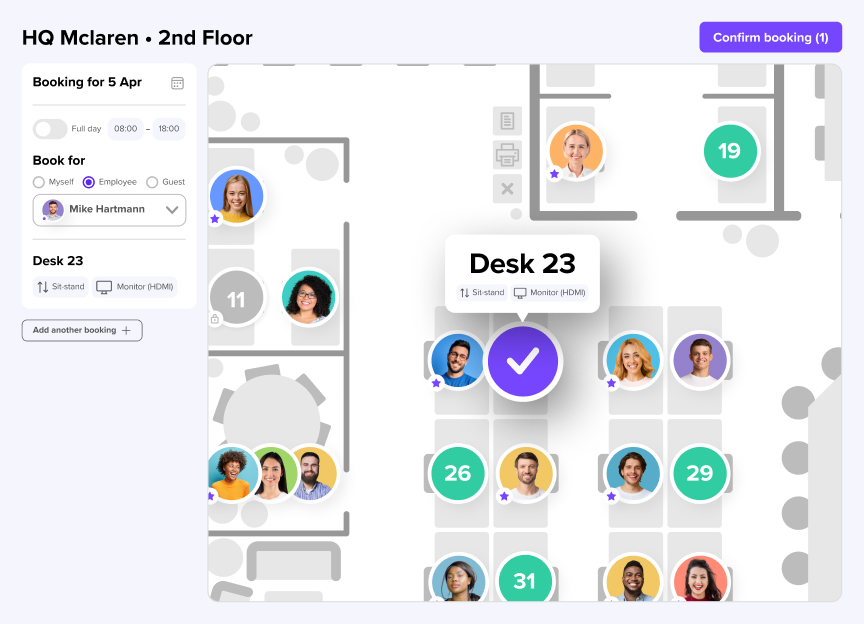
Your digital floor plans must be accurate and current. Employees need to trust that the desk they select on screen actually exists and is available. Mark amenities like monitors, standing desks, or quiet zones so people choose the right spot for their work.
Define clear ownership for different zones. Assign specific neighborhoods to departments so teams sit together. This prevents fragmentation and ensures everyone has a "home base" when they come to the office.
Step 3: Set clear hybrid work policies and team days
Transparent policies reduce confusion and help employees plan their weeks. Define expectations clearly, like minimum office days or specific "anchor days" when everyone should be on-site. Week planning tools let teams coordinate these days without endless email threads.
When employees see when their favorite colleagues are coming in, they're more likely to show up. Social coordination drives attendance. Make these patterns visible to encourage organic collaboration.
Step 4: Use check-ins and auto-release rules
Require employees to check in when they arrive at their booked desk or room. This confirms their presence and validates your data. If someone doesn't check in within a set window, the system should automatically release the booking.
Auto-release solves the problem of desk hoarding. It frees up space for others who need it and keeps the booking system dynamic. Desk booking with these rules significantly reduces the frustration of seeing empty desks marked as unavailable.
Step 5: Review utilization data and adjust the office
Regularly review workplace analytics to spot patterns. Look for peak days where capacity is strained and quiet days where the office sits empty. Identify which types of spaces are most popular and which get ignored.
Use this data to make informed changes. If meeting rooms are always full but desks are empty, convert some desk space into collaboration pods. Continuous adjustment based on data ensures the office remains relevant to how people actually work.
What to look for in workplace management software
Selecting the right technology is critical for executing your strategy. The software should be comprehensive, user-friendly, and secure.
[Table1]
Desk booking and meeting room booking
Employees should book desks and rooms in a few clicks from tools they already use. The interface must be intuitive, requiring no training. Mobile access is essential for people who plan their days on the go.
Interactive floor plans help users visualize where they're sitting relative to their team. A robust room booking system also handles equipment filtering, catering requests, and recurring meetings. Simplicity here drives high adoption rates.
Visitor management and front desk workflows
A complete solution handles guest registration, notifications, and compliance. It should let employees pre-register guests, sending them digital invites with directions and safety information. This streamlines the front desk experience and reduces wait times.
Visitor management features should maintain a digital log of who entered the building and when. This is vital for security audits and emergency evacuations. It replaces the unsecured paper logbook with a GDPR-compliant digital record.
Workplace analytics and space utilization reporting
With 89% of organizations ranking utilization as their top workplace metric, leaders need dashboards showing occupancy, peak days, and booking vs. actual attendance. The software should provide granular data, like utilization rates by department or specific zones. This information is the currency for making real estate decisions.
The ability to export data matters for deeper analysis. Leaders should compare trends over time to see if policy changes are working. Actionable insights help justify costs and make the office footprint more efficient.
Integrations with MS Teams, Slack, and calendars
The best workplace software lives where your work happens. It should connect with Outlook, Google Calendar, Slack, MS Teams, and HRIS platforms. deskbird offers 50+ integrations to ensure data flows automatically between systems.
Integrations reduce administrative work. Syncing with an HRIS system automates user provisioning and de-provisioning. Calendar sync ensures room bookings appear immediately on employee schedules, preventing double bookings.
GDPR, ISO 27001, and privacy-first tracking
Privacy and security matter, especially for companies with a European presence. The software must be ISO 27001 certified to ensure robust information security management. It should also be fully GDPR-compliant, hosting data in Europe and respecting user privacy.
Privacy-first tracking focuses on anonymized utilization trends rather than individual surveillance. This builds trust with employees who may be wary of being monitored. Security teams need assurance that the platform meets strict enterprise compliance standards.
Common workplace management problems in hybrid workplaces
Even with good intentions, companies face hurdles when managing hybrid spaces. Identifying these challenges is the first step toward solving them.
- Low adoption: Employees ignore the system if it's hard to use or doesn't reflect reality. If booking takes more than a minute, people revert to old habits.
- No-shows and ghost bookings: Desks are reserved but sit empty, wasting space and frustrating colleagues who need a spot. This usually happens when there's no check-in requirement.
- Inaccurate data: Floor plans or attendance records don't match what's actually happening. Decisions based on bad data lead to poor real estate strategies.
- Policy confusion: Employees don't know when they're expected in the office or how to book resources. This leads to uneven attendance and lack of coordination.
- Privacy concerns: Teams worry about being tracked or monitored. If the purpose of data collection isn't clear, it damages company culture and trust.
Make workplace management simple with the right tools
Managing a hybrid workplace doesn't have to be complicated. The goal is making the office a deliberate destination where collaboration happens naturally. By focusing on people-first policies and data-driven decisions, you turn your office into an asset instead of a burden.
deskbird simplifies this process with an all-in-one platform for desk booking, room scheduling, visitor management, and analytics. It's built to reduce friction, letting employees coordinate their week in seconds while giving leaders the insights they need to cut costs. With a focus on privacy and ease of use, it helps organizations run hybrid offices that work for everyone.
Ready to turn office data into smarter space decisions? Book a demo.

Frequently Asked Questions
What's the difference between workplace management and workspace management?
Does workplace management software track individual employees?
Do visitors and guests need paid software licenses?
Why do employees book desks but not show up?
Run your hybrid office without the chaos
- Stop no-shows with check-ins and auto-release rules
- See real utilization data to right-size space and cut costs
- Keep IT happy with GDPR, ISO 27001, and 50+ integrations