
.webp)
How to automate visitor management in 5 simple steps
Manual visitor sign-in sheets create security gaps, slow down your reception team, and leave you guessing who is actually in the building during an emergency. This guide walks you through 5 steps to automate your visitor management process, from pre-registration and digital check-in to real-time host notifications and compliance-ready logs that work seamlessly in hybrid offices.
What is automated visitor management?
Automated visitor management is a digital system that replaces manual sign-in sheets and paper logs with software that handles guest arrivals. This means visitors check in through a tablet or their phone instead of writing their name on a clipboard.
The system manages the entire visit from start to finish. It sends invitation emails before the guest arrives, checks them in when they walk through the door, notifies the host instantly, and keeps a digital record of who was on-site. Traditional methods rely on receptionists juggling phone calls, handwritten logs, and sticky notes. Office automation removes that friction entirely.
Why automate visitor management in a hybrid office?
With 53.1% of remote-capable employees now in hybrid roles, offices face unpredictable attendance patterns that make visitor coordination harder. Your receptionist might not know which employees are working from home on Tuesday. Hosts forget they scheduled a client meeting. Visitors arrive to find empty desks and confusion.
Manual processes break down when you cannot predict who will be in the office. A guest shows up, but the host is on Zoom at home. The receptionist calls around trying to find someone who knows about the meeting. The visitor waits in the lobby for 15 minutes. That is not the first impression you want to make.
Automation solves this by connecting visitor arrivals to real-time office data.
The system knows who booked a desk that day. It sends reminders to hosts before the meeting. It alerts them the moment their guest checks in, whether they are at their desk or in a meeting room.
The practical benefits you will see immediately:
- Less work for reception staff: No more phone tag with hosts or manually tracking who came and went
- Faster lobby experience: Visitors spend seconds checking in instead of filling out forms
- Professional first impressions: Guests see a modern, organized process that reflects well on your company
- Real-time visibility: You know exactly who is in the building at any moment for safety and security
- Accurate records: Digital logs eliminate illegible handwriting and lost paperwork
How an automated visitor management workflow works
The workflow follows 5 clear steps that create a consistent experience for every guest who enters your building.
Step 1: Set up guest booking and pre-registration
The process starts before the visitor arrives. You or your team member registers the guest in the system ahead of time. You enter their name, email, company, and the reason for their visit.
This pre-registration step lets you prepare everything the visitor needs. You can book a meeting room for the appointment, reserve a parking spot if your lot fills up quickly or even arrange catering if the meeting runs through lunch. The complexity arises when systems don’t talk to each other: you register the visitor once, then manually book their desk, then manually reserve parking. One person, three entries, three systems.
Platforms like deskbird let you handle all of this in one place. When you register a visitor through deskbird's visitor management, you can simultaneously book the desk they will use, the conference room for your presentation, and the parking space near the entrance. Everything connects so you are not jumping between different tools.
Step 2: Send automated visitor emails with arrival instructions
Once you register the guest, the system sends them a professional invitation email automatically. This email gives them everything they need to arrive prepared.
The invitation includes the meeting date and time, your office address with a map link, and specific instructions for checking in when they arrive. Many systems include a unique QR code the visitor can scan at the kiosk. The email also provides Wi-Fi details, parking instructions, and your contact information in case they are running late.
The system sends a reminder email the day before the visit. This reduces no-shows and ensures the guest has the information handy right when they need it. You do not have to remember to send follow-up emails manually.
Step 3: Run on-site check-in with kiosk mode or receptionist check-in
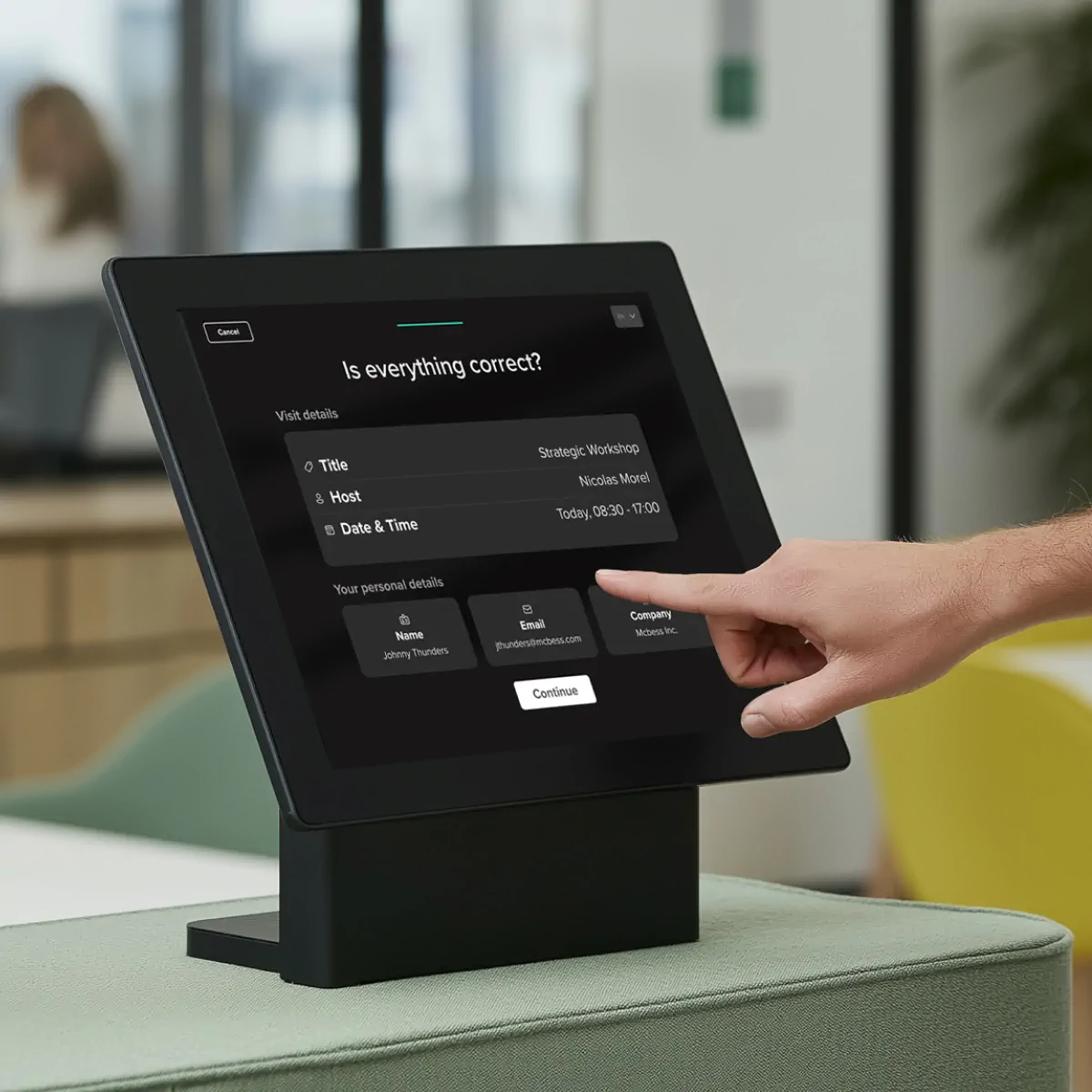
When the visitor walks into your lobby, they encounter the check-in step. kiosk mode.
The system can capture a photo of the guest and print a visitor badge automatically. The badge shows their name, who they are visiting, and the date. This makes it easy for your employees to identify guests as they move through the office.
If you prefer a personal touch, your receptionist can check visitors in with one click on their dashboard. This works well for VIP guests or executive meetings where you want a human greeting. The backend automation still happens, but the experience feels more welcoming.
Step 4: Notify hosts in Microsoft Teams without notification overload
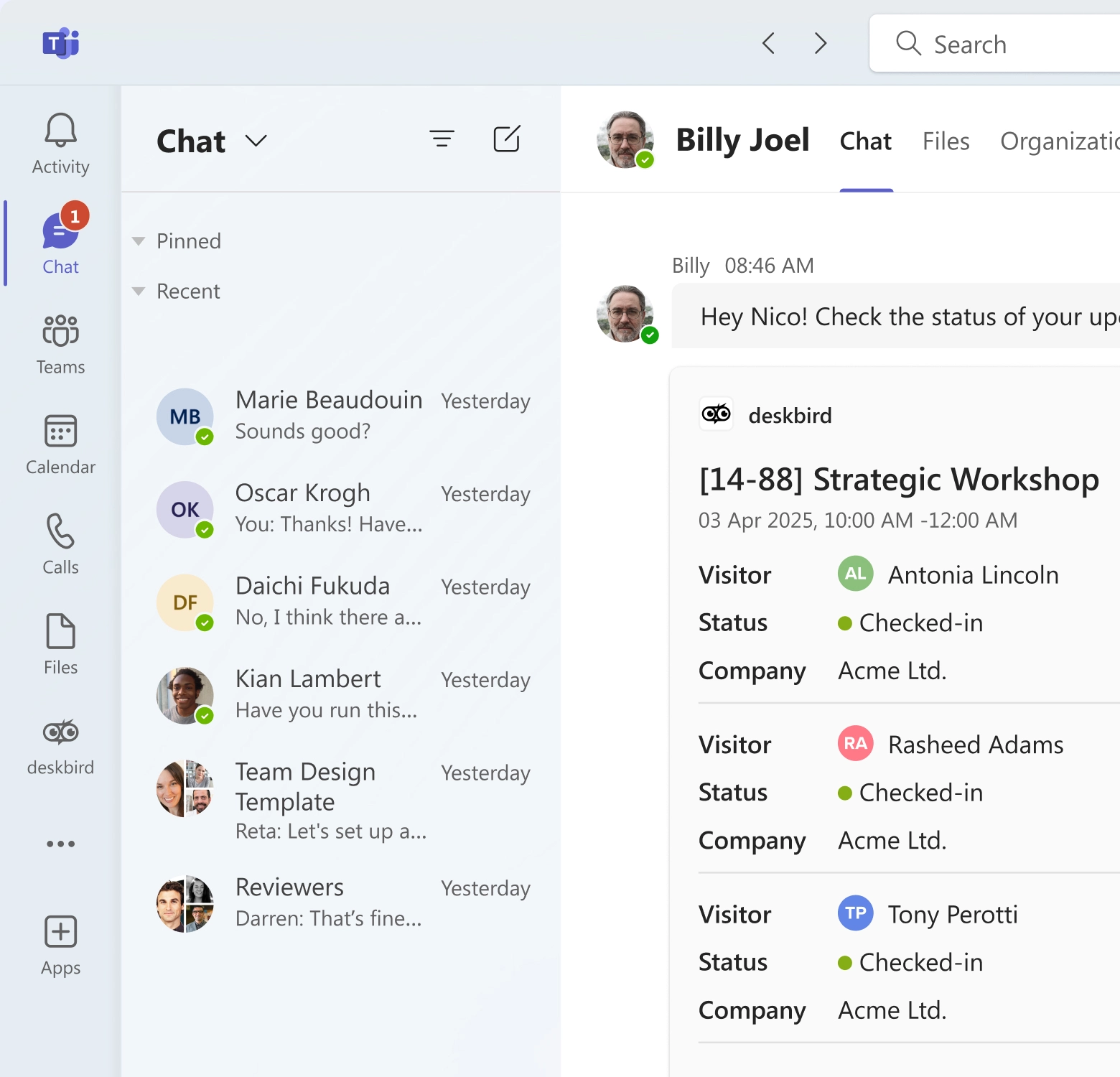
The moment the guest completes check-in, the system sends an instant alert to the host. This is where integration with tools like Microsoft Teams makes a real difference.
Your host might be in a meeting room on a different floor. They might be at their desk wearing headphones. A phone call to the front desk would go unanswered. But a direct message in Teams reaches them immediately.
deskbird's Microsoft Teams integration sends the notification exactly where your employees already work. The host sees "Your guest Sarah Chen has arrived" in their Teams chat. They can head to the lobby right away without the receptionist needing to track them down.
This prevents notification overload at the front desk. The receptionist is not fielding calls and messages about every arrival. The system routes each notification to the right person automatically.
Step 5: Keep a real-time visitor log with check-in and check-out times
The final step maintains an accurate record of the visit. The system logs the exact time the guest checked in. When they leave, they can check out at the same kiosk, or your receptionist can mark them as departed with one click.
Some systems automatically check out all visitors at the end of the business day. This ensures your log stays current even if someone forgets to check out manually.
Why accurate logs matter for your office:
- Emergency evacuations: Safety officers need a real-time list of everyone in the building during a fire alarm or other emergency
- Compliance audits: Many industries require detailed records of who accessed your facility and when
- Security reviews: Your security team can investigate incidents by reviewing who was on-site at specific times
Guest booking and visitor pre-registration features to automate
Beyond the basic workflow, modern visitor management systems offer specific features that strengthen security and reduce administrative work.
Visitor invitations send branded emails with arrival details to create a professional first impression before guests arrive, while document signing collects NDAs or health declarations digitally before arrival to prevent reception bottlenecks and ensure legal compliance. Approval workflows route sensitive visitor requests to managers or security teams for added protection, and watchlist screening automatically flags restricted individuals to alert security if they attempt to register. For recurring guests, the system saves consultant and contractor details to eliminate repetitive data entry on future visits.
These features work together to create a complete system, trying it to broader workplace operations. Service booking reserves desks, meeting rooms, parking, or catering within the same visitor workflow, ensuring operational needs are handled in one place rather than across multiple tools. This integration is what separates deskbird’s approach from standalone visitor tools: when you register a weekly contractor, the system not only speeds up their future check-ins but also coordinates their workspace, meeting room availability, and host notification across your entire platform. If they need to sign an NDA, the system sends it automatically before their first visit and remembers they have already signed it for future visits.
deskbird connects visitor management with meeting room booking and desk sharing so you can handle space and guest logistics in the same platform. This matters in hybrid offices where you need to coordinate who is coming in, where they will sit, and which rooms are available.
Kiosk mode and touchless visitor check-in options
The physical check-in experience is the first interaction a guest has with your office technology. A great visitor experience depends on getting this right. You have 3 main options that suit different office styles and visitor volumes.
- Tablet kiosk self check-in works for high-volume lobbies or offices without full-time reception staff. You mount an iPad or Android tablet on a stand at the front desk. Visitors walk up, tap the screen, enter their name, and complete check-in in under 30 seconds. The kiosk can connect to a wireless printer to produce badges automatically.
- Mobile check-in with QR codes offers a completely touchless experience. The visitor receives a unique QR code in their invitation email. When they arrive, they scan this code at the kiosk camera or show it to the receptionist. The system recognizes their booking and checks them in instantly. This reduces lobby congestion during busy morning hours when multiple guests arrive at once.
- One-click receptionist check-in maintains a personal welcome while still automating the backend. Your receptionist greets the guest by name and clicks "Check-in" on their screen. This triggers the same automations like host notification and badge printing, but the guest experiences human hospitality instead of a self-service kiosk. This approach works well for executive briefing centers or client-facing offices where personal service matters.
Visitor logs and reporting for audits, safety, and GDPR
A digital visitor tracking system creates a secure data trail that paper logbooks cannot match. This matters for safety, compliance, and privacy.
Paper logbooks expose every visitor's name to everyone who signs in after them. Anyone walking past the front desk can flip through pages and see who visited your office last week. A digital system protects this information behind access controls.
In an emergency evacuation, a paper logbook is useless if it is left on the reception desk. A cloud-based system gives your safety officers a real-time list of everyone in the building from their phone. They can account for every visitor instantly during a roll call.
Compliance audits often require proof of who accessed your facility. Digital systems let you export detailed logs showing visitor names, hosts, entry times, exit times, and signed legal documents. You can filter by date range, department, or visitor type to answer specific audit questions.
According to DLA Piper's 2025 survey, GDPR regulators have issued EUR 5.88 billion in total fines since 2018, making data sovereignty critical. You need to know where visitor data is stored and how long it is retained. deskbird is built with privacy-first infrastructure, including ISO 27001 certification and EU-based hosting. This ensures visitor data is processed according to European privacy laws, which matters if you have offices in the EU or work with European clients.
Visitor management integrations with Microsoft Teams, Outlook, and Google Calendar
Adoption is the biggest challenge with any new workplace software. If employees have to log into a separate portal to invite a guest, they will revert to sending email invitations or text messages. The right hybrid work software solves this by embedding visitor management into the tools your team already uses. Integrations solve this by embedding visitor management into the tools your team already uses every day.
- Calendar sync automatically creates visitor bookings when you add an external guest to a meeting invite in Outlook or Google Calendar. You schedule a client meeting for Thursday at 2pm and add their email address. The system detects the external attendee and prompts you to register them as a visitor. You confirm with one click, and the invitation email goes out automatically.
- Communication integrations send host notifications to the chat apps where your employees are already active. Instead of email notifications that get buried in inboxes, the alert appears in Microsoft Teams or Slack where your team sees it immediately. deskbird connects with 50+ tools to meet your team where they work.
- Directory sync pulls employee data from your HR system or Azure Active Directory. This ensures visitors are matched with active employees and correct email addresses. When someone leaves your company, they automatically disappear from the host dropdown menu. You do not have to manually update user lists.
- Access control integrations grant physical access to doors or turnstiles based on valid check-in status. When a visitor checks in, the system can send a signal to your badge reader to temporarily grant them access to specific floors or rooms. This eliminates the need for physical visitor badges in some offices.
Implementation checklist for automated visitor management
Rolling out a new system requires planning to ensure a smooth transition from manual processes.
- Define your visitor types: clients, candidates, contractors, delivery personnel, VIPs
- Map your check-in flow: self-service kiosk, receptionist-led, or hybrid approach
- Choose hardware: iPad or Android tablet, secure mounting stand, badge printer if needed
- Set up integrations: connect to Outlook/Google Calendar and Teams/Slack for notifications
- Configure notification rules: decide who gets alerted for different visitor types
- Create visitor policies: upload NDAs or health declarations that must be signed
- Test the full experience: walk through the flow as a visitor before launch day
- Train reception and hosts: ensure front desk staff knows how to override the system if needed
Start with a pilot group before rolling out company-wide. Choose one department or one office location to test the system for 2 weeks. Gather feedback from receptionists, hosts, and visitors. Adjust your configuration based on what you learn, then expand to the rest of your organization.
Make visitor automation part of a smarter workplace
Automating visitor management removes manual steps, improves security, and creates a better experience for guests and hosts alike. The key is covering the full workflow, from invite to sign-out, and connecting visitor data to your broader workplace operations.
For hybrid offices, this matters even more. Visitor volume fluctuates with attendance patterns. Lobbies get crowded on anchor days. And when the front desk isn't staffed, self-serve check-in keeps everything running.
deskbird brings visitor management into the same platform teams already use for desk booking, room booking, and workplace analytics, treating it as part of the complete hybrid office experience. Hosts can register guests, book a meeting room, and reserve a parking spot in one flow. Visitors check in via tablet or kiosk, and hosts get instant notifications in Microsoft Teams.
Because visitor data lives alongside attendance and space usage, you can see how visitor traffic affects your busiest days and plan accordingly. All data is hosted in the EU with ISO 27001 and SOC2 certification as well as full GDPR compliance.
For organizations that prioritize user experience and data privacy, deskbird offers a solution that is simple for employees and powerful for administrators. See it in action: book a visitor management demo.

Frequently Asked Questions
What makes a great visitor experience?
A great visitor experience is professional, welcoming, and seamless—from the moment a guest arrives to when they leave. It combines clear wayfinding, smooth check-ins, personalized greetings, and a safe, comfortable lounge area where guests can be seated while they wait for their hosts.
How long does it take to set up automated visitor management?
Most cloud-based systems can be configured in a few days. The timeline depends on how many visitor types you have, what integrations you need, and whether you're deploying kiosks at multiple sites. Simple setups with one location and standard flows often go live within a week.
Is automated visitor management compliant with GDPR?
It can be, but compliance depends on how you configure it. Collect only the data you need, define clear retention periods, and ensure visitors consent to data processing. Look for platforms hosted in the EU with ISO 27001 certification and explicit GDPR compliance commitments.
How does deskbird simplify the visitor check-in process?
deskbird streamlines check-in by letting receptionists or kiosk devices mark visitor arrival with one click. The visitor dashboard handles check-in, check-out, editing visitor details, and host notifications all in a single interface.
Can visitors pre-register before arriving at the office?
Yes. Visitors can be invited in advance by entering their name/email and visit details. They receive automated email invitations, reminders, and site instructions ahead of arrival..
Change to the efficient, professional way to welcome visitors
- Let guests self check-in with tablet or kiosk compatibility
- Reserve desks, parking spots or rooms for your visitors in advance
- Automatically notify hosts via Microsoft Teams when guests arrive
