

Why invest in meeting room scheduling software and what to look for
Large organizations often lose time and space to no-shows and room search friction. Meeting room scheduling software eliminates these hidden costs by centralizing reservations, preventing double bookings, and providing the utilization data needed to right-size your real estate footprint.
TL;DR
Meeting room scheduling software pays for itself by eliminating the hidden costs of poor room management: wasted space from no-shows, lost productivity from double bookings, and real estate decisions made without data. The right platform delivers real-time availability, check-in enforcement with auto-release, and analytics that connect directly to space planning. Organizations using dedicated room scheduling tools like deskbird see 90%+ adoption and significant reductions in unused bookings. Meeting rooms become a measurable asset, not a coordination headache.
What is meeting room scheduling software
Meeting room scheduling software is a digital tool that simplifies how teams book, manage, and use meeting spaces. It eliminates scheduling conflicts, improves room utilization, and keeps collaboration running smoothly from one central platform.
This type of software lets you view real-time availability, book spaces instantly, and sync reservations with your calendar. Users can reserve rooms from their phones or laptops, receive automatic reminders, and access interactive floor plans to find the right space fast. Advanced reporting tools track usage trends, helping you make evidence-based decisions about your office space.
For large organizations, manual room management breaks down quickly and meeting rooms becomes essential infrastructure. It ensures coordination between on-site and remote teams, simplifies management, and provides the data needed to right-size your real estate footprint.

The cost of not investing in room scheduling
You know it's time to invest in meeting room scheduling software when managing your office spaces becomes inefficient, time-consuming, or error-prone. Double bookings, no-shows, and poor visibility into room use signal that a centralized room booking system can help you streamline scheduling, make space usage more efficient, and boost team coordination.
Watch for these warning signs:
- Employees regularly arrive at rooms already occupied by someone else
- Booked rooms sit empty because no one showed up
- Teams waste 10-15 minutes per meeting searching for available space
- You cannot answer basic questions about which rooms are overused or underused
- Hybrid scheduling requires constant back-and-forth communication

Double bookings waste time and erode trust
Double bookings cause frustration and wasted time. Employees struggle when they find a room they booked is already occupied. Beyond the immediate disruption, repeated conflicts erode trust in your booking systems and create productivity losses that compound across the organization. A room scheduling system eliminates this problem by ensuring spaces are only booked when available, preventing conflicts and keeping everyone on schedule.
No-shows leave valuable space sitting empty
Reservations that are booked but unused, also known as ghost bookings or no-shows, waste valuable space. Industry data suggests no-show rates can reach 30-40% in organizations without enforcement mechanisms, though exact figures vary by organization. Room scheduling software addresses this directly. These systems automatically free up unused meeting spaces through auto-release if nobody checks in within a specific timeframe, ensuring rooms are occupied efficiently and available to others.
Employees lose productive time searching for rooms
When employees can't find an available meeting spot, productivity and collaboration suffer. Even 10 minutes lost per meeting adds up quickly across an organization with hundreds of daily bookings. A room scheduling system providing real-time availability shows what's free instantly. Team members book quickly, save time searching for a collective workspace, and get back to work faster.
Without reliable data, you cannot make space more efficient
You can't make your office space more efficient without knowing how meeting spots are allocated. A room reservation system lets you see which units are occupied most often and when and gives you important utilization metrics such as:
- Occupancy rates
- Booking frequency
- Peak usage times
- No-show rates
- Capacity utilization
You can rely on this workplace analytics data to make informed decisions about managing and reconfiguring your conference areas or when making larger real estate decisions such as consolidating floors, renegotiating leases, or planning office redesigns.

Hybrid coordination becomes guesswork
In a hybrid work model, coordinating between in-office and remote employees can be complex. Without visibility into who's coming in and when, enforcing hybrid policies becomes difficult. Meeting room scheduling software helps you manage these dynamics by providing a centralized platform where all your team members can book conference rooms and coordinate their hybrid schedules. Everyone gets access to the space they need, when they need it.
Key features to look for in room scheduling software
Choosing the right meeting room scheduling software means focusing on features that simplify booking, enhance collaboration, and make space usage more efficient. The best tools make it easy for your team to reserve rooms, avoid scheduling conflicts, and gain insights into how your meeting spaces are used.
Prioritize these capabilities when evaluating solutions:
- Real-time availability with calendar integration
- Check-in enforcement and auto-release for unused bookings
- Interactive floor plans and mobile access
- Analytics and utilization reporting
- Security and compliance for enterprise requirements
Real-time availability and calendar integration
Real-time availability lets your staff find and reserve spaces easily. No more checking paper calendars or sending emails. Sync with Google Calendar, Outlook, Slack, and Microsoft Teams for effortless scheduling and coordination. Strong Outlook integration or Google Calendar sync keeps everyone in the loop and avoids conflicts. These bidirectional calendar integrations are often the most important feature for day-to-day usability.
Check-in enforcement and auto-release
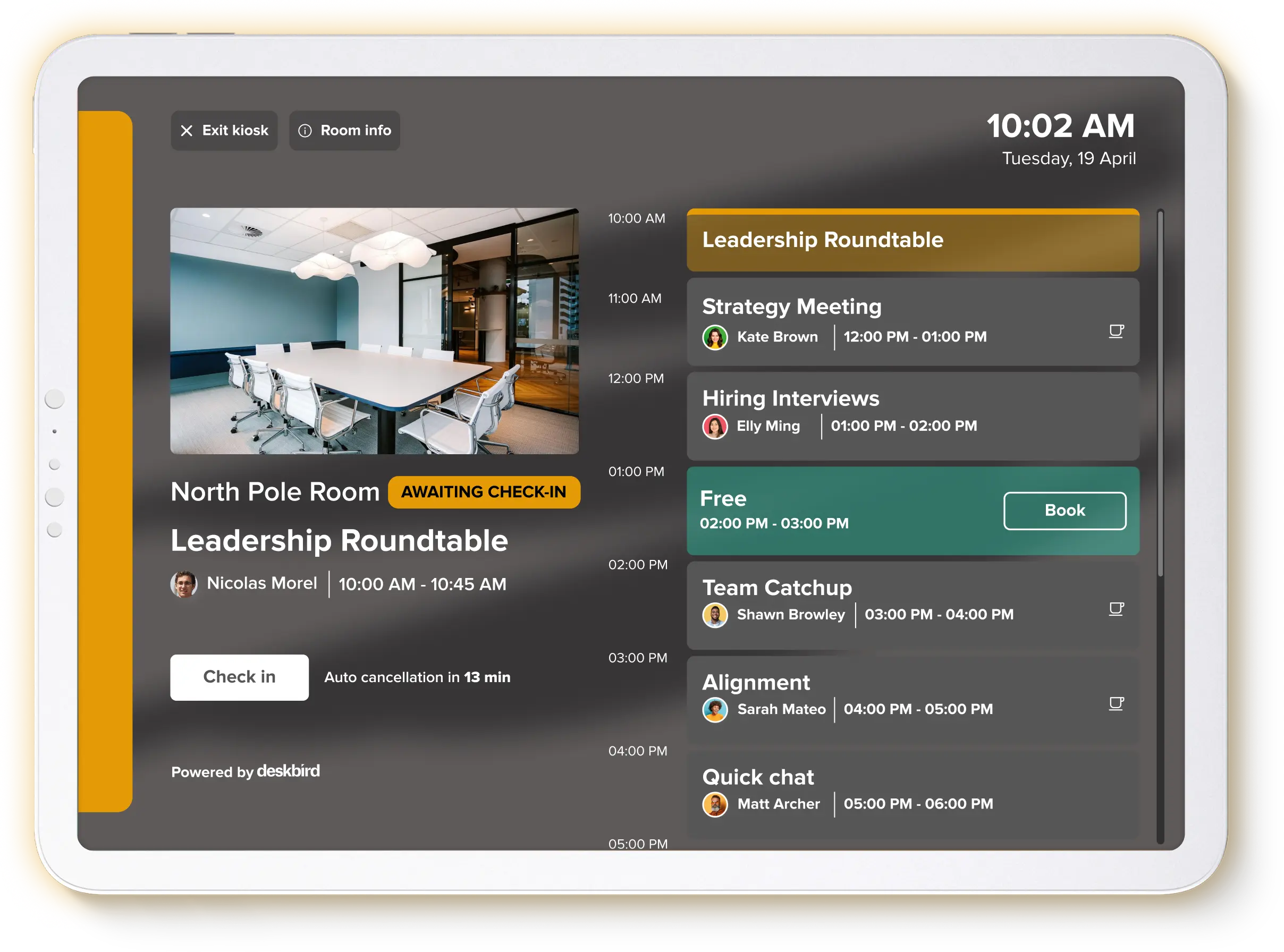
Check-in requirements with auto-release rules directly address the no-show problem. Employees must confirm their arrival through a mobile app, room display, or kiosk mode tablet. The system then automatically frees up rooms if no one arrives within a set timeframe, typically 10-15 minutes. This single feature can reduce wasted room capacity by 60-75% based on typical implementation results, ensuring spaces are available for teams who actually need them.
Interactive floor plans and mobile access
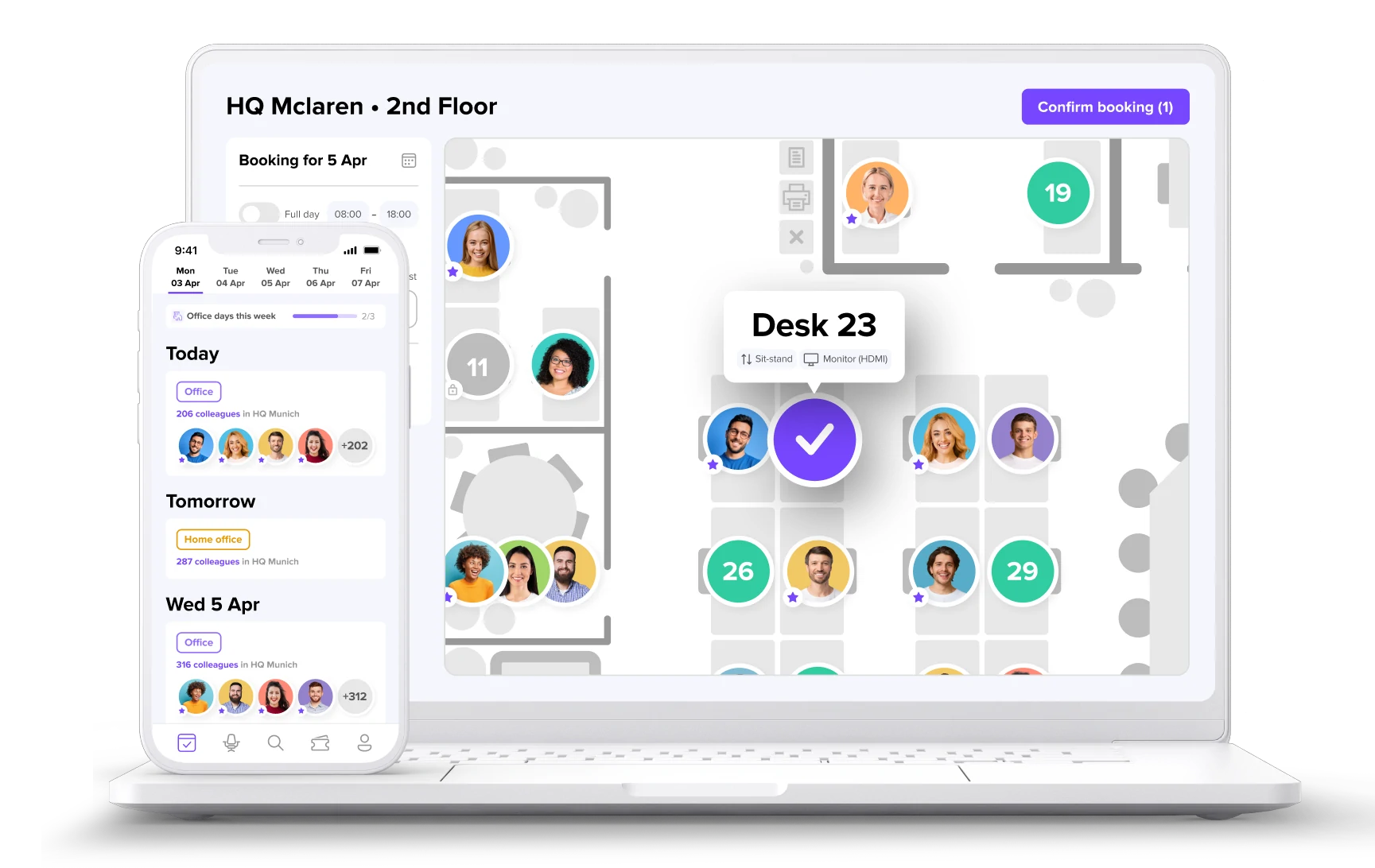
Digital floor plans help your team locate suitable meeting rooms and view their amenities effortlessly. Finding rooms and seeing what they offer becomes simple. Mobile apps allow your team to book spaces anytime, anywhere, ideal for those on the go or working remotely. Handle reservations from wherever you are with complete convenience and flexibility.
Analytics and utilization reporting
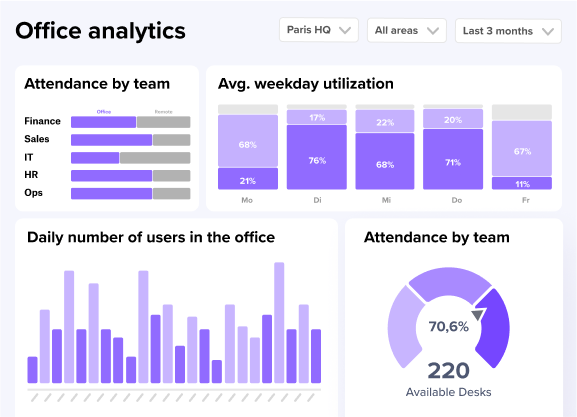
Gain insights into room utilization, popular time slots, and other relevant data. Analytics help organizations support office space optimization and find bottlenecks. Look for platforms that connect to BI tools or provide exportable data through an open APIs, so real estate teams can build defensible cases for space changes. These statistics show how meeting rooms are used, allowing for better planning and resource management.
Security and compliance for enterprise
Enterprise organizations need room scheduling software that meets IT security requirements. Look for SSO (single sign-on) and SCIM for automated user provisioning, which reduces maintenance burden and ensures employees are deprovisioned when they leave. Certifications matter: ISO 27001, SOC 2 Type II, and GDPR compliance indicate the vendor meets rigorous security and data protection standards. These aren't optional for organizations handling sensitive data or operating in regulated industries.
How to choose the right room scheduling software
Selecting meeting room scheduling software requires weighing the core software criteria, not just feature lists. The right choice depends on your calendar ecosystem, IT requirements, and total cost of ownership.
[Table1]
Match the solution to your calendar ecosystem
Your choice depends heavily on whether you're a Microsoft shop, Google Workspace environment, or mixed. Outlook integration depth varies significantly between vendors. Some offer basic calendar sync, while others provide native Teams integration, room resource management, and bidirectional updates. Test the actual integration, not just the claim that one exists.
Evaluate integration depth and IT requirements
IT teams care about maintenance burden and security. Look for SSO support (Azure AD/Entra ID, Okta) and SCIM for automated user provisioning. These reduce ongoing IT workload and ensure access controls stay current. Ask vendors about their integration reliability and whether updates require IT intervention. Native integrations that work out of the box save significant implementation and maintenance time.
Consider total cost beyond per-seat pricing
Per-seat pricing is just the starting point. Factor in:
- Hardware costs for room displays or kiosks
- Implementation effort and timeline
- Training requirements (or lack thereof)
- Adoption rates and their impact on data accuracy
- Ongoing maintenance and IT support needs
A tool with higher per-seat costs but 90%+ adoption and no training requirements often delivers better ROI than a cheaper alternative that employees avoid using.
How to implement room scheduling software successfully
Setting up a meeting room scheduling tool takes less effort than expected when you plan it strategically. Tailor the system to your organization's needs, ensure integration with existing tools, and help employees adopt it smoothly.
Configure the software and connect calendars
Start by customizing the platform to match your company setup. Add all meeting spaces, list capacities and amenities, and assign booking permissions. Connect the tool with calendars like Outlook or Google Calendar to synchronize all reservations and prevent double bookings. Verify that your Wi-Fi or Ethernet network supports the software and any hardware. A stable connection ensures all room scheduling features work correctly. This calendar sync creates a smooth, transparent scheduling experience for everyone.
Set up displays and check-in workflows
Install any required hardware outside each meeting space, like digital displays or tablets in kiosk mode. These show real-time availability and booking information. Make sure the monitors are mounted and connected correctly. Customize the system settings to fit your organization's needs, including check-in requirements, booking rules, and reservation policies like time slots and availability windows. Define your auto-release timeframe for no-shows. Personalized software makes it more user-friendly and ensures your requirements are met.
Test, train, and drive adoption
Before full deployment, test all features of the room scheduling system. Verify if there are any bugs or issues. Testing should include booking spaces, canceling reservations, and checking real-time updates.
The best room scheduling tools require minimal training. If employees need extensive instruction to book a room, adoption will suffer, and your utilization data will be unreliable. Look for intuitive interfaces that work the way people expect. Inform all employees about the newly installed system, its benefits, and how to use it through email, internal announcements, and brief walkthroughs. Clear instructions and support help workers adopt the software more easily.
Monitor usage and make improvements continuously
Launch the system gradually and monitor its performance closely in the first few weeks. Track usage patterns, address issues quickly, and adjust as needed. Gather feedback and analyze usage data to make your office space more efficient. Review the system's performance regularly and make adjustments based on user comments. Room utilization analytics become more valuable over time as you build historical data for trend analysis and real estate planning.
How deskbird supports meeting room scheduling
Looking for a simple, powerful way to manage your meeting rooms? deskbird is an all-in-one workspace management solution that helps you book rooms, make your office more efficient, and keep your hybrid teams connected.
deskbird delivers measurable outcomes:
- 90%+ adoption rates across 500+ companies, meaning your utilization data is actually reliable
- Significant no-show reduction through smart check-in and auto-release
- Comprehensive analytics connecting room usage to real estate decisions
- Native Outlook integration, Google Calendar sync, MS Teams, and Slack
- ISO 27001, SOC 2 Type II, and GDPR compliance with EU-hosted infrastructure
deskbird isn't just for booking meeting rooms. It's an all-in-one solution that allows you to reserve offices and parking spaces, make your office layout more efficient, and even schedule week planning and events. Handle all your reservation needs from one place.
deskbird's platform focuses on an intuitive user interface that drives 90%+ adoption, giving you reliable utilization data for better real estate decisions. Improved navigation and simplified booking processes drive higher adoption rates, which means more accurate utilization data for space planning decisions. A user-friendly design means all employees can navigate the system without training, driving the 90%+ adoption rates that make your utilization data reliable.
deskbird integrates with your existing tech stack: Microsoft Teams, Slack, Google Calendar, Outlook, SAP, Personio, Workday, BambooHR, and more. No more app switching. Native integrations work out of the box with zero ongoing maintenance. Track occupancy rates, peak usage times, and no-show patterns with deskbird's office analytics and reporting. Detailed information and trend analysis help you make space utilization more efficient, supporting data-driven decisions to improve your workspace.
Start a free trial of the deskbird platform to give your employees more flexibility with workspace booking and week planning while reducing unused capacity. Or request a free demo to experience the full potential of working with a room reservation system.

Frequently Asked Questions
Does Microsoft have a room scheduling tool?
Microsoft 365 includes basic room booking through Outlook and Exchange, but it lacks advanced features like check-in enforcement, auto-release of unused rooms, and utilization analytics. Many organizations pair Microsoft calendars with dedicated room scheduling software like deskbird for deeper functionality while maintaining fullOutlook integration.
Does Google have a room scheduling tool?
Google Workspace allows basic room booking through Google Calendar, but it does not include features like no-show detection, auto-release, or detailed analytics. Organizations often add a dedicated room scheduling platform that integrates with Google Calendar like deskbird to gain these capabilities.
How do I reduce no-shows and ghost bookings?
Implement check-in requirements with auto-release rules that free up rooms when no one arrives within a set timeframe, typically 10-15 minutes. deskbird automates this process with smart check-ins to reduce no-shows and make booked spaces available again faster.
Can meeting room scheduling software integrate with my existing tools?
Yes, most modern room scheduling platforms integrate with calendar systems (Outlook, Google Calendar), collaboration tools (MS Teams, Slack), and identity providers (SSO,SCIM). deskbird connects with 100+ tools including major HRIS platforms like Personio, SAP, and Workday.
What data can I get from room scheduling software?
Room scheduling software provides analytics on occupancy rates, booking frequency, peak usage times, no-show rates, and capacity utilization. This data helps real estate teams right-size room inventory and make evidence-based decisions about office space.
How long does it take to implement room scheduling software?
Implementation timelines vary, but cloud-based solutions can be deployed in days rather than months. deskbird typically achieves 90%+ adoption rates without formal training, reducing rollout complexity significantly.
What security certifications should I look for?
Enterprise organizations should look for ISO 27001, SOC 2 Type II, and GDPR compliance. These certifications indicate the vendor meets rigorous security and data protection standards. deskbird holds all three certifications with EU-hosted infrastructure.
See exactly which rooms you need. And which ones you don't.
- 90%+ adoption across 500+ companies means your utilization data is reliable
- Cut ghost bookings before they cost you
- Analytics connect directly to real estate decisions, not just room reports