

9 types of office layouts with pros and cons
Choosing a suitable office layout can make a huge difference in how your team works. There are nine common layouts to choose from, including traditional, open, and team-based layouts, and all of them come with different pros and cons. Which setup to choose depends on your team’s work style and model, office size, and organizational culture. To create a successful work environment, companies should combine flexible layouts, ergonomic and inclusive design, biophilic elements, workplace analytics, and modern technology.

Why is your office layout important?
Your office layout plays a critical role in shaping how your employees feel, work, and connect. A well-planned workspace not only drives productivity but also fosters collaboration, supports well-being, and reflects your company culture. In short, the way your office is designed can directly influence both employee satisfaction and business performance. Here are the key reasons why your office layout matters.
- Productivity boost: When an office is well-designed, essential tools and spaces are easy to find, which minimizes interruptions and time waste. Additionally, employees who can work in a setup that matches their needs are more likely to be productive.
- Better collaboration: A thoughtful design promotes better communication and collaboration as teams can find workspaces and equipment that meet their needs.
- Enhanced employee well-being: Enabling employees in a tailored environment is a clear, people-centric move. It enhances a modern, comfortable, and ergonomic setup, which boosts health and satisfaction.
- Optimized space utilization: Customized layouts allow you to tailor your office space according to your actual needs and those of your workforce.
- More flexibility: Dynamic and agile office designs meet today’s workforce demands for flexibility at work with regard to the physical workspace and the way they work.
- Office cost savings: Tailored office layouts enable you to reduce costs by optimizing or downsizing your office, making it more valuable and attractive.
- Stronger corporate culture: Well-designed offices reflect company values and foster teamwork.
- Employee expectations: There is no one-size-fits-all office layout. A modern setup with flexible office spaces and amenities aligns with employee needs.
🎬 Learn how we can support your hybrid work environment in this less than two-minute video about the features of the deskbird app!

The 9 types of office layouts you can choose for your workplace
Each layout serves different needs, work styles, and organizational goals. Here's a breakdown of the most common office layouts with their key benefits and drawbacks.
1. Traditional office layout
In a traditional office, employees have individual offices or cubicles which provide private spaces for focused work. This layout frequently portrays an evident hierarchical setup, with managers in separate offices and team members in cubicles.
Pros of a traditional office layout
- Quiet environment perfect for concentration and deep work
- Clear structure that defines roles and responsibilities
- Allows employees to personalize their workspace
- Creates a sense of ownership and stability
Cons of a traditional office layout
- Physical barriers limit spontaneous collaboration and communication
- Requires more space and resources than modern designs
- Less efficient use of office real estate
- Can feel isolating for some employees
2. Open office layout
Open offices feature large, unenclosed spaces with minimal partitions, encouraging collective work. Desks are typically arranged in clusters, promoting interaction and collaboration.
Pros of an open office layout
- Facilitates communication and teamwork naturally
- Creates an engaging, energetic environment
- More cost-effective and easier to reconfigure
- Uses space efficiently and fosters community
- Supports transparency and accessibility
Cons of an open office layout
- Noise and distractions can reduce focus and productivity
- Limited privacy for confidential work or calls
- According to a survey by Savills UK, 37% of employees in open-plan offices said their workspace decreased productivity
- Constant activity can feel overwhelming for some workers

3. Cubicle office layout
Cubicles are semi-enclosed workspaces with partitions, giving each employee a small, personal area. This layout offers a balance between privacy and openness.
Pros of a cubicle office layout
- More privacy and fewer distractions than fully open offices
- Helps employees focus better on individual tasks
- Cost-effective and space-efficient
- Keeps the workplace organized and structured
Cons of a cubicle office layout
- Can feel isolating and limit collaboration
- May appear cold or impersonal, affecting morale
- Some noise still travels through dividers
- Less flexibility for reconfiguration
4. Private office layout
Private desks are individual workstations with enclosed spaces so employees can focus. Most come with a desk, ergonomic chair, and plenty of storage.
Pros of a private office layout
- Total privacy with minimal distractions
- Ideal for confidential or sensitive work
- Can serve as a status symbol and boost job satisfaction
- Perfect for roles requiring deep focus or executive decision-making
Cons of a private office layout
- Takes up more space and resources
- Less efficient use of office real estate
- Limits spontaneous interactions and collaboration
- Can slow communication and innovation
5. Team-based office layout
This layout assigns employees by teams or departments, with designated areas for each group. It supports collaboration and often includes shared workspaces.
Pros of a team-based office layout
- Boosts communication and teamwork within groups
- Makes project management easier with everyone nearby
- Supports focused collaboration on shared goals
- Creates team identity and cohesion
Cons of a team-based office layout
- Limits cross-departmental collaboration
- Noise and distractions can be problematic when multiple people work closely
- Constant interaction may lead to interruptions
- Less flexibility for individual work styles
6. Activity-based office layout
This layout provides different areas for specific activities, such as quiet zones for focused work, open collaboration spaces, and casual, informal meeting spots.
Pros of an activity-based layout
- Flexible design accommodates various work styles and tasks
- Employees choose the environment that best suits their needs
- Increases productivity by matching space to activity
- Boosts satisfaction and performance through choice
Cons of an activity-based layout
- Managing and maintaining multiple workspaces is complex
- Employees may struggle to adapt to moving between zones
- Requires more planning, resources, and coordination
- Can feel disorienting without clear guidelines

7. Coworking office layout
Coworking spaces are shared workspaces where multiple individuals or companies work together. They often feature open areas, private desks, and centralized amenities.
Pros of a coworking office layout
- Ideal for networking and collaboration across companies
- Offers flexible rental options and diverse environments
- Fosters innovation and creativity through exposure to different industries
- Cost-effective for startups and small teams
Cons of a coworking office layout
- Noisy and distracting communal spaces can hinder focus
- Limited privacy for confidential work
- Potential for overcrowding during peak times
- Lack of control over the environment and amenities
8. Hybrid office layout
Hybrid offices combine different layouts in the same workspace so employees can choose to do their jobs in the best work environment possible.
Pros of a hybrid office layout
- Accommodates various work styles and enhances flexibility
- Supports better work-life balance through choice
- Adapts as activity patterns and preferences change
- Attracts a broader talent pool seeking modern, flexible workplaces
- Optimizes space usage based on actual attendance
Cons of a hybrid office layout
- Can be challenging to manage and coordinate effectively
- Requires modern technology (like deskbird!) to support seamless communication
- Needs clear guidelines to prevent confusion
- May require more planning and investment upfront

9. Home office layout
Home offices are workspaces within a household, often customized to fit individual needs and preferences. It includes essential office equipment and a comfortable working environment.
Pros of home office
- Offers comfort and convenience with no commute time
- Increases flexibility and work-life integration
- Allows employees to create personalized, ergonomic setups
- Can boost productivity for self-motivated workers
Cons of home office
- Blurs lines between professional and personal life, risking burnout
- Isolation can impact collaboration and team connection
- Home distractions may reduce productivity
- Not everyone's living environment supports effective work
How to choose the right office layout for your teams
To choose the right office layout, start by aligning the design with your team’s working model, office size, and daily activities. Consider employee feedback, prioritize ergonomics and inclusivity, and look at how your space is actually used. Adding flexibility, natural elements, and smart technology ensure your workplace runs smoothly.
Here are nine practical steps to guide your decision.
1. Prefer an agile office layout with multiple types of workspaces
Design your office with a mix of quiet zones, collaborative areas, and informal meeting spots so employees can choose the environment that best fits their tasks. This flexibility supports different work styles, adapts to changing needs, and creates an agile office layout that fosters innovation, productivity, and employee satisfaction.
2. Take your working model into account
Match your layout to your team's working model:
- Hybrid teams: Benefit from hot desking, bookable spaces, and flexible zones
- Fully in-office teams: May need more fixed desks and dedicated areas
- Part-time onsite: Require shared spaces that maximize efficiency on high-attendance days
Adapting design to attendance patterns ensures space efficiency, smooth transitions, and higher employee comfort.
3. Ask your teams about their preferences
Engage employees in the design process by gathering feedback through surveys and meetings to understand their needs for collaboration, quiet focus, or ergonomic comfort. Involving them not only ensures that the new layout reflects real priorities but also increases morale, ownership, and productivity from day one.
4. Consider your office size and headcount
Plan layouts realistically by balancing ambition with available office space and headcount. Small offices can maximize efficiency with multifunctional areas and smart storage, while larger workplaces should create defined zones for focus and collaboration. This approach guarantees comfort, prevents overcrowding, and supports smoother workflows.
👋 Try our hybrid office space calculator: discover how to optimize your workspace and save costs!
5. Think about the ergonomics of your space
Prioritize ergonomics with adjustable furniture, correct screen positioning, and adequate lighting to reduce strain and boost productivity. Incorporating ergonomic practices improves employee health, prevents workplace injuries, and ensures long-term comfort, making your office a healthier and more efficient environment.
6. Create an inclusive workspace layout
Design your office with accessibility in mind by providing wide pathways, adjustable desks, and assistive technologies that support all abilities. Inclusive layouts not only comply with workplace regulations but also create a culture of equity, increase employee satisfaction, and allow every team member to contribute fully.

7. Implement biophilic office design
Integrate natural light, plants, earthy materials, and outdoor spaces to connect employees with nature. A biophilic office design reduces stress, boosts creativity, and improves overall well-being while also making the office more visually appealing and aligned with sustainability goals.
8. Check your office analytics
Use workplace analytics to track how desks, meeting rooms, and shared areas are utilized, then adapt layouts to eliminate wasted space and align with actual demand. Data-driven decisions improve resource allocation, balance usage across zones, and ensure the office supports how your teams actually work.
9. Use modern workplace technology
Adopt smart technology like desk booking systems, occupancy sensors, and digital ergonomic furniture to streamline workflows and maximize space efficiency. Modern tools support hybrid models, enable flexibility, and create a seamless experience that empowers employees to perform at their best.
Conclusion: The right office layout can transform your workplace
Choosing the right workspace layout goes beyond arranging desks. It shapes how your team collaborates, focuses, and thrives. Each option, from traditional and private offices to hybrid and activity-based designs, offers unique strengths and challenges. The key is to align your layout with your team’s work style, company culture, and growth goals.
A well-planned design not only maximizes space but also boosts productivity, strengthens collaboration, and enhances employee well-being. Request a free demo of the deskbird app to discover how we can help you manage a flexible office efficiently and improve your workplace experience!

Frequently Asked Questions
What is the most popular layout for an office?
The open office layout remains the most popular layout, with roughly 70% of US office workers sitting in open-plan offices. However, many organizations now combine open areas with quiet zones or hybrid setups to address common drawbacks like noise, distractions, and limited privacy while keeping flexibility and efficiency.
Which office layout is best for hybrid or flexible work models?
Hybrid office layouts are best suited for flexible work. They combine multiple setups, such as hot desks, collaboration areas, and private spaces, to accommodate diverse work styles. Supported by desk booking systems, they give employees freedom to choose where and how they work while optimizing space usage.
How do open-plan offices compare to private office layouts?
Open-plan offices encourage collaboration, flexibility, and community but often suffer from noise and lack of privacy. Private offices, by contrast, provide focus, confidentiality, and a sense of ownership but use more space and limit spontaneous communication. Most modern workplaces blend both to balance benefits and drawbacks.
How can workplace management tools like deskbird help companies adapt their office layout to changing workplace needs?
Tools like deskbird provide real-time workplace analytics, smart desk booking, and hybrid scheduling. These features help companies monitor space usage, reduce wasted office space, and adjust layouts quickly. By aligning resources with employee behavior, organizations can cut costs, improve collaboration, and ensure the office remains flexible and future-ready.
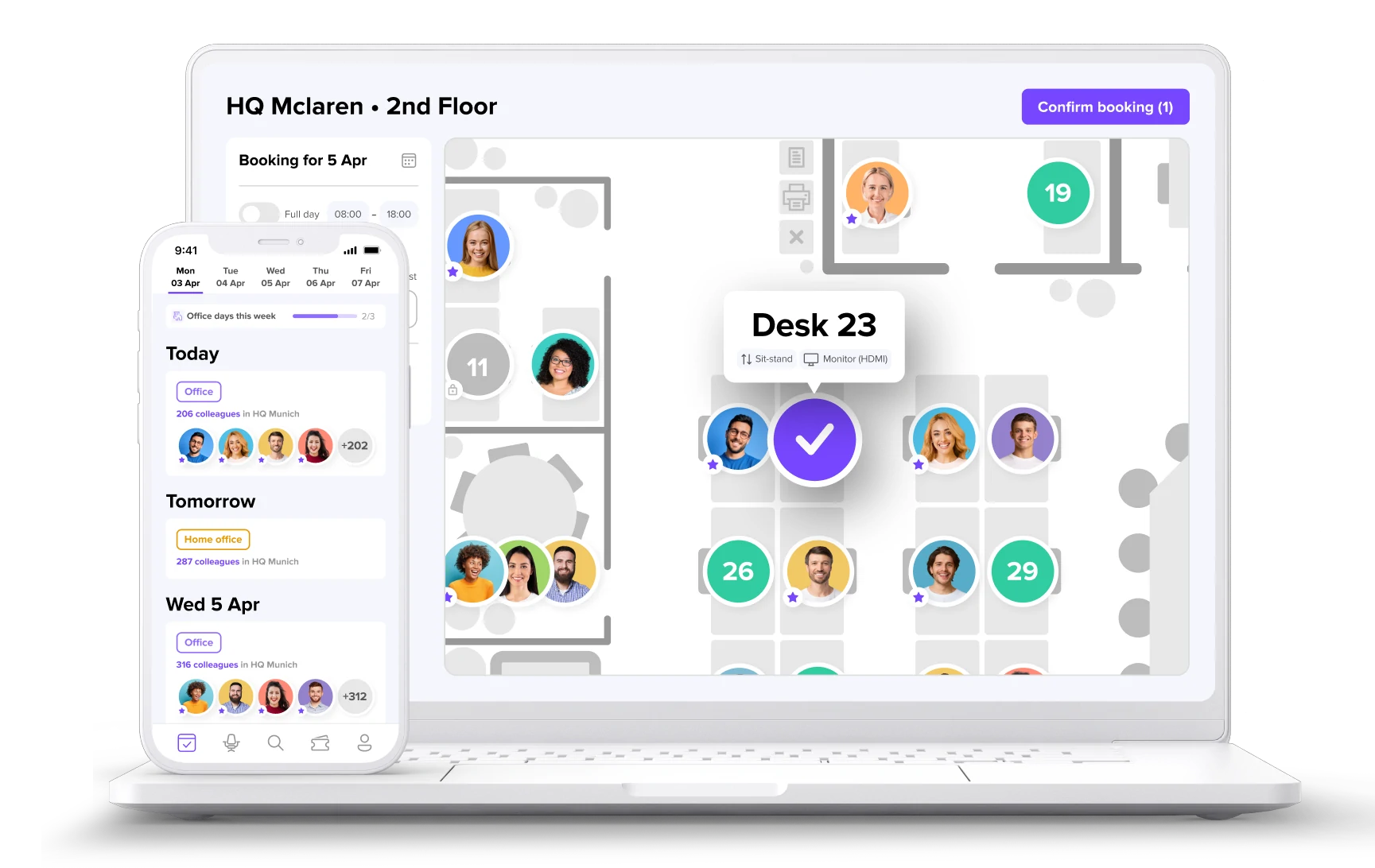
Make the most out of your office
- Explore how to optimize your layout with interactive floor plans
- Use real-time data to optimize office usage and avoid empty desks
- Get usage insights to know when to scale, shrink, or redesign