
Workplace analytics: a practical guide for hybrid teams
How to leverage workplace analytics to optimize hybrid offices and take smart business decisions. Learn metrics and best practices to improve attendance, optimize space usage and reduce real estate costs.

Workplace analytics gives you concrete data about how your office space actually gets used so you can make smarter decisions about real estate, hybrid policies, and capacity planning. This guide explains what workplace analytics tracks, how it works, and how to use it to reduce costs and improve your hybrid workplace without guesswork.
What is workplace analytics?
Workplace analytics is the practice of collecting and analyzing data about how employees use office spaces, digital tools, and time. This means you get concrete answers about what is actually happening in your office instead of relying on guesswork or quick visual scans.
The data comes from booking systems, calendars, sensors, and HR platforms. These sources feed into workplace analytics software that shows patterns you cannot see with the naked eye. For example, you might discover that a meeting room you thought was always busy actually sits empty most afternoons, or that Fridays see half the attendance of Tuesdays.
This information helps you make better decisions about real estate, hybrid policies, and office layouts. Instead of asking "Do we have enough space?" you can answer "We use 60% of our desks on peak days and 25% on Fridays."
What data does workplace analytics track?
Workplace analytics captures 4 main types of information. Each category answers different questions about how your office operates.
- Space usage tracks how physical resources get used throughout the day. This includes desk occupancy, meeting room bookings, visitor traffic, and peak hours. You learn whether you have too many desks, too few, or just enough for your actual needs.
- Collaboration patterns measure how teams interact with each other. The system looks at meeting frequency, duration, attendee lists, and which departments work together most often. This reveals if your office layout supports the way people actually collaborate or creates unnecessary friction.
- Time allocation shows how employees split their workday between different activities. It distinguishes between meeting time, focus work, and other tasks. This helps you spot potential burnout risks or identify if people spend too much time in unproductive meetings.
- Attendance trends monitor who comes to the office, when they arrive, and how often they visit. You can break this down by team, department, or location to understand if your hybrid work policy is being followed or ignored.
The key difference from surveillance tools is that workplace data analytics uses aggregated, anonymized information. The system shows group behavior and office-wide trends, not individual employee tracking.
How does workplace analytics work?
Workplace analytics follows a 3-step cycle that turns raw inputs into visual insights. This process runs continuously in the background without requiring manual data entry.
- Data collection pulls information from your existing digital footprint. The system connects to calendars like Outlook and Google Calendar, desk booking platforms, badge readers, Wi-Fi networks, IoT sensors, and HRIS tools. Every time someone books a desk or swipes into the building, that action becomes a data point.
- Analysis uses algorithms to process this information and identify patterns. The software looks for trends like which days see the highest attendance, which zones stay empty, and how booking behavior changes over time. Machine learning helps spot anomalies that might indicate a problem, like a sudden drop in meeting room usage.
- Reporting generates dashboards and visualizations that anyone can understand. You see utilization rates, peak days, busiest zones, and resource demand in charts and graphs. This makes it easy to share insights with leadership or facilities teams without needing a data science degree.
Privacy-first platforms set minimum group sizes before displaying any data. Most require at least 5 people in a group before showing results. This prevents anyone from identifying individual behavior in the reports.
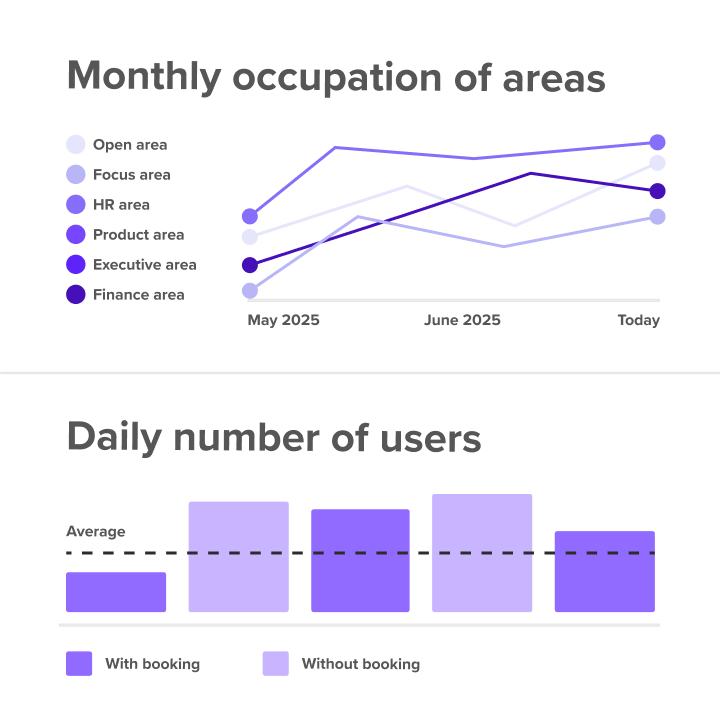
Key workplace analytics metrics to measure
Tracking the right metrics tells you what is really happening versus what you assume is happening. These measurements form the foundation of any workspace analytics strategy.
- Space utilization rate: The percentage of available desks or rooms actually used during a specific period
- Peak occupancy days: Which days see the highest attendance (typically Tuesday through Thursday in hybrid offices)
- No-show rate: How many booked desks or rooms go unused after someone reserves them
- Desk-to-employee ratio: How many desks you need compared to your total headcount
- Meeting room demand: Which rooms are constantly overbooked versus those that sit empty
- Average attendance: How often employees come to the office per week or month
Space utilization rate is often the most eye-opening metric for companies new to workplace analytics. Many organizations discover they are paying for far more space than they actually need. A utilization rate below 50% suggests you could downsize your office footprint without affecting employee experience. XY Sense's Workplace Utilization Index shows global office utilization currently averages 43%.
Peak occupancy days help you plan capacity. If Tuesday through Thursday consistently hit 80% capacity while Monday and Friday hover around 30%, you know exactly when you need maximum resources available.
The desk-to-employee ratio has shifted dramatically with hybrid work. Traditional offices maintained a 1:1 ratio, giving every employee their own dedicated desk—though CBRE data shows only 40% of companies still maintain this. Hybrid offices often operate efficiently with ratios closer to 0.6:1 or 0.7:1, meaning 6-7 desks for every 10 employees.
Benefits of workplace analytics for hybrid teams
Workplace analytics removes the friction from managing flexible work arrangements. The data provides clarity that makes hybrid operations smoother for everyone involved.
- Reduced real estate costs come from identifying underused space. When analytics show that you only need 60% of your current office on peak days, you can downsize to a smaller lease. This saves money on rent, utilities, cleaning, and maintenance without forcing anyone to work from home against their preference.
- Improved space planning happens when you design layouts based on actual usage instead of assumptions. If data shows employees struggle to find quiet focus areas, you can convert underused social zones into dedicated quiet rooms. If certain teams always book desks near each other, you can create neighborhood zones that support their collaboration.
- Better hybrid policy decisions emerge when you see which rules work and which create problems. Analytics reveal if mandatory office days drive attendance or if employees prefer coming in on specific days for organic collaboration. You can adjust policies based on evidence rather than executive opinions.
- Increased employee experience comes from giving teams visibility into when colleagues will be in the office. This clarity helps people plan their week around meaningful in-person collaboration instead of commuting for solo work they could do from home.
- Data-driven budgeting replaces guesswork when planning office investments. Whether you are buying new furniture, upgrading technology, or redesigning a floor, analytics ensure you spend money where it adds the most value.
Workplace analytics for hybrid environments helps you balance flexibility with collaboration needs. The office becomes a deliberate destination rather than a mandatory obligation.
Common use cases for workplace analytics
Organizations apply workplace analytics to solve specific operational challenges. These scenarios show how data translates into better management decisions.
- Office relocation or downsizing requires accurate space projections. Before signing a new lease, you can use analytics to determine exactly how much square footage you need. This prevents the expensive mistake of leasing too much space for a hybrid workforce that only comes in 2-3 days per week.
- Hybrid work enforcement helps HR teams understand if attendance policies are followed in practice. If you mandate 3 days per week in the office but analytics show most teams only come in 1-2 days, you know the policy needs adjustment or better communication.
- Capacity planning for growth uses current data to predict future needs. Fast-growing companies can see if their existing space can absorb new hires or if they need to expand. This helps avoid overcrowding on peak days without immediately acquiring expensive new real estate.
- Meeting room optimization reallocates spaces based on actual demand versus perceived need—Density's research shows global meeting room utilization averages just 30%. If analytics show that 4-person meetings constantly happen in 10-person conference rooms, you can convert some large rooms into smaller huddle spaces. This creates more total capacity without adding square footage.
- SustainabilitySustainability reporting measures and reduces energy waste by identifying underused floors or zones. Closing specific areas on low-traffic days like Fridays can significantly lower heating, cooling, and lighting costs while supporting environmental goals.
Privacy and ethical considerations
Privacy is the most important factor when implementing workplace analytics. Employees worry about surveillance, so you need platforms that prioritize privacy by design from the start.
Aggregation thresholds ensure data only displays when groups meet minimum size requirements. Most ethical systems require at least 5 people in a group before showing any information. This prevents anyone from isolating a single individual's habits from the group trend.
Anonymization strips individual identities from all reports. The system processes data to show that "the Marketing team" is in the office, not that "Sarah from Marketing" is at desk 42. Names, employee IDs, and other personal identifiers never appear in analytics dashboards.
GDPR and compliance matter especially for European companies or those with European employees. Platforms that follow strict data protection standards ensure information is hosted securely and processed according to regulations. Look for certifications like ISO 27001 and SOC2 that verify security practices.
Transparency builds trust with your team. Employees should know exactly what gets tracked and why. Clear communication about the goal—improving the office experience, not monitoring individual performance—prevents anxiety and resistance.
Purpose limitation means data should only inform space decisions. It should never be used for performance reviews, disciplinary actions, or determining promotions. When employees trust that analytics serve the workplace rather than surveillance, they engage more honestly with booking systems.
Privacy-first design encourages adoption of booking tools and ensures the data you collect is accurate and useful. If employees fear monitoring, they will avoid the system entirely, leaving you with incomplete information.
How to choose workplace analytics software
Selecting the right platform ensures you get actionable insights without creating new administrative headaches. The best workplace analytics software balances comprehensive data with simplicity.
Integration depth determines how smoothly the system fits into your existing workflow. Look for platforms that connect directly with MS Teams, Slack, Outlook, Google Calendar, and HRIS tools like Personio or SAP. When data flows automatically from tools people already use, you get higher accuracy without manual entry.
Privacy standards are non-negotiable for protecting employee information. Verify that platforms offer GDPR compliance, EU hosting options, and certifications like ISO 27001 and SOC2. These credentials prove the vendor takes security seriously and follows industry best practices.
Ease of use matters because workplace leaders should access insights without IT support. The interface should be intuitive enough that anyone can pull reports and view dashboards in just a few clicks. Complex systems that require training or technical knowledge often go unused.
Actionable outputs separate useful platforms from those that just display numbers. Look for features that suggest improvements or automate resource management based on usage trends. For example, some systems can automatically reduce bookable desks on low-attendance days to save energy costs.
Scalability ensures the solution grows with your organization. Whether you have 50 or 5,000 employees, the analytics should remain fast and accurate. Ask vendors about performance at different company sizes before committing.
How deskbird supports workplace analytics
deskbird makes hybrid work simple for employees and transparent for management. The platform goes beyond basic booking to provide deep intelligence on how your office actually gets used.
Comprehensive analytics dashboards visualize occupancy, utilization, and attendance trends in real-time. You see exactly which days are busiest and which zones are underutilized. This data helps you make confident decisions about right-sizing your real estate portfolio.
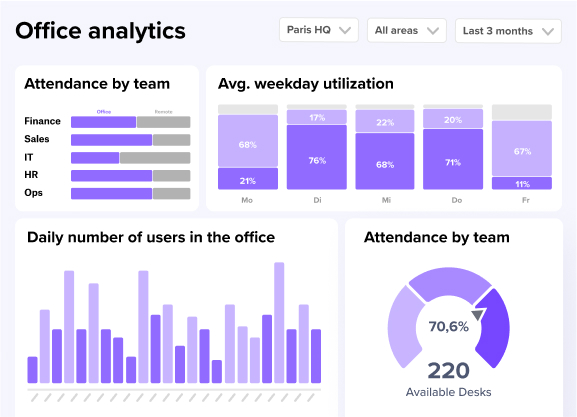
Dynamic Spaces automatically adjusts bookable resources based on demand patterns. If analytics show that Fridays have low attendance, the system can make fewer desks available or close off specific zones. This saves on cleaning and energy costs without requiring manual intervention from facilities teams.
Deep integrations with MS Teams, Slack, and HRIS systems like Personio and SAP ensure high adoption rates. When booking happens inside tools people already use every day, they actually do it. This leads to more accurate data that reflects true office usage.
GDPR-compliant, ISO 27001-certified security protects your workplace data. Because deskbird is built and hosted in Europe, it follows strict privacy standards that keep employee information safe and anonymous.
With deskbird, we are well equipped to get people to check office attendance numbers when making decisions about their in-office or remote days.
Giulia Pelia, Office Manager at Dermaceutic Laboratoire
Turn workplace data into smarter office decisions
Workplace analytics removes guesswork from managing a hybrid office. With accurate data, you can make your office more efficient, reduce unnecessary costs, and create a workspace people actually want to visit.
The right analytics platform transforms your office from a static cost center into a flexible asset that adapts to your team's needs. You stop paying for empty desks and start investing in spaces that support real collaboration.
deskbird provides the insights you need to run a better hybrid workplace. By combining intuitive booking tools with powerful analytics, we help you build a workplace strategy based on reality rather than assumptions. Book a demo to see how deskbird helps you make data-backed workplace decisions.
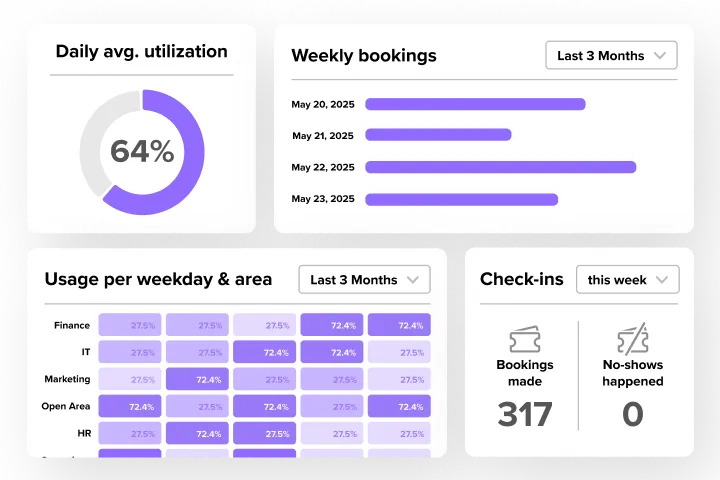
Workplace analytics for smarter office decisions
Get precise data on office use and team behavior, convert data into actionable improvements, and shape a fully optimized workplace with deskbird.
Workplace analytics FAQs
More on workplace data insights and how to leverage them with deskbird.
What is workplace analytics?
Workplace analytics is the use of data, AI, and machine learning to understand how people work and how office resources are used. It helps organizations make evidence-based decisions that boost productivity, engagement, and efficiency while maintaining transparency, ethical data practices, and employee trust in hybrid or evolving work environments.
What is the difference between workplace analytics and workforce analytics?
Workplace analytics focuses on how physical spaces and resources get used, such as desk occupancy and meeting room demand. Workforce analytics examines employee performance, engagement, retention, and HR-related metrics like turnover rates.
What data is typically tracked with workplace analytics tools?
Workplace analytics tools monitor data such as space usage, employee productivity, engagement levels, attendance, collaboration patterns, and resource utilization. This information is gathered from calendars, booking systems, sensors, and digital tools to reveal how people interact with spaces and technologies, supporting more efficient and responsive workplace design.
Is workplace analytics the same as employee surveillance?
No. Responsible workplace analytics aggregates and anonymizes data to show patterns across groups of at least 5 people, not individual behavior. The goal is improving the office environment and space planning, not monitoring individual productivity.
How long does it take to get useful insights from workplace analytics?
You typically need several weeks of data to identify reliable patterns and account for anomalies like holidays or company events. Ongoing tracking provides the most accurate insights for long-term planning and policy decisions.
