
6 best (hot) desk booking software & platforms in 2026
This guide compares the main desk booking platforms, explains what features actually matter for adoption and cost savings, and shows you how to choose the right tool for your organization.

TL;DR
The best desk booking software makes reserving a workspace as easy as sending a message. However, a booking system is only as useful as the data it generates so data quality depends entirely on whether employees actually use the tool. That's why the best platforms focus as much on the employee experience as on the admin controls.
The shortlist for the best desk booking software this year is:
- deskbird. Solid choice for mid-market to Enterprise teams that seek a modern, intuitive platform. Book desks in 2 clicks directly inside Teams and Outlook, with 90%+ adoption rates that yield real utilization data to back up space decisions.
- Skedda. Good choice for simple setups or smaller teams. Solid booking rules and predictable space-based pricing for offices that don't need a full workplace platform.
- Envoy. Envoy's integration of visitor management and desk booking in one platform is a differentiator for organizations where front-desk operations and space management overlap.
Introduction
Desk booking software lets hybrid teams reserve workspaces before they arrive, eliminating desk hunting and giving workplace leaders the data they need to manage office space efficiently.
The best desk booking software isn't the one with the most features. It's the one your employees actually use, consistently enough to generate data that helps you make smarter decisions about space. This is crucial because most offices are paying for more space than they need. In fact, only 36% of organizations use real-time occupancy data to manage their footprint. The rest are guessing.
Desk booking software closes that gap, but only when adoption is high enough to trust the data. That's the bar to clear. Use this guide to find the tool that clears it for your team.
Key features to look for in desk booking software
The features that matter most reduce friction for employees and give you reliable data. Everything else is secondary.
- Real-time availability on an interactive floor plan. Employees should see which desks are free, where their team is sitting, and be able to book without extra steps.
- Check-in and auto-release. Ghost bookings (desks reserved but never used) are a genuine problem. Smart check-in flows that auto-release no-shows keep your data accurate.
- Integrations that reduce friction. If employees need to open a new app to book a desk, adoption will suffer. Tools that work inside Teams, Outlook, or Slack remove that barrier.
- Analytics that inform decisions. Peak-day attendance, utilization rates, no-show patterns: all these numbers let you make confident space decisions instead of relying on assumptions.
- Booking rules and policies. Team zones, booking windows, hybrid policy enforcement: all of these help you match space to how your office actually works.
List of 6 desk booking software tools
1. deskbird
Best for: Hybrid offices of mid-market to enterprise organizations, especially those already on Microsoft 365 and looking for high adoption and reliable space utilization data.
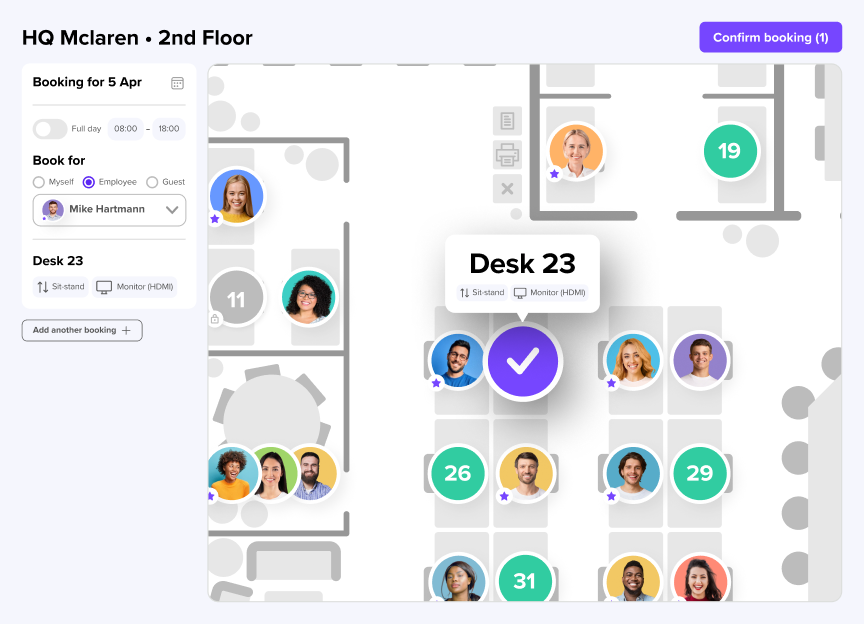
deskbird is a workplace management platform built specifically for hybrid work. Employees book desks, rooms, parking, and other resources through an interactive floor plan or directly inside Microsoft Teams and Outlook without switching apps.
One of the platform's defining advantage is adoption. With over 90% employee adoption rates across 500+ companies, deskbird generates the kind of utilization data and analytics that actually helps you make decisions. Rather than tracking intent (what employees said they'd do), deskbird tracks check-ins, which reflects what employees actually did. That distinction matters when you're justifying real estate decisions to a CFO.
Standout features:
- Desk and room booking in 2 clicks, natively inside Teams and Outlook
- Colleague view: see who's in and sit near teammates without extra coordination
- Auto check-in and ghost booking prevention
- Workplace analytics with real utilization rates (no sensors needed)
- SCIM, Azure AD/Entra ID, and Okta for zero-maintenance IT provisioning
- ISO 27001 and SOC 2 certified, EU-hosted in Frankfurt
deskbird pricing
deskbird offers transparent pricing so teams only pay for the features needed and aligned with their stage of growth. Paid plans start at €2.50/user/month and can be complemented with add-ons for room bookings, visitors and user management.
2. Envoy
Best for: Mid-to-large offices where visitor management, access control, and desk booking are equally important.
Envoy started as a visitor management platform and built desk booking on top of that foundation. For organizations where managing who enters the building is just as important as who books which desk, that combined capability is useful.
Admins can designate desks as hot, permanent, or unavailable, and set up team neighborhoods so groups can sit together. The analytics give workplace managers a view of who's onsite, when, and where, useful for both space planning and compliance.
Some users may find it lacks structured hybrid work coordination features like in-office policies or EU-level privacy standards options. Online reviews also mention admins finding Envoy hard to navigate.
Pricing: The basic plan for Envoy Workplace start at $60/bookable resource/year. It doesn't include modules such as visitor management (Envoy Visitors). Additionally, other capabilities (e.g. deliveries, access control, evacuations) are priced per location/product, which can make costs unpredictable for teams looking to grow.
3. Officely
Best for: Teams under 200 people running primarily on Slack who want straightforward desk booking without implementation overhead.
Officely takes a channel-native approach to desk booking. Employees book desks and rooms directly inside Slack (and, increasingly, Microsoft Teams), without leaving the platform they already use for communication.
For smaller teams or startups that haven't committed to a full workplace management tool, Officely is a solid option. As there's no new standalone app to learn and onboard, setup is straightforward.
The trade-off is depth. Officely doesn't have the analytics, multi-location controls, or admin customization of other more complete platforms. Hybrid policy compliance only works through Slack or Teams, which means the experience is tied to those channels. Larger organizations that need real utilization data and space optimization tools may need to look elsewhere.
Pricing: Paid plans start from $2.50/user per month (billed annually).
4. Skedda
Best for: SMBs, universities, and organizations with straightforward booking needs.
Skedda is an established space booking platform with over 12,000 customers. Its main appeal is a configurable booking rules engine wrapped in a straightforward interface.
Administrators can set policies around who can book what, when, and under which conditions. The self-service model means less admin overhead once the system is up and running.
One thing to keep in mind is that Skedda's pricing is based on the number of bookable spaces, not users. That sounds predictable, but it can get expensive quickly if you add meeting rooms, parking bays, or phone booths as every resource type counts toward the tier limit. Analytics and advanced admin controls are also locked behind higher-paid tiers.
Pricing: Starting from $99/month including 15 spaces and a limited insights dashboard.
5. Kadence
Best for: Teams prioritizing team visibility and AI-assisted coordination.
Kadence focuses on the coordination side of hybrid work — not just where desks are available, but who will be in the office and when. Its dynamic team neighborhoods feature lets zones shift based on the day of the week, which is useful for offices where departments rotate their in-office schedules.
The platform also introduced Kadence SpaceOps in late 2025, an AI module designed to help real estate and workplace leaders model space decisions, forecast occupancy changes, and evaluate office consolidation strategies.
Pricing: Kadence prices are not publicly displayed on their website, requiring custom quotes for evaluation.
6. Robin
Best for: Large enterprises managing multi-site, multi-resource environments.
Robin started as a meeting room booking tool and has expanded into a broader workplace platform. It covers desk booking, room reservations, visitor management, wayfinding, digital signage, and workplace analytics in one system.
The platform connects with hardware displays and interactive kiosks, which is relevant for large office campuses where physical signage is part of the space management setup.
Pricing: Robin pricing isn’t disclosed. The subscriptions are billed on an annual basis, effectively locking you into a long-term contract, which can result in higher minimum commitments.
How to choose desk booking software for your team
The right tool depends on a few variables including your integration environment, where your offices are located and ultimately, your team size.
- Start by listing your must-have integrations. If your company lives in Microsoft Teams, a tool without deep Teams integration will struggle.
- Check data privacy requirements. Ask where data is hosted. If you operate in Europe or work with European clients, GDPR compliance and EU hosting are essential.
- Test the user experience yourself. The best software is the one people actually use. If booking is not intuitive, adoption will fail.
- Ask about rollout support. Moving to hybrid is a cultural change, so look for a vendor that helps with onboarding and internal communication.
- Compare total cost. Factor in setup fees, add-on costs, and potential savings from reducing your real estate footprint.
Why hybrid teams choose deskbird
deskbird combines desk and room booking, workplace analytics, and hybrid policy management in one platform and is designed specifically for teams that need high adoption and reliable space data.
Employees book from their phone, from Microsoft Teams, or from the Outlook Add-In, wherever they already plan their day. Facilities teams get utilization data based on actual check-ins, not intentions. And the whole platform is GDPR-compliant and EU-hosted, with ISO 27001 and SOC 2 certification.
The result is a workplace management tool that doesn't require a behavior change to work. That's why deskbird customers see 90%+ adoption rates and why that adoption translates into data teams can actually use to make decisions.
Disclaimer
Software listed in this article, and corresponding pricing and functionalities, are based on publicly available information as of March 2026 and are subject to change. Information provided without guarantee. If something is mapped out incorrectly, please contact us.

Intuitive desk booking, accurate office insights
Choose an effortless desk booking system that gives you real-time visibility, automated coordination, and office insights your team can rely on.
Frequently Asked Questions
Additional questions on desk booking software.
What is desk booking software?
Desk booking software lets employees reserve a workspace before coming into the office, instead of relying on assigned seating or first-come, first-served. In hybrid offices, where not everyone comes in every day, it prevents overcrowding, eliminates desk conflicts, and gives workplace teams the data they need to manage space efficiently. Most platforms include interactive floor plans, check-in flows, and analytics for tracking utilization over time.
Can desk booking software help reduce office costs?
Yes, but only when adoption is high enough to generate reliable data. With accurate utilization data, facilities teams can see how many desks are actually used on peak days, identify underused zones, and model desk ratios against real attendance patterns. The key is accurate check-in data, not just booking intent.
Can desk booking software integrate with Microsoft Teams?
Most modern platforms integrate with Microsoft Teams, but the depth varies. Some tools require employees to open a separate app. Others, like deskbird, let employees book desks and rooms directly inside Teams and Outlook without switching contexts. For Microsoft-native organizations, that distinction matters a lot for adoption. Check whether the integration is a dedicated app or just a notification connector before committing.
How does desk booking software handle ghost bookings?
Ghost bookings happen when employees reserve a desk but don't show up. The standard fix is auto-release: if an employee doesn't check in within a set window (typically 15–45 minutes after their booking starts), the desk is automatically made available again. The best platforms let you configure that window and send reminders to reduce unnecessary releases.
What security certifications should desk booking software have?
Look for ISO 27001 and SOC2 Type II certifications and GDPR compliance at minimum. If you operate in Europe, EU-based data hosting like deskbird offers adds an extra layer of protection for employee location data.
