

Office move management: A guide for facilities teams
Office move management for hybrid workplaces fails most often in the weeks after move day, when outdated floor plans and disconnected booking systems turn a successful physical relocation into an operational mess. Facilities teams that treat the move as complete once furniture arrives miss the harder part: keeping digital maps, desk assignments, and access permissions aligned as employees actually start using the new space.
TL;DR
Office move management is the process of planning and executing workplace relocations while keeping daily operations running. For hybrid teams, this means coordinating not just physical space, but also flexible seating, booking systems, and attendance data.
- Cross-functional coordination between facilities, IT, and HR matters more than logistics vendors alone
- The weeks after the move cause the most friction when floor plans, booking tools, and access systems are out of sync
- Hybrid workplaces need tools that update in real time and integrate with Microsoft Teams, Outlook, and HRIS systems
What is office move management?
Office move management is the strategic process of planning and executing changes to where employees work within a physical space. This includes everything from moving a single team to a different floor to relocating an entire organization to a new building. Facilities teams use move management to keep real estate aligned with headcount, hybrid policies, and business goals.
Companies that allow at least 12 months for planning report 31% higher satisfaction after a move. The further behind you start, the more likely the transition creates lasting operational friction.
The discipline covers 3 main types of moves. An internal restack moves teams or departments within the same building to improve collaboration or reduce wasted space. A floor consolidation reduces the number of occupied floors to cut real estate costs. A full relocation moves the entire organization to a new site.
Office move management vs. corporate office relocation
Office move management often refers to the ongoing process of managing internal moves like restacks and team shuffles. Corporate office relocation typically means a one-time, large-scale move to a completely new site.
Both require similar planning disciplines. Relocations involve additional complexity: lease negotiations, new building fit-outs, and change management for employees adjusting to a new commute. Ongoing move management focuses more on making existing space efficient as team sizes and attendance patterns shift.
What move churn means and why it drives cost
Move churn is the rate at which employees or teams change workspaces over a given period. High churn increases the facilities workload, generates more IT support tickets, and raises the risk of outdated seating data.
For hybrid workplaces, churn is often invisible. People move informally and sit wherever space is available. This makes accurate floor plans and booking data essential. Without reliable data, facilities teams cannot make defensible real estate decisions or justify space changes to leadership.
How does office move management work in a hybrid workplace?
Managing moves in a hybrid workplace adds complexity to traditional facilities planning. You are not just moving physical desks. You are reconfiguring neighborhoods, adjusting desk-to-employee ratios, and updating digital booking systems. A structured approach helps facilities teams manage these variables while keeping employees informed.
Intake and triage
Move requests need a centralized intake process. Ad hoc requests via email or chat quickly lead to confusion and lost information. Hybrid teams often need to coordinate moves with specific attendance patterns rather than just overall headcount. A single intake point lets you prioritize requests based on business impact and timeline.
Plan and design
Before any physical movement begins, facilities teams map out seating plans, neighborhood designs, and capacity rules. Hybrid workplaces often use desk sharing or hot desking, which fundamentally changes how you plan layouts.
You need to update floor plans and booking systems before the move happens. Employees should know exactly where to go on day one. If your digital maps are wrong, people get lost, IT tickets spike, and your utilization data becomes unreliable.
Coordinate execution
The execution phase involves a detailed run of show for move day. This includes vendor coordination, IT cutover, badge access updates, and clear employee communication.
[Table1]
Clear ownership and a single point of contact for escalations are critical. Any logistical or technical issues need immediate resolution without stalling the entire project.
Review and optimize
The move is not finished when the last box is unpacked. Post-move, teams should close out punch lists, validate seating arrangements, and collect employee feedback.
For hybrid teams, this is the time to review utilization data. Adjust desk ratios or booking rules based on actual attendance. If Tuesday and Wednesday are your peak days, you may need different capacity rules than you planned.
Office move management checklist and timeline
A successful corporate office relocation requires months of preparation and cross-functional alignment. Breaking the project into a clear timeline keeps facilities, IT, and HR teams on track.
[Table2]
Set goals, budget, timeline, and success metrics
Every move should start with clear objectives that explain why the organization is relocating. Common goals include cost reduction, improved collaboration, or supporting a new hybrid policy.
You need measurable success metrics. These might include on-time completion, employee satisfaction scores, or meeting specific utilization targets in the new space. Without clear metrics, you cannot prove the move was worth the investment.
Build the relocation team and assign RACI
A corporate move requires input from facilities, IT, HR, finance, and communications teams. A RACI matrix defines who is Responsible, Accountable, Consulted, and Informed for every task.
This structure prevents confusion and avoids delays. When something goes wrong on move day, everyone needs to know exactly who owns the problem and who can make decisions.
Audit inventory and update floor plans
Inventory all furniture, equipment, and physical assets well before the move begins. Floor plans should be updated in your workplace management platform before employees arrive at the new space.
Accurate digital maps prevent day-one confusion and reduce the immediate burden on IT support. If desk 42 does not exist anymore, people will book it, fail to find it, and sit somewhere else. Your booking data becomes useless.
Design the new workplace for hybrid teams
Workplace design for hybrid teams requires careful planning of neighborhoods, desk ratios, and seating rules. These environments typically need a mix of assigned desks, hot desks, and collaborative team zones.
Facilities leaders should use historical attendance data to inform layout decisions and plan real estate. If your data shows that only 40% of employees come in on any given day, you do not need a 1:1 desk-sharing ratio. Right-sizing the real estate saves money and creates a better experience.
Select vendors and plan the run of show
Facilities teams evaluate and select moving companies, IT vendors, and other essential partners. You need to decide between a phased move or a big bang approach based on business continuity needs.
A detailed run of show document covers every logistical step of move day: who arrives when, what gets moved first, and how you handle problems. Without this document, move day becomes chaotic.
Create an employee communication plan with move instructions
Clear and timely communication before, during, and after the move keeps employees engaged and reduces anxiety. Employees need specific instructions on when to pack, where to go, and how to find their new desk.
A standard communication timeline includes updates at 4 weeks out, 1 week out, move day, and day one in the new office. Each message should answer the questions employees actually have, not just announce that a move is happening.
Plan IT and access cutover
IT tasks are often the most critical part of a move: network setup, badge access, printer mapping, and meeting room AV. Testing these systems before move day is non-negotiable.
Having dedicated IT support on-site during the first week helps resolve inevitable technical hiccups immediately. If people cannot log in or access meeting rooms, productivity drops and frustration rises.
Execute move day and week-1 support
Move day involves intense vendor coordination, employee check-ins, and rapid issue escalation. Setting up a central command center provides a clear escalation path for any problems that arise.
Week-1 support is critical for resolving issues quickly and maintaining employee trust. The first few days in a new space shape how people feel about the move. Fast problem resolution makes the difference between a successful transition and a frustrating one.

What to look for in office move management tools?
The right workplace management tools reduce manual work, improve data accuracy, and help hybrid teams adapt faster after the move. Static spreadsheets and PDF maps make it impossible to keep up with hybrid attendance patterns.
Floor plans and desk directory you can keep up to date
Outdated floor plans are one of the biggest post-move risks. When maps are wrong, employees get lost, IT support tickets spike, and utilization data becomes unreliable.
A good platform lets facilities update interactive floor plans in minutes rather than waiting weeks for external vendors. Employees should see real-time availability and find colleagues without asking for help.
Integrations with Microsoft Teams, Outlook, SSO, and SCIM
Integrations matter because employees want to book desks and rooms where they already work. If booking requires a separate app, adoption drops. Your data becomes unreliable.
SSO and SCIM protocols mean IT does not have to manually provision or deprovision users. These zero-maintenance integrations reduce IT workload and improve overall platform adoption. When employees leave, their access disappears automatically.
Rules and permissions for hybrid seating
Hybrid workplaces often need granular controls to manage who can book specific desks or zones. You might need capacity limits by floor or priority access for certain departments on specific days.
Role-based access control supports both employee flexibility and internal compliance requirements. You can give teams their own neighborhoods while still maintaining visibility into overall space usage.
Workplace analytics for utilization and attendance
Analytics help facilities validate the success of the move by showing if people are using the new space as planned. You can identify which zones are underutilized and which days have the highest peak attendance.
Accurate analytics depend entirely on high adoption. If employees do not use the booking system, your data is worthless. This is why ease of use matters so much for workplace tools.
What should you do after an office move to protect productivity?
The weeks immediately following the move are when most operational problems surface. Broken equipment, missing signage, and outdated booking data can quickly frustrate employees and harm productivity.
Close out the punch list
Walk through the new space to document any remaining physical issues. Assign owners to each problem and track them through to complete resolution. Facilities, IT, and external vendors should all participate in this final walkthrough.
Validate seating and wayfinding
Check that digital floor plans, physical signage, and naming conventions match reality. Employees should be able to find their desk, their team, and the nearest meeting room without asking for help. Clear wayfinding reduces friction and makes the new office feel welcoming immediately.
Measure what changed
Use analytics to compare pre-move and post-move utilization rates. Tracking attendance patterns, peak days, and no-shows reveals how the new space actually performs. This data helps justify the cost of the move and informs future real estate decisions.
Collect feedback and iterate the workplace setup
Employee feedback is essential to understand what is working and what needs immediate improvement. Hybrid teams should expect to iterate on seating arrangements, booking rules, and neighborhood design in the weeks after the move. The first layout is rarely the final one. Book a demo to keep floor plans and bookings in sync.

Frequently Asked Questions
How long does a typical corporate office relocation take from planning to completion?
What causes the most downtime during an office move and how do you prevent it?
Which teams should be involved in corporate move management beyond facilities?
How do you manage hybrid seating assignments after relocating to a new office?
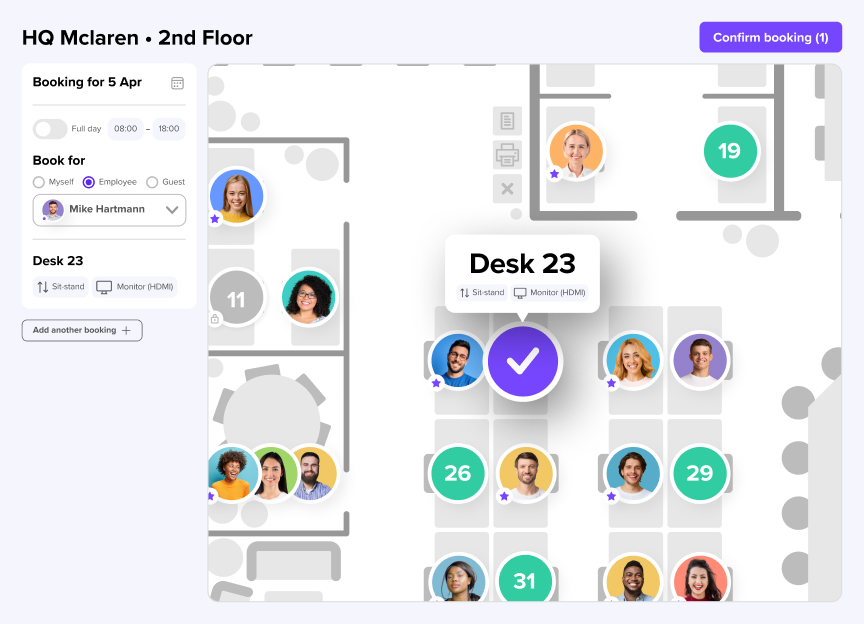
Keep floor plans and bookings in sync after your office move
- Outdated floor plans are the top cause of post-move confusion and bad utilization data.
- Real-time booking tools and interactive maps keep employees oriented from day one.
- Accurate space data only comes from tools employees actually use, at 90%+ adoption rates.
