
What is workplace intelligence and why it matters for hybrid teams
TL;DR
Workplace intelligence is the practice of collecting and analyzing data about how employees use your office, covering attendance patterns, desk usage, room bookings, and more, so you can make confident decisions about space, cost, and hybrid policies. It connects data from booking systems, sensors, and calendars into one clear picture. This guide explains what workplace intelligence is, which metrics matter most, and how to act on the data.
Introduction
Most companies still guess how their office gets used. They assume Tuesday is busy, that big boardroom is worth keeping and that people follow the hybrid policy. Workplace intelligence replaces guesswork with real data. It tells you which days fill up, which desks never get touched, and whether your current setup actually fits the way your team works.
This is not just about software, it's a shift in how you manage space. When you understand how your office is actually used, every decision, from lease renewals to floor plan redesigns, gets easier to justify and easier to get right. In this guide, you'll learn what workplace intelligence is, which metrics to track, and how to use the data to run a leaner, more responsive office.
What is workplace intelligence?
Workplace intelligence is the practice of collecting and analyzing data about how employees use your physical office, so you can make better decisions about space, costs, and hybrid policies. It tracks desk bookings, room reservations, badge swipes, and sensor data to reveal patterns in how people actually show up and where they spend time. The goal is not to monitor individuals, it's to understand space.
This is different from workforce intelligence, which focuses on employee productivity or performance. Workplace intelligence is about the environment: who shows up, where they sit, and which rooms get used.
Common data sources include:
- Desk and room booking systems: Track reservations and confirm actual check-ins
- Badge or access control systems: Show when employees enter the building
- Occupancy sensors: Detect real-time presence at desks or in meeting rooms
- Calendar integrations: Reveal meeting patterns and scheduled office days
When these feed into one platform, you stop relying on assumptions. You see exactly what gets used and what sits empty.
Why workplace intelligence matters in a hybrid office
Hybrid work breaks the old math. 53% of remote-capable employees now work in hybrid arrangements. You used to need one desk per employee. Now 100 employees might only need 60 desks, but they might all show up on Tuesday.
This unpredictability creates 2 problems. On quiet days, you pay for empty space. On busy days, people cannot find a seat. Without data, you cannot tell which problem you have, let alone how to fix it.
Workplace intelligence gives you visibility into these patterns. You see which days run busy, which floors sit empty, and whether your hybrid policy matches reality.
Here is what that visibility enables:
- Right-size your office: See which zones sit empty and adjust your footprint to cut costs
- Improve the employee experience: Help people find colleagues and avoid commuting to a deserted office
- Support policy decisions: Know whether your "3 days in office" policy actually works or needs adjustment
Companies with clear attendance data make faster, more confident real estate decisions. You stop debating opinions. You start acting on evidence.
Workplace intelligence metrics and KPIs for office utilization
Tracking the right metrics helps you spot problems early. An occupancy intelligence platform calculates these KPIs automatically so you can measure progress over time.
Office attendance and presence rate
Attendance rate is the percentage of employees who come to the office on a given day. Presence rate shows who actually checked in versus who just booked a desk.
Compare these 2 numbers to reveal no-show patterns: if bookings run high but check-ins run low, you have a ghost booking problem.
Desk utilization and peak days
Desk utilization measures how many desks get used compared to how many are available. Most hybrid offices see peak days on Tuesday, Wednesday, and Thursday, with Tuesday recording 58.6% global occupancy.
Tracking peaks helps you plan capacity. If utilization hits 90% on Wednesdays, you risk overcrowding. If it never passes 50%, you are paying for space you do not need.
Meeting room utilization and no-show rate
Meeting room utilization shows how often rooms get booked and used. The no-show rate tracks rooms that get reserved but sit empty. No-shows block other teams from meeting, even when space is physically available. This matters because statistics say 30% to 40% of booked rooms sit empty.
Auto-release features free up rooms when no one checks in. This recovers lost capacity.
Space demand by team, site, and floor plan zone
Breaking down utilization by team or zone reveals who needs more space and which areas sit empty. You might find sales teams in the office 4 days a week while engineering rarely visits.
Zone analysis shows which neighborhoods get heavy use. Desks near windows might always be full while back corners stay empty. This data guides floor plan redesigns.
Policy adoption and booking behavior
Tracking whether employees follow hybrid policies shows if those policies are realistic. If people consistently book last-minute or struggle to find seats near their team, your setup creates friction.
Booking behavior data reveals where the employee experience breaks down. You can then adjust policies to match how people actually want to work.
Workplace intelligence dashboards and reports for workplace teams
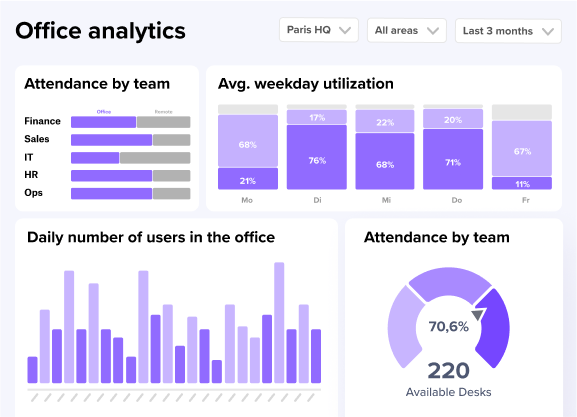
Dashboards turn raw data into visual summaries you can act on. Different views serve different needs, from daily operations to long-term planning.
[Table1]
Presence by site, team, and employee type
This view shows which locations or teams have the highest and lowest attendance. Multi-site companies use it to compare adoption rates across regions and manage different hybrid policies.
Daily utilization for desks and meeting rooms
Facility managers rely on daily views to respond quickly. If a floor nears capacity, they can open overflow areas. If a floor sits empty, they might close it to save on cleaning and energy.
Utilization trends over time for space planning
Weekly and monthly trend views reveal seasonal patterns. You might see lower attendance in summer or December. These trends support lease negotiations and long-term space planning.
Floor plan and zone-level utilization
Heatmaps overlay utilization data on your floor plan. Colors show "hot" areas with heavy use and "cold" areas that sit empty.
Visual evidence often convinces leadership faster than spreadsheets. If the heatmap shows a large boardroom rarely used while phone booths stay red, the solution becomes obvious.
Exportable reports for leadership and finance
Exportable reports let you share data with executives and finance teams. You can link space usage directly to cost savings. For advanced analysis, many platforms support BI integrations with tools like Power BI or BigQuery.
Success Story: ILF Austria - More employees, same space
ILF Consulting Engineers Austria faced a problem many growing companies know well: more employees, the same office space, and constant disagreements about who gets which desks. With over 800 staff and a hybrid model allowing up to 100 remote days per year, certain departments were claiming far more space than they actually used. Instead of letting senior management keep mediating, ILF Austria turned to workplace intelligence. After rolling out deskbird in January 2025, the team gained real visibility into actual desk occupancy across its Vienna and Innsbruck offices. Today, over 80% of the workforce actively uses the platform, desk distribution is fairer, and the debates have stopped entirely.
Through all the analyses, we've realized that we actually have enough space. In fact, we could continue to grow, and desks would probably still not become scarce. But we were only able to make that statement after using deskbird to closely review desk occupancy and evaluate everything in detail.
— Josef P. Mayr, Managing Director, ILF Consulting Engineers Austria
Workplace intelligence tools and software
Workplace intelligence software collect data on how employees actually use office space, from desk bookings to badge swipes, so you can make smarter decisions about your real estate.
- It pulls data from booking systems, sensors, and calendars to show real attendance patterns.
- It helps workplace teams cut wasted space and avoid overcrowding on peak days.
- It gives you evidence to adjust hybrid policies based on how people actually work.
Integrations that reduce manual work
Workplace intelligence works best when it connects to tools employees already use. Integrations reduce manual data entry and improve accuracy.
- Calendar tools: Outlook and Google Calendar sync meeting room bookings automatically
- Communication platforms: MS Teams and Slack let employees book desks without leaving their chat apps
- HR systems: Personio and SAP keep employee lists and team structures up to date
- Access control: Badge systems provide verifiable entry counts
- BI tools: Power BI and BigQuery enable custom reporting
When systems talk to each other, human error drops. You get cleaner data and spend less time on manual updates.
One company navigating hybrid work across multiple European locations struggled with manual scheduling processes. Coordination chaos led to wasted space and employee frustration. After adopting a unified workplace platform, they integrated their booking system directly with existing HR and calendar tools. The result: automated user provisioning and immediate visibility into attendance patterns.
"The integration with our HRIS was a game-changer. We no longer have to manually update user lists when people join or leave. It just works, and the data we get out of it is actually reliable."
You can see how these integrations work in practice at deskbird's success story on navigating the hybrid workplace.
Workplace intelligence and employee privacy in Europe
Collecting workplace data raises privacy concerns, especially in Europe where GDPR sets strict standards. The key distinction: workplace intelligence analyzes space, not individuals.
GDPR-compliant tools focus on anonymization and aggregation. They show patterns like "the marketing team is in on Tuesdays" rather than tracking specific people.
Privacy best practices include:
- Aggregate data: Show team-level trends, not individual movements
- Limit data retention: Keep only what you need for analysis
- Be transparent: Tell employees what data you collect and why
- Choose EU-hosted platforms: Ensure data stays within European jurisdiction
deskbird maintains ISO 27001 certification and offers EU-only hosting. This lets you gain insights without compromising employee trust or legal compliance.
Make workplace intelligence simple with deskbird
deskbird combines desk booking, room booking, visitor management, and workplace analytics in one platform. You get a single source of truth for space utilization without juggling multiple tools.
This unified approach keeps data consistent: when someone books a desk, it feeds into the same analytics as room reservations and visitor check-ins.
- See who is coming to the office and where they are sitting
- Track utilization across desks, rooms, and floors
- Get reports that help right-size your office
If you want to turn office data into smarter space decisions, book a demo.

Frequently Asked Questions
What data sources feed into workplace intelligence platforms?
How do ghost bookings affect office utilization data?
Can workplace intelligence software comply with GDPR?
What is the difference between workplace intelligence and workforce intelligence?
See how your office is really being used
- Track desk and room usage across every floor and team
- Spot peak days, empty zones, and no-shows before they become problems
- Get clear reports you can share with leadership and finance
