
The workplace tech audit: 4 tools deskbird replaces for IT
Most IT teams manage four separate tools to run a hybrid office: one for desk booking, one for meeting rooms, another for visitor check-ins, and a fourth for facilities tickets. A workplace tech audit reveals how much of that stack you can retire when you consolidate into a single platform that employees actually use.
TL;DR
IT teams can consolidate desk booking, room booking, visitor management, and workplace ticketing into one platform, cutting tool sprawl and provisioning overhead.
- deskbird replaces 4 separate workplace tools without requiring new hardware or sensors
- Native single sign-on (SSO), System for Cross-domain Identity Management (SCIM), and Microsoft Entra ID (Azure AD) integrations remove manual user provisioning
- Adoption rates above 90% ensure utilization data is accurate enough to inform real estate decisions
What is a workplace tech audit?
A workplace tech audit is a structured review of every tool your employees use to book desks, reserve meeting rooms, check in visitors, or report office issues. IT teams run these audits when tool sprawl creates provisioning headaches, unreliable data, or redundant software costs. 87% of IT leaders report moderate to major financial impact from sprawl.
The purpose is straightforward: identify which tools overlap, where integrations break down, and which security gaps exist. Scope typically covers desk booking, room booking, visitor management, attendance tracking, and facilities ticketing. The outcome is a clear map of what to consolidate, replace, or retire entirely.
Most organizations discover they have 3 to 5 separate tools handling functions that a single workplace management platform could cover. Each tool requires its own provisioning workflow, its own calendar integration, its own support documentation. That fragmentation creates ongoing maintenance burden for IT.
Who should run a workplace tech audit?
A successful audit requires shared ownership across departments. IT validates security posture, integration reliability, and provisioning workflows. Facilities or Workplace teams own the physical space and employee experience. HR typically owns attendance policy and hybrid work compliance.
[Table1]
Based on our internal data, IT is involved in about 29% to 31% of deskbird evaluations. IT often initiates the buying process. Even when Facilities identifies the need, IT controls the final decision. Any new workplace management platform must reduce maintenance burden rather than add to it.
Signs your workplace tech stack creates IT overhead
IT teams recognize the symptoms of tool sprawl quickly. You manage separate provisioning for each tool, meaning manual user additions and removals across desk booking, room booking, and visitor systems. Every new hire requires setup in multiple applications. Every departure requires cleanup in multiple places.
Calendar sync failures are another warning sign. Double bookings or ghost meetings generate constant helpdesk tickets. Employees complain that the room they booked shows as available in Outlook but occupied in the booking tool. These sync issues erode trust in the system.
Low adoption creates a different problem entirely. When employees find the official tool too slow or confusing, they revert to spreadsheets or side apps. This shadow IT means your utilization reports do not reflect reality. You cannot make confident real estate decisions based on data that only captures a fraction of actual behavior.
What to include in a workplace tech audit for hybrid offices
Your audit should inventory 5 specific categories. For desk booking, document who owns the tool, how provisioning works, and the current adoption rate. For room booking, evaluate calendar integration reliability, no-show handling, and any kiosk or display hardware dependencies.
Visitor management requires a close look at the check-in workflow, pre-registration process, and compliance logs. Attendance analytics need assessment for data accuracy and privacy posture. Facilities ticketing should be evaluated for how well it integrates with existing systems like Jira or ServiceNow.
Each category often has a separate tool with its own vendor contract, admin console, and support channel. The audit reveals where these tools overlap and where consolidation makes sense.
Workplace tech audit metrics IT should measure
IT should use quantitative criteria to evaluate each tool in the workplace stack. These metrics determine whether a tool is worth keeping or whether consolidation is overdue.
[Table2]
Adoption rate is the most critical metric. Data accuracy depends entirely on whether employees actually use the software. A tool with low adoption generates unreliable utilization data, and unreliable data leads to poor real estate decisions.
Step-by-step workplace tech audit checklist
1. Inventory workplace tools and owners
List every tool used for desk booking, room booking, visitor check-in, attendance tracking, and facilities ticketing. Document the internal owner, annual license cost, and provisioning method for each application. This creates a baseline understanding of your current software footprint.
2. Map critical integrations and data flows
Identify how each tool connects to Microsoft 365 (MS365), Google Workspace, your human resources information system (HRIS), and identity providers like Microsoft Entra ID (Azure AD) or Okta. Note any manual data transfers, broken syncs, or API limitations. Integration reliability directly impacts the number of support tickets IT receives.
3. Check adoption and ghost bookings
Pull usage data to see how many employees actively book desks or rooms. Calculate how many bookings result in no-shows. One workplace utilization analysis suggests nearly 30% of booked rooms sit empty. Low adoption means the data is unreliable and the tool is failing its primary purpose.
4. Verify calendar sync and booking reliability
Test whether bookings made in Microsoft Teams, Outlook, or Google Calendar appear correctly in the workplace tool. Document any sync delays or failures that cause double bookings. Employees expect these systems to communicate instantly.
5. Validate security, access, and audit logs
Confirm that each tool supports SSO using Security Assertion Markup Language (SAML) or OpenID Connect (OIDC) and supports SCIM provisioning. Check for active ISO 27001 and SOC 2 Type 2 certifications. Ensure the platform is GDPR-compliant and allows you to export audit logs for compliance reviews.
6. Consolidate and set a rollout plan
Based on the audit findings, identify which tools you can retire and which functions a single platform can absorb. Define a rollout timeline with clear milestones for data migration and user onboarding.
What IT gets when workplace tools consolidate
Consolidating workplace tools delivers immediate operational benefits for IT. Technology consolidation often reduces costs by 20% to 35% within 60 to 90 days.
A single platform also means fewer support tickets. IT only troubleshoots one set of workflows and one calendar integration. When employees actually use the consolidated platform, the resulting utilization data becomes reliable. Workplace leaders can finally use accurate data to make defensible real estate decisions.
Compliance posture improves as well. Instead of validating security certifications across 4 separate vendors, you validate once. Instead of managing 4 sets of audit logs, you export from one system.
What to look for in workplace software before IT approves it
Enterprise IT teams have strict requirements for any new software deployment. A workplace management platform must reduce maintenance burden and integrate naturally with existing infrastructure. If IT has to touch the tool every quarter, it becomes a liability.
The non-negotiable requirements include native Microsoft 365 integration across Microsoft Teams and Outlook, plus identity integration with Microsoft Entra ID (Azure AD). The platform must support SSO, SCIM, SAML, and OIDC to eliminate manual provisioning. Active ISO 27001 and SOC 2 Type 2 certifications prove security standards rather than just claiming them.
EU-hosted and GDPR-compliant architecture keeps your data in Frankfurt, Germany. An open application programming interface (API) covers remaining integrations, which reduces custom development. Proven adoption rates above 90% across 500+ companies ensure the data will actually be accurate.
Privacy and compliance checks for workplace tools in Europe
IT must validate the privacy posture of any tool that tracks employee location and office attendance. A GDPR-first architecture is mandatory for European organizations. The system must support data minimization and offer clear anonymization options.
EU hosting is a security strength. deskbird hosts customer data in Frankfurt, Germany, and follows GDPR requirements. The platform provides granular role-based access control so managers only see relevant team data. Exportable audit logs are essential for internal reviews and regulatory compliance.
How deskbird replaces 4 workplace tools without new hardware
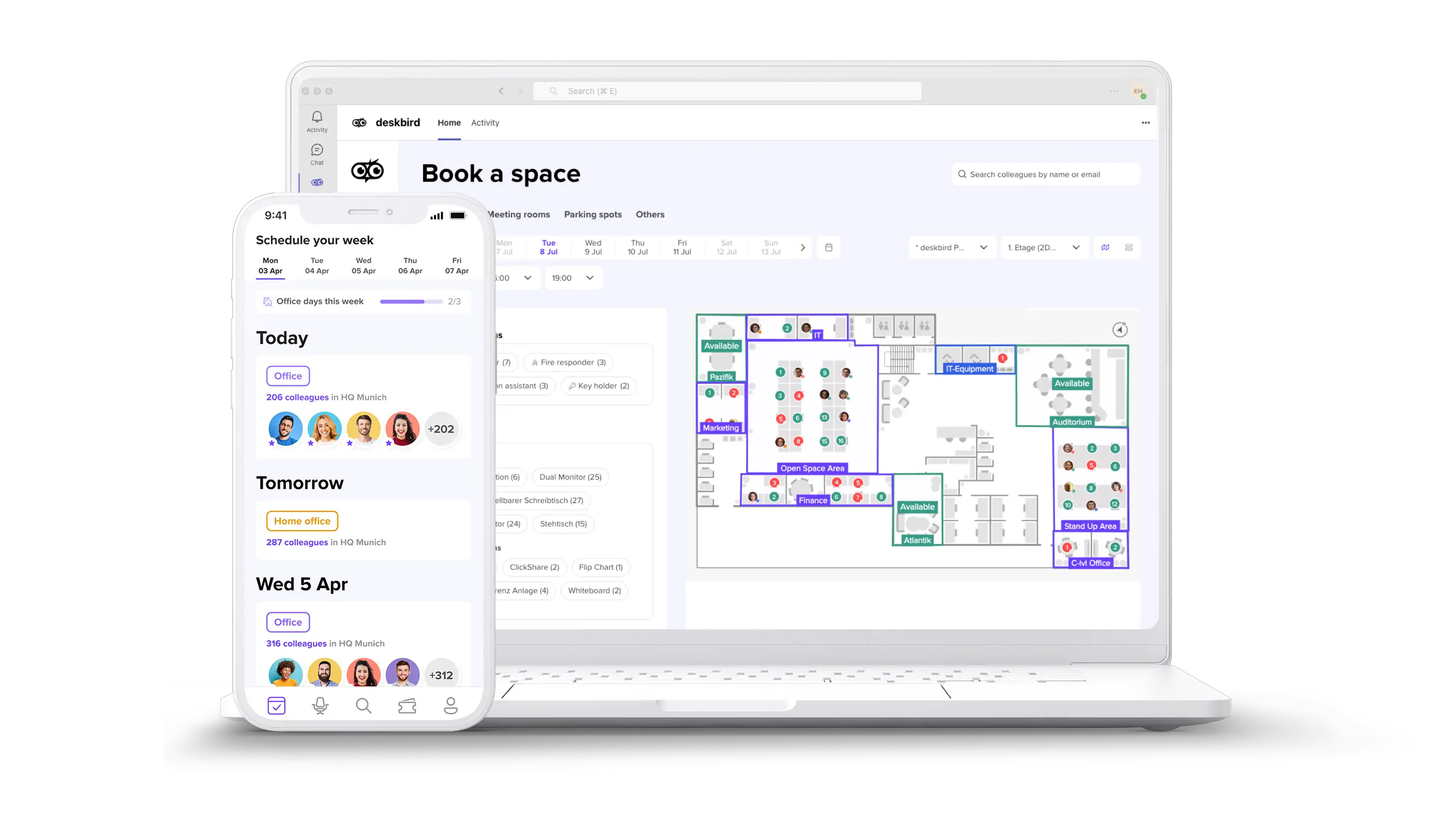
deskbird consolidates desk booking, room booking, visitor management, and workplace ticketing into one platform. The system relies on native MS365 integration and SCIM auto-provisioning rather than expensive sensors or proprietary hardware.
[Table3]
deskbird is built and hosted in Europe. It is ISO 27001-certified, SOC 2 Type 2-audited, and GDPR-compliant. Customers often reach 90%+ adoption, which makes utilization data more reliable.
Run a hybrid office without the IT headache
Managing a hybrid office does not require managing a dozen different applications. deskbird is built for IT professionals who want native integrations, zero-touch provisioning, and enterprise-grade security. The platform delivers the ease of use employees need and the data accuracy leadership requires.
To consolidate four tools into one, book a demo.

Frequently Asked Questions
Can managers see individual employee attendance in deskbird?
Can IT set booking rules to prevent desk hoarding?
How does tool consolidation reduce IT maintenance burden?

See how deskbird replaces 4 tools in one demo
- One platform covers desk booking, room booking, visitor management, and ticketing
- 90%+ adoption rates mean your utilization data is actually reliable
- No new hardware, no manual provisioning, no extra vendor contracts