
Best visitor management software 2026: 9 tools compared
We compared 9 visitor management tools on pre-registration, self check-in, host alerts, badges, security checks and public pricing, using each vendor's own pages, so you can build a shortlist that fits your front desk.

TL;DR
The best visitor management software gets guests registered before they arrive, lets them check in without a queue, and tells the host straight away. Security checks and price decide the rest, and both depend on the plan you pick. Our shortlist for 2026:
- deskbird. Best for hybrid teams that want visitors, desks and meeting rooms in one platform, with host alerts by email and in Microsoft Teams. Visitor management is the Visitors Plus add-on to a deskbird plan, licensed per office.
- Envoy. A free plan for one small office, and ID scanning and access control on the Enterprise plan.
- Sign In App. A public price per site, iPad or Android kiosks and a choice of six data regions. SwipedOn and The Receptionist now belong to the same group.
- Lobbytrack. A free plan for up to 100 visitors a month, and criminal-database watchlist checks on its top plan.
What is visitor management software?
Visitor management software replaces the paper sign-in book with pre-registration, self check-in and an alert to the host. We compared 9 tools using each vendor's own product pages, pricing pages and help centers, checked on November 11, 2026. deskbird is our product. We list it first and name its limits as plainly as anyone else's, including where a standalone visitor tool is the better buy.
How do you choose visitor management software?
Pick the tool that matches how much security your front desk needs, then check that the plan you can afford actually includes it. Several vendors keep ID scanning, watchlists or access control on a higher tier.
- Pre-registration. Hosts should invite guests from the place they plan the meeting, such as Outlook or Google Calendar, so the visit is set up before anyone reaches reception.
- Self check-in. A kiosk on a tablet or a QR code keeps the queue short. Check which tablets the kiosk runs on and whether each kiosk costs extra.
- Host alerts where people work. Check which channels reach the host: email, Microsoft Teams, Slack or text.
- Badges and the evacuation list. In an emergency you need to know who is in the building. Look for an on-site list you can export or a roll call feature.
- Documents. NDAs and safety briefings signed before or at check-in, and stored with the visit, save the front desk a lot of paper.
- Security checks. ID scanning, watchlists and access control matter most for regulated or high-security sites. Decide whether your site needs them before you compare plans.
- Data protection. Ask where visitor data is hosted and how long it is kept, and whether you can show visitors your own privacy notice.
- Pricing model. Most visitor tools on this list charge per location or site. Some workplace platforms, deskbird included, sell visitors as an add-on to desk and room booking.
If you also share desks or book meeting rooms, our comparison of the best desk booking software and our meeting room booking software comparison cover those sides of the office.
9 visitor management systems compared
The table compares what each of the 9 vendors publishes on its own pages. The details for each tool follow below.
| Tool | Self check-in | Host alerts | NDA signing | ID scan or watchlist | Desks and rooms too | Public entry price |
|---|---|---|---|---|---|---|
| deskbird | Android, iPad or browser kiosk | Email; Teams if the host uses it | Yes | No | Yes, same platform | Visitors Plus add-on to a deskbird plan, on request |
| Envoy | iPad kiosk; QR from Premium | Email, app, Slack, Teams; SMS from Premium | From Premium | Enterprise only | Separate product | Free plan; Premium $362/location/month, billed annually |
| Eptura Visitor | iPad kiosk | Email, SMS, Teams, Slack | Yes | Watchlists on Power | Via Eptura Engage | Not public |
| Sign In App | iPad or Android, QR | Email, Teams, Slack, SMS | Yes | ID scan from Enhanced | From Enhanced (50 desks; Pro 500) | $630/site/year |
| Greetly | iPad or Android, QR | Email, text, Slack, Teams, Google Chat | Yes | Internal watchlist; U.S. ID scan on Pro | No | $99/month, billed yearly |
| Archie | iOS or Android tablet, QR | From Starter; Slack, Teams, SMS on Pro | Yes | Block list on Enterprise | Separate products | $109/location/month, billed yearly |
| Lobbytrack | Tablet, QR | Email; SMS, Slack, Teams on Ultimate | From Professional | License scan from Professional; watchlist on Ultimate | Ultimate plan only | Free up to 100 visitors/month |
| Robin | iPad display, phone link | Email, Slack, Teams | Acknowledged on screen | Not stated | Yes, same platform | Not public |
| Kisi | QR on every plan; tablet kiosk from Plus | From Plus | Pro only | Not stated | No | Free plan; paid plans per location |
How we picked: we started from the 7 tools AI assistants named most often when we asked for the best visitor management software for an office reception, in 16 answers from our own tracking in October 2026. Three of them, SwipedOn, The Receptionist and Sign In App, now belong to one company and share one entry. We added Robin and Kisi, which the assistants also named, because they show two other ways to buy visitor management: inside a desk and room platform, and inside door access control. Lobbytrack completes the list because it appears in Google's top 10 for visitor management searches in November 2026.
Want to see visitors, desks and meeting rooms in one platform? Book a deskbird demo, or read on for each tool in detail.
1. deskbird
Best for: Hybrid companies that book desks and meeting rooms in one platform and want visitors in the same place, with host alerts by email and in Microsoft Teams.
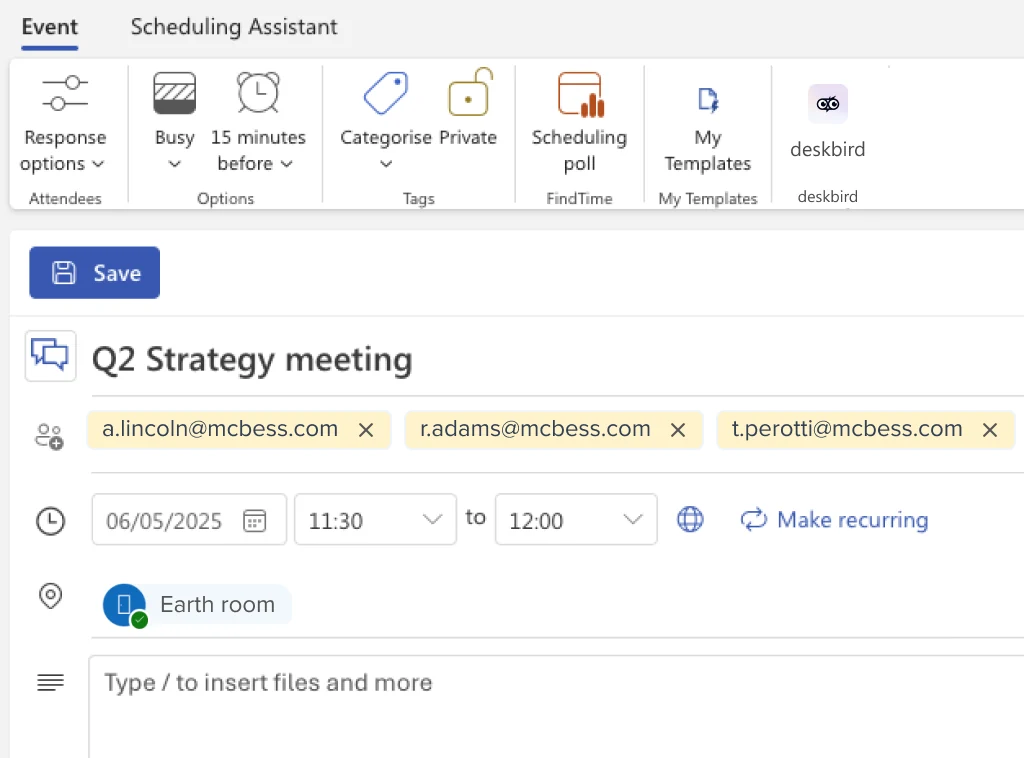
With visitor management in deskbird, a visit starts where the meeting starts. Your team invites guests from the web app, from the Outlook add-in or while booking a one-off meeting room in the web app, and the host gets an email, plus a Microsoft Teams alert if they use deskbird in Teams, the moment the guest checks in.
- Pre-registration: invite one guest or import up to 500 from a CSV file. Guests with an email address get an invitation with a personal visitor portal for directions, instructions and documents, no account needed.
- Self check-in: a visitor kiosk runs on an Android tablet, an iPad or in Chrome. Invited guests enter the code from their invitation, and walk-ins register on the spot.
- Documents and badges: NDAs and safety briefings are signed in the portal before arrival or at the kiosk, and stored with the visit. Reception prints badges from the browser on a printer connected to the reception computer.
- Evacuation list: the Onsite now list shows who is in the building and can be exported for a headcount. Visits export to Excel for audits.
- Visitor data: four fields per visitor. You choose per office whether data is kept without limit or anonymized after 30, 90 or 180 days.
- Watch out: we do not scan IDs, take visitor photos or check watchlists. Invited guests check in with a code, not a QR code, invites come from the web app or Outlook but not from Google Calendar, and host alerts go to email and Microsoft Teams, not Slack or SMS.
- Setup limits: there are no custom visitor fields, one badge design applies to the whole company, and recurring room bookings cannot carry a visit yet.
- Integrations: your IT team can pull visit records into access control or security systems through our Public API on the Professional and Enterprise plans. The visitor endpoints are read-only.
Pricing: Visitor management is the Visitors Plus add-on to a deskbird plan, licensed per office, with the price on request. The Business plan costs $3.75 per active user per month billed annually, or $4.75 billed monthly, with desk, room and parking booking in the plan, from 25 users. See deskbird plans and pricing, or see visitor management in a demo.
2. Envoy
Best for: Companies that want to grow from a free plan for one small office to ID scanning and access control on an enterprise plan, with one vendor.
- Employees register guests and visitors get invitation emails on every plan. Registering visitors from a web calendar, badge printing, NDA signing, visitor photos, SMS alerts and QR sign-in start at Premium.
- The Enterprise plan adds ID scanning with 500 scans a year included, an internal blocklist plus third-party restricted-party lists, and access control integrations such as Brivo, Kisi and LenelS2.
- Envoy also sells desk, room and parking reservations as a separate product at $5 per bookable resource per month, billed annually, plus a platform fee.
- Watch out: the visitor kiosk runs on iPad only. EU hosting in Frankfurt is for EU-specific accounts arranged through an account manager. Our deskbird vs Envoy comparison covers the platform side.
Pricing: Basic is free for 1 location, up to 50 employees and 100 entries a month. Premium costs $362 per location per month, billed annually, and Enterprise is priced on request (Envoy pricing page, November 11, 2026).
3. Eptura Visitor (formerly Proxyclick)
Best for: Multi-location enterprises whose security team wants access control and watchlist checks, especially if they already run Eptura Engage (formerly Condeco) for desks and rooms.
- Both tiers, Advanced and Power, cover pre-registration, an Outlook add-in, an iPad kiosk, badge printing on AirPrint printers, NDA e-signing, photo capture and a digital logbook with emergency lists and roll call.
- Hosts are notified by email, SMS, Microsoft Teams or Slack.
- The Power tier adds access control (AMAG, Brivo, Gallagher, Genetec, Lenel, Paxton and more), your own and third-party watchlists, guest Wi-Fi credentials, QR or access-card entry and facial recognition.
- Watch out: there is no public price, and the access control integration needs a Windows client that is always on. Proxyclick became Eptura Visitor in 2025.
Pricing: Not public. Eptura sells an annual subscription priced by number of locations, with a minimum term of one year (Eptura pricing page, November 11, 2026).
4. Sign In App (now with SwipedOn and The Receptionist)
Best for: Small and multi-site organizations that want a public price per site, iPad or Android kiosks and a choice of data region.
- SwipedOn (since April 2024) and The Receptionist (since January 2026) belong to the same group. Their websites now point buyers to Sign In App plans.
- Visitors sign in at an iPad or Android kiosk, or contactless by scanning a QR code with their own phone. Every plan includes unlimited employees, sign-ins and iPads.
- Hosts are alerted by email, Slack, Microsoft Teams, push or SMS. Badges print on Brother QL printers, and the evacuation list with roll call is in the Core plan.
- Data stays in the region you pick from six, including Germany and the UK. Desk and room booking (Spaces) is included from Enhanced, for up to 50 desks on Enhanced and 500 on Pro. Integrations include Outlook and Google Calendar, plus access control from SALTO, Gallagher, Avigilon and Genetec.
- Watch out: ID scanning starts at Enhanced, single sign-on and SCIM at Pro, and SMS is charged per message below Pro. Each site needs its own subscription.
Pricing: Per site per year: Core $630, Enhanced $1,260 and Pro $1,890, or £415, £835 and £1,255 in British pounds. Executive is priced on request, and a 15-day free trial needs no card (Sign In App pricing page, November 11, 2026).
5. Greetly
Best for: Smaller offices that want host alerts in many channels and a public price, without buying a workplace platform.
- Hosts send branded invites from Outlook or Google Calendar, and guests get a personal QR code for check-in. Greetly's help center labels the calendar setting Beta. The kiosk runs on an iPad or an Android tablet.
- Every plan alerts hosts by email, text, Slack, Google Chat or Microsoft Teams, and includes NDA e-signing, visitor photos, an internal watchlist and evacuation support.
- You choose hosting in the EU or North America. Greetly is part of OfficeSpace, which sells a workplace management platform.
- Watch out: badge printing and ID scanning need the Pro plan, ID scanning covers U.S. driver's licenses only, and watchlists are internal lists only. Greetly has no native access control integration.
Pricing: Essential costs $99 per month and Pro $159 per month, both billed yearly. The price depends on your locations, entrances and visitor types, and there is a free trial (Greetly website, November 11, 2026).
6. Archie
Best for: Teams that want visitors, desks and rooms from one vendor but prefer to buy each product separately, priced per location.
- The Starter plan covers pre-registration, a kiosk app for iOS and Android tablets, QR or email check-in, badge printing on Brother QL printers, e-signatures and a real-time visitor log.
- Host notifications are in Starter. Pro adds visitor photos, SMS alerts, Slack and Microsoft Teams integration, evacuation roll call, single sign-on and SCIM.
- On the Enterprise plan, Archie lists door access integrations with Kisi, Brivo and UniFi, and guest Wi-Fi integrations.
- Watch out: the block list and custom data residency are Enterprise only, so EU data residency is a custom deal.
Pricing: Starter costs $109 and Pro $185 per location per month, billed yearly according to Archie's FAQ, and Enterprise is priced on request. A 14-day trial follows a demo (Archie pricing page, November 11, 2026).
7. Lobbytrack
Best for: Security-heavy sites such as government offices, healthcare and schools that need watchlist checks against criminal databases.
- Every plan, the free one included, has touchless QR sign-in, visitor photos and badge printing on Brother or Zebra printers.
- NDAs and driver's license scanning start at Professional.
- Ultimate adds the watchlist check against an internal list and external criminal databases, SMS, Slack and Teams alerts, evacuation management and access control with Lenel S2, Openpath and Brivo.
- Watch out: most security and integration features sit on Ultimate, which has no public price. Lobbytrack says ISO 27001 certification is in progress.
Pricing: Starter is free up to 100 visitors a month. Basic costs $50 and Professional $100 per location per month, with no contract, and Ultimate is priced on request (Lobbytrack pricing page, November 11, 2026).
8. Robin
Best for: Companies with 500 or more employees that want visitors as one module of a full desk, room and parking platform.
- Hosts pre-register guests in the web dashboard or the mobile app, admins can import a CSV file, and the Outlook add-in creates a visit for each meeting attendee they select. Guests get an email invite and a reminder 4 hours before.
- Walk-ins sign in on an arrival display on an iPad, and invited guests can check in from their phone through the email link. Hosts are alerted by email, Slack or Microsoft Teams.
- Badges print on Brother printers and can carry a guest photo taken at the display. Guests acknowledge NDAs or waivers on the display or from the invite.
- Watch out: arrival displays run on iPad only, and access control integrations are set up case by case at added cost. How deskbird and Robin differ is covered in our comparison.
Pricing: Not public. Visitor management is part of the Robin platform, priced after a demo and billed annually only (Robin pricing page, November 11, 2026).
9. Kisi
Best for: Offices that run Kisi access control, or want to, so a visitor's invite link or QR code also opens the door.
- Every plan sends visitors access links or QR codes by email, and links by SMS to U.S. numbers. Basic allows up to 5 email links, Plus up to 500 and Pro up to 2,000. Hosts send email invites with built-in access from Plus.
- QR self check-in on the visitor's phone works on every plan. A tablet kiosk, badge printing and host notifications start at Plus. NDAs and required signatures at check-in are on Pro only.
- Kisi lists integrations with Envoy, Robin, Archie and Skedda, so it can also open doors for visitors registered in another tool.
- Watch out: Kisi is access control first and has no desk or room booking of its own. Door access for visitors needs Kisi's Controller Pro 2, opening doors by QR code needs a Terminal Pro, and SMS links work for U.S. numbers only.
Pricing: Basic is free. Plus and Pro are priced per location on Kisi's pricing page, which switches between monthly and annual billing, and Kisi hardware is extra (Kisi pricing page, November 11, 2026).
Which visitor management software fits your team?
Two questions decide it: how much security your site needs, and whether visitors belong in the same tool as desks and meeting rooms. Pick a standalone visitor tool when reception is the only job, the plan that includes the ID or watchlist checks your site needs, and a workplace platform such as deskbird when visitors, desks and meeting rooms belong together.
- Small office, tight budget: Lobbytrack is free up to 100 visitors a month, and Greetly starts at $99 per month, billed yearly.
- Strict security with ID and watchlist checks: Envoy Enterprise, Eptura Visitor Power or Lobbytrack Ultimate for watchlists, or Sign In App from Enhanced for ID scanning.
- Many sites with a public price per site: Sign In App, with data kept in the region you choose.
- Data hosted in Germany: Sign In App, where Germany is one of the six data regions you can pick.
- Visitor management only, no desk or room booking: pick a standalone visitor tool from this list.
- Visitors, desks and meeting rooms in one platform, with host alerts by email and in Teams: deskbird.
Why do hybrid teams run visitors in deskbird?
With the Visitors Plus add-on, visits sit next to desk, room and parking booking in the app your people already use. A guest, a meeting room and a desk are planned in one place.
- Add a visit while booking a one-off meeting room in the web app, and the guest gets the invitation with your instructions and documents.
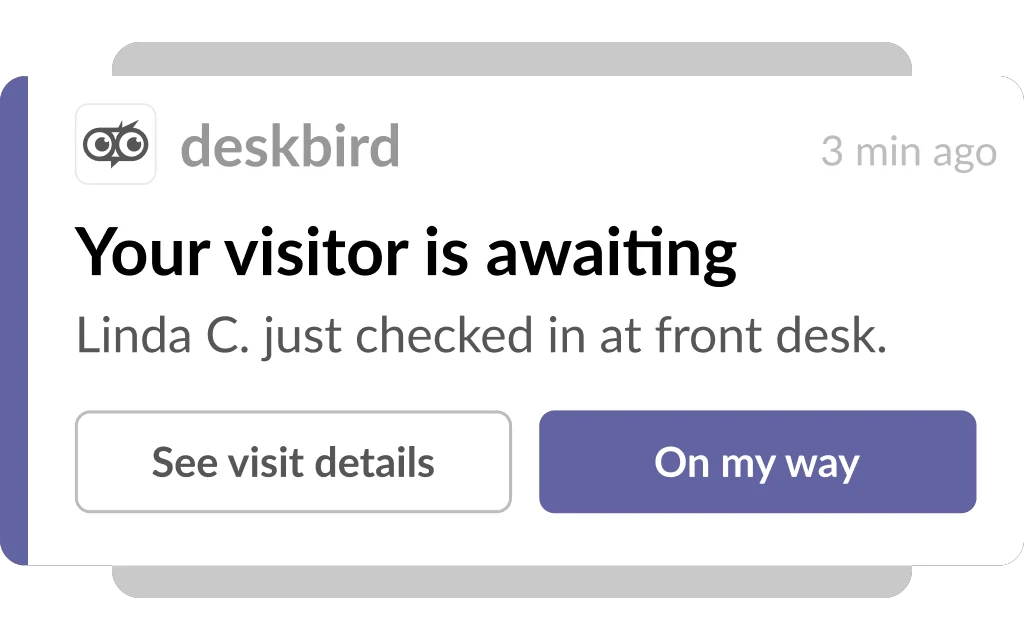
- Hosts hear about arrivals by email, and in Microsoft Teams when they use deskbird there, and can answer with I'm on my way so reception knows they are coming.
- One admin portal covers every office, and you decide per office which locations run visitor management.
- ISO 27001, SOC 2 and GDPR, with visitor data retention you set per office.
The visitor management module has enabled us to achieve greater control over access to our offices [...]. Fully integrated with our Office 365 collaboration platforms, it ensures timely notifications and a smooth, connected workflow.
Tatiana Gómez Alvira, CIO Office Manager, Europastry
More than 250,000 users in 10,000+ workplace teams across 80+ countries use deskbird, with over 90% daily adoption. To see visitors, desks and rooms together for your own offices, book a deskbird demo.
Disclaimer
Software listed in this article, and its pricing and features, are based on publicly available information as of November 11, 2026, and can change. We compared each vendor's own published pages and have not tested these products ourselves. If we got something wrong, please contact us.

See visitors, desks and rooms in one platform
See how a visit, a meeting room and a desk come together in deskbird, from the Outlook invite to the host alert when your guest arrives. Book a demo and bring your questions about your own front desk.
Frequently Asked Questions
Additional questions on visitor management software.
What is a visitor management system?
A visitor management system replaces the paper sign-in book. Hosts register guests in advance, visitors check in at a tablet or with a code, the host is told when they arrive, and the system keeps a log of who is on site. Most tools also print badges and collect signed NDAs, and some add ID scanning and watchlist checks for high-security sites.
What features should visitor management software have?
Start with pre-registration, self check-in, host alerts in the tools your team already uses, an on-site list for evacuations, and signed documents stored with each visit. Then decide how much security your site needs, such as ID scanning, watchlists or access control, and check which plan includes it, because many vendors keep those features on their top tier.
How much does visitor management software cost?
Most vendors price per location. Public entry prices: Lobbytrack is free up to 100 visitors a month, Greetly costs $99 per month billed yearly, Archie $109 per location per month billed yearly, and Sign In App $630 per site per year. Envoy has a free plan for one location, and Premium costs $362 per location per month, billed annually. Eptura and Robin share prices on request. In deskbird, Visitors Plus is an add-on to a deskbird plan, licensed per office, with the price on request.
Can visitor management software scan IDs or check watchlists?
Some tools can, often on a higher plan: Envoy Enterprise scans IDs and checks restricted-party lists, Eptura Visitor Power checks watchlists, Lobbytrack Ultimate checks criminal databases, Sign In App scans IDs from Enhanced, and Greetly Pro scans U.S. driver's licenses. We do not scan IDs, take visitor photos or check watchlists in deskbird, so if your site needs those checks, pick one of the tools that does.
How do visitor management tools handle GDPR?
Ask where visitor data is hosted, how long it is kept and how visitors see your privacy notice. Sign In App lets you pick a data region, including Germany, and Greetly offers EU or North America hosting. In deskbird you set per office whether visitor data is kept without limit or anonymized after 30, 90 or 180 days. The consent box in the visitor portal always links to the deskbird privacy policy, and invitation emails cannot carry your own notice. You add your privacy notice as a document that visitors read in their portal and at the kiosk.
Do I need special hardware for a visitor kiosk?
Usually a tablet is enough. Envoy and Robin run their kiosks on iPads only, while Sign In App, Greetly and Archie also run on Android tablets. Our kiosk runs on Android tablets, iPads or in Chrome, ideally on a screen of 10 inches or more. For badges you need a printer: several vendors support Brother QL label printers, and in deskbird reception prints from the browser on its connected printer.
Can one tool handle visitors, desks and meeting rooms?
Yes. In deskbird and Robin, visitors run on the same platform as desk and room booking. Envoy, Archie and Eptura sell them as separate products, and Sign In App includes desk and room booking from its Enhanced plan. In deskbird you can add a visit while booking a one-off meeting room in the web app, and Visitors Plus is an add-on to a deskbird plan, licensed per office.