

How to measure office occupancy without sensors
TL;DR
You can measure real office occupancy without installing sensors by reading signals your building already produces: WiFi connections, monitor activity, badge swipes, and booking check-ins.
- Booking logs show what people planned to do, not what actually happened.
- WiFi, network connections, and device presence already exist in your building and can feed occupancy analytics.
- Anonymized, aggregate-only data collection can support GDPR-aligned occupancy analytics, without sensor installation costs.
What is occupancy data without the hardware?
Occupancy data without hardware means measuring how your office space is actually used by reading signals that already exist in your building. No dedicated sensors, cameras, or IoT devices required.
Your office already emits digital signals. WiFi networks track device connections. Monitors and docking stations register when laptops plug in. These signals reveal how space performs without adding new equipment.
This approach differs from booking data, which only shows what people planned to do. It also differs from surveillance: no cameras, and you can keep reporting aggregate-only. You get a clear picture of space utilization by connecting these existing signals to a workplace management platform.
Hardware-free ways to measure office occupancy
WiFi-based presence signals
WiFi-based occupancy tracking counts devices connecting to your office access points. When someone's phone or laptop joins the network, the system registers their presence in that zone.
This method uses infrastructure you already have. It covers large areas easily. The challenge is accuracy: one person with a phone, laptop, and tablet looks like 3 people unless the system applies deduplication. You also need your network team involved, and accuracy depends heavily on access point density.
Network and Ethernet connection signals
Wired connections like Ethernet ports and docking stations indicate desk-level presence. When a laptop connects to a monitor or dock, the network knows someone is working at that specific desk.
This approach delivers desk-level accuracy without requiring any user action. The limitation is that it only works for wired setups. You need MDM deployment for software-based detection, and it only captures presence when employees plug in their devices.
Booking data with check-in rules
Booking systems with mandatory check-in policies improve data quality. If employees must confirm their desk booking upon arrival, the gap between booked and used shrinks. An auto-release policy frees up the desk if the user fails to check in within a set window.
No new infrastructure required. Easy to implement. The downside is that it still relies on user compliance. You measure intent with a confirmation step rather than continuous presence throughout the day.
Computer and monitor presence signals
Software-based detection uses a lightweight agent on employee laptops to detect when a device connects to an office monitor. This is how deskbird Dock works.
Dock reads Wi-Fi network presence, the access point (BSSID) and default gateway, plus monitor and docking station connections. The access point and gateway are what distinguish a device genuinely on site from one on the VPN at home.
This method provides a desk-level presence signal at zero hardware cost. It requires MDM for deployment and only detects presence when the device connects to the workstation. For IT teams, the appeal is zero maintenance: no batteries to replace, no devices to calibrate, no hardware estate to manage.
Where occupancy tracking breaks down
[Table1]
When workplace leaders doubt the numbers, they stop using them entirely. Decisions revert to guesswork. Companies continue to measure their money to the last cent while measuring their office by feel.
What privacy-safe occupancy data looks like
Occupancy measurement raises a fair question about employee monitoring, and for organizations operating in the EU or with works councils it often decides whether a rollout happens at all. deskbird Dock answers it with 3 modes.
User authenticated. The device is tied to a deskbird account. Full analytics, plus automations like auto check-in and desk swap.
Anonymous. Presence sits on a pseudonymized device ID, never a name.
Anonymous with daily rotation. Device IDs reset every 24 hours, so visits cannot be linked across days. This is the mode works councils usually ask about.
Reporting is aggregate in every mode. The platform is hosted in Europe and holds ISO 27001 and SOC 2 Type II. Switching to an anonymous mode anonymizes historical user-level data, which is worth knowing before you choose.
The cost of sensors vs hardware-free occupancy data
Sensors need professional installation floor by floor, then batteries and calibration for as long as you own them. Software deploys through MDM in days, scales to new sites at almost no incremental cost, and leaves IT nothing to maintain but updates.
What the data changes at portfolio level
Lease events. Every renewal, break clause and expansion decision becomes a question of evidence rather than estimate. Floor by floor utilization shows which buildings earn their footprint before you commit to another term.
Consolidation. Utilization evidence across sites shows where two half-used floors can become one, and which locations carry enough demand to keep.
Cost per used seat. Occupancy cost divided by desks actually occupied, rather than desks provided, is the number that survives board scrutiny. It is also the number most portfolios cannot currently produce.
Mandated-day reporting. Attendance data shows whether an RTO policy produces in-office time, and whether teams overlap when they are in. Aggregated and anonymized, so it reports on the policy rather than on people.
Booked versus used. The gap between the two, across a portfolio, is usually the first number that changes someone's mind about how much space they need.
How deskbird delivers occupancy truth without hardware
deskbird Intelligence is the analytics layer of the deskbird OS for workplace management.
deskbird Dock turns monitors and network activity already inside your building into passive presence detection. It deploys silently via MDM for Windows and macOS, requiring zero hardware estate and no network changes.
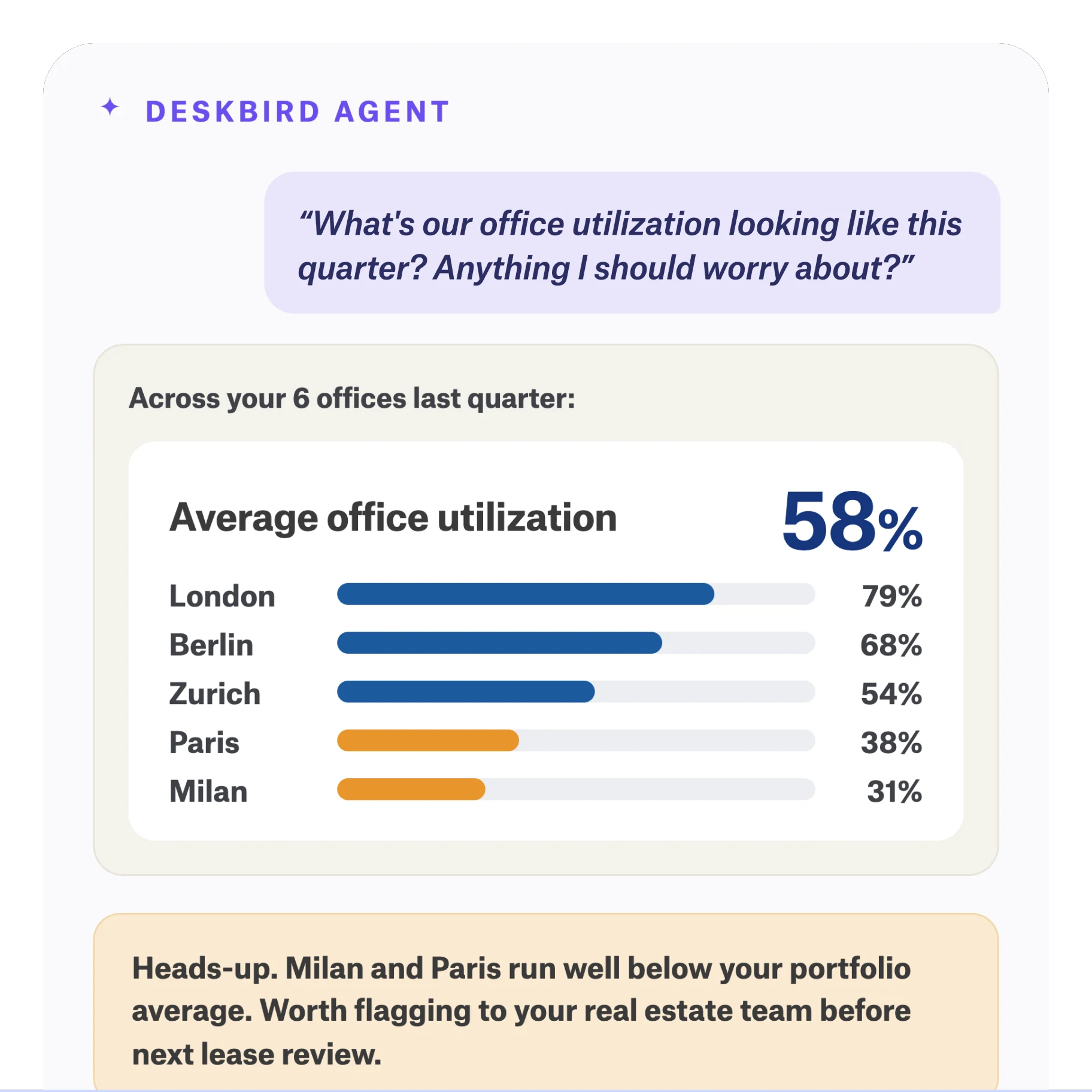
The agentic layer is where the data stops being a dashboard. It works inside the assistants your teams already use, including Microsoft Copilot, Claude, ChatGPT and Gemini, so there is nothing new to roll out.
.webp)
Ask in plain language what a consolidation would save across 6 sites, or which floors run under 40% on a Monday, and it proposes the metrics and the layout to answer it, with the saving behind each scenario quantified.
If you want decision-grade occupancy without sensors, see deskbird Dock in action.

Frequently Asked Questions
How accurate is monitor-based occupancy detection compared to dedicated sensors?
Does hardware-free occupancy tracking work with existing MDM systems like Intune?
What privacy modes are available for works-council review?
Can I measure occupancy without employees taking any action?
How long does software-based occupancy tracking take to deploy?
See real occupancy data without installing a single sensor
- deskbird Dock reads monitor and network signals your building already produces
- Silent MDM deployment, no site visits, no hardware estate to manage
- 3 privacy modes built for GDPR and works council requirements
